

fevercity
Well-known member
Comp, digits, then details.... {another WHITE-BALANCE FAKE necessary - see below}
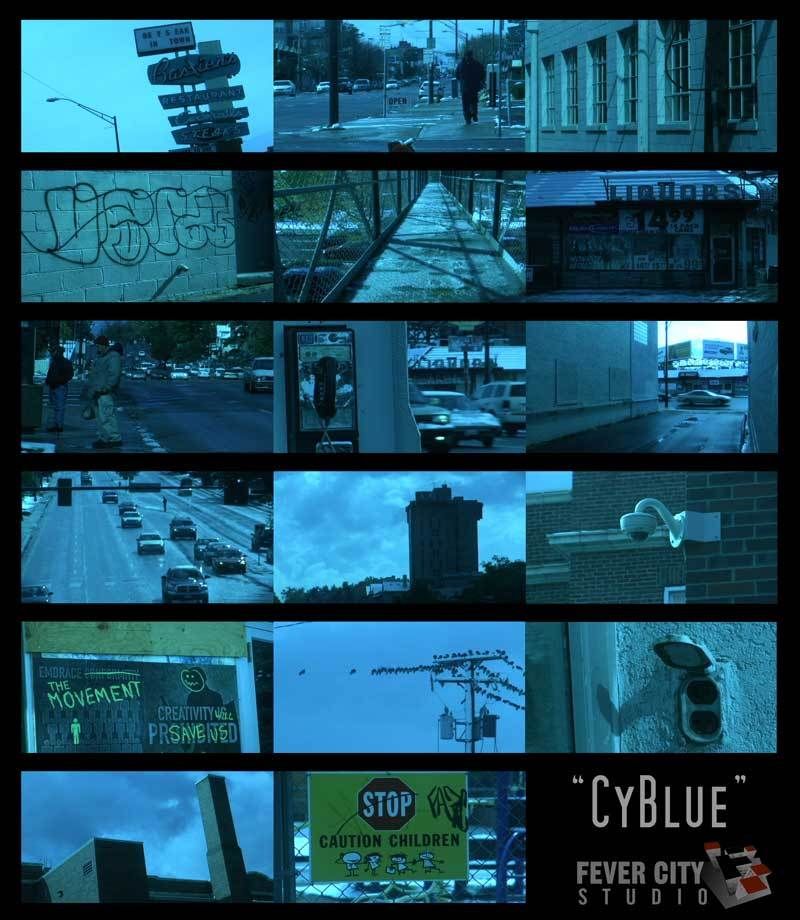
"CyBlue"
DETAIL LEVEL: -4
V DETAIL LEVEL:-3
DETAIL CORING:+2
CHROMA LEVEL:-7
CHROMA PHASE: -7
COLOR TEMP:-3
MASTER PEDESTAL: -6
A. IRIS -2
GAMMA: B. PRESS
KNEE: LOW
MATRIX: NORM
SKIN TONE DTL: OFF
V DETAIL FREQ:MID
PROGRESSIVE: 24p
I realize I just posted another batch ("TANG" - http://www.dvxuser.com/V6/showthread.php?t=113122) but I got in a groove lately and this recipe had eluded me. Larry R. was kind enough to start the settings sticky back in late June and, suddenly, the settings inspiration failed me. After posting the "GoldenEye" set, I'd been asked several times about creating a 'cool blue' look. "300" had just come out and a series of plug-ins were being cooked up that mirrored some of this look.
Not to bore you with the details but here goes: A 'cool blue' look actually leans heavily towards cyan, stopping just short of it. There's actually more cyan in any given 'blue look' than there is blue. Blue gets too blocky and noisy. Our first thought on seeing a similar shot is "Hey, that's a cool blue". Usually, there's some cyan-at-play. Cyan proved increasingly difficult to find its evil twin, reverse or anti-complementary color for a white balance fake. Yes, that's complementary, "relating to or constituting one of a pair of contrasting colors that produce a neutral color when combined in suitable proportions". Suffice to say, it can get old white-balancing and staring at scopes.
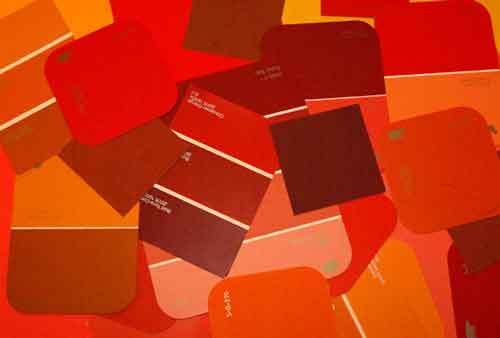
Upon further inspection, it was the paint chips that were the problem after all. Both BEHR and Disney lines of paint arrive at a dizzying array of paint choices by blending various colors just like anyone would. When referenced, many of their products leave behind chroma blooms and color artifacts that offset additional colors. You don't always see these when shooting in one situation with a camera tethered to a vectorscope and waveform. Outside, with changing light and exposure, things can get weird and colors shift. Lows, Mids and Highs all respond differently, especially when you're goofing around with the camera's brain like here. There's almost no way to predict how a BEHR or Disney will do in-field.
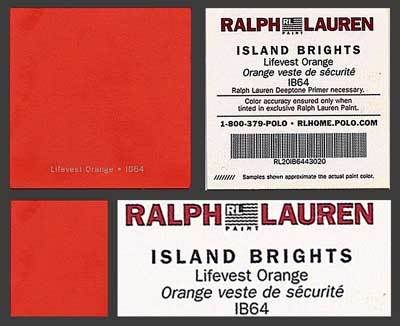
Enter Ralph Lauren. Seems his smaller (2.5" x 2.5") paint samples had found their way to the bottom of the gear bag. For whatever reason, Ralph Lauren's line of paints provide much cleaner and isolated white balance fakes. Maybe it's the higher price and, no, I don't work for Ralph Lauren. These paint chips, as always, are free at your local Home Depot.
This is a similar approach as prior.... Freak out the camera and dial it in on the scopes to be 'painted' whatever with little hints remaining of other colors. This look would benefit from a lower MASTER PED and green-suppression.
IB64 "Lifevest Orange" was the WINNER for this white-balance fake.
And the losers are......
Please feel free to comment. It is appreciated. After all, this batch came aboiut simply because people asked. Even if you 'do it in post'. I do that too - just having some fun with the DVX. Thanks for looking!
"CyBlue"
DETAIL LEVEL: -4
V DETAIL LEVEL:-3
DETAIL CORING:+2
CHROMA LEVEL:-7
CHROMA PHASE: -7
COLOR TEMP:-3
MASTER PEDESTAL: -6
A. IRIS -2
GAMMA: B. PRESS
KNEE: LOW
MATRIX: NORM
SKIN TONE DTL: OFF
V DETAIL FREQ:MID
PROGRESSIVE: 24p
I realize I just posted another batch ("TANG" - http://www.dvxuser.com/V6/showthread.php?t=113122) but I got in a groove lately and this recipe had eluded me. Larry R. was kind enough to start the settings sticky back in late June and, suddenly, the settings inspiration failed me. After posting the "GoldenEye" set, I'd been asked several times about creating a 'cool blue' look. "300" had just come out and a series of plug-ins were being cooked up that mirrored some of this look.
Not to bore you with the details but here goes: A 'cool blue' look actually leans heavily towards cyan, stopping just short of it. There's actually more cyan in any given 'blue look' than there is blue. Blue gets too blocky and noisy. Our first thought on seeing a similar shot is "Hey, that's a cool blue". Usually, there's some cyan-at-play. Cyan proved increasingly difficult to find its evil twin, reverse or anti-complementary color for a white balance fake. Yes, that's complementary, "relating to or constituting one of a pair of contrasting colors that produce a neutral color when combined in suitable proportions". Suffice to say, it can get old white-balancing and staring at scopes.
Upon further inspection, it was the paint chips that were the problem after all. Both BEHR and Disney lines of paint arrive at a dizzying array of paint choices by blending various colors just like anyone would. When referenced, many of their products leave behind chroma blooms and color artifacts that offset additional colors. You don't always see these when shooting in one situation with a camera tethered to a vectorscope and waveform. Outside, with changing light and exposure, things can get weird and colors shift. Lows, Mids and Highs all respond differently, especially when you're goofing around with the camera's brain like here. There's almost no way to predict how a BEHR or Disney will do in-field.
Enter Ralph Lauren. Seems his smaller (2.5" x 2.5") paint samples had found their way to the bottom of the gear bag. For whatever reason, Ralph Lauren's line of paints provide much cleaner and isolated white balance fakes. Maybe it's the higher price and, no, I don't work for Ralph Lauren. These paint chips, as always, are free at your local Home Depot.
This is a similar approach as prior.... Freak out the camera and dial it in on the scopes to be 'painted' whatever with little hints remaining of other colors. This look would benefit from a lower MASTER PED and green-suppression.
IB64 "Lifevest Orange" was the WINNER for this white-balance fake.
And the losers are......
Please feel free to comment. It is appreciated. After all, this batch came aboiut simply because people asked. Even if you 'do it in post'. I do that too - just having some fun with the DVX. Thanks for looking!


