New PC/Mac for editing GH2 footage?

duder1234

Member
Hey guys,

Just bought a GH2 and some lenses. Still in the process of researching all the gear. TOTALLY forgot about EDITING the footage! :thumbup:

I currently own a mac mini:

Specs:

2.26 GHz Intel Core 2 Duo
2 GB 1067 MHz DDR3
NVIDIA GeForce 9400

I was wondering if my little guy can handle the GH2's AVCHD footage with FCPX or Adobe Premiere cs5.5?

If it can't, which workstation would you suggest for $1500? PC or Mac.

Thanks!
 
Hey guys,

Just bought a GH2 and some lenses. Still in the process of researching all the gear. TOTALLY forgot about EDITING the footage! :thumbup:

I currently own a mac mini:

Specs:

2.26 GHz Intel Core 2 Duo
2 GB 1067 MHz DDR3
NVIDIA GeForce 9400

I was wondering if my little guy can handle the GH2's AVCHD footage with FCPX or Adobe Premiere cs5.5?

If it can't, which workstation would you suggest for $1500? PC or Mac.

Thanks!

I know you can turn a PC into a Mac these days but the advantage of Mac is for me to have the choice between FCPX and PC based editing software. For that reason I'm going for an iMac though I decided its well worth waiting for the next refresh in the next few months for Ivy Bridge chips. I've been told to get as much RAM as possible, which can always be bought cheaply third party.

On ething why are you asking if your computer that you already have can handle the footage, why don't you try it for yourself from original files you can find online?
 
I wasn't sure if my computer can handle the footage...I don't even have my GH2 yet or the editing software. Just trying to get an idea if my current computer can help me out, or if I need to invest in another machine.
 
I wasn't sure if my computer can handle the footage...I don't even have my GH2 yet or the editing software. Just trying to get an idea if my current computer can help me out, or if I need to invest in another machine.

I think you'll find a core 2 duo to be slow with video work, that was my last computer. I built a 'hackintosh', pc that dual boots osx and windows7 using a cookie-cutter build from this site: http://tonymacx86.blogspot.com/search/label/CustoMac.

Everything works great except usb 3.0. It's an i7 2600k system with 16gb of ram. No crashes yet in any programs, either windows or mac (actually firefox crashed a few times in windows).

Since I had hard disks, a case, psu, monitors, keyboard, etc.. already the upgrade was only $500 from core2 duo to i7. Next I'll upgrade the video card.

The nice thing about building your own is that you can upgrade piece by piece. There are so many people doing it these days that there are tons of help and suggestions (and youtube tutorials) if you have problems.
 
Your 2.26 GHz Intel Core 2 Duo with 2G-RAM is a little skinny for the job. It'll do it, and run the programs you need to edit.
However, MORE RAM is needed as a cheap upgrade. I'd recommend getting yourself maxed out on RAM (as a cheap upgrade).

The main problem will be you computer, is needing to either convert the footage into ProRes, or having FCP X / Premier run the native .mts (AVCHD) files.
It takes a bit of processor power to run these files NATIVELY, and once you start placing effects over the footage, your computer will really slow down.
These days, 2 cores will barley do it for the high-res HD footage and/or the compressed packages they come in (AVCHD).
That said, if you process all your footage into a ProRes format, you can edit relatively smoothly. Just it'll take your computer several hours to convert all that footage (for larger projects).
For a few quick takes and occasional, "out and about" footage. The machine you have, will suffice (with a little more ram).


I suggest looking into a new iMac or a new Mac Mini, as they start off with an i5 and come with 4Gigs of RAM... That should hold you over for the next few years of HDSLR editing.
 
If you are going to spend money on a new computer I would have one eye on the future of Video, ie 4K. Its could be the new standard in a year or two. Thats Why even though I don't want to I waited to get an iMac cause the refresh will be faster and hopefully will if rumors are right will have room for more upgradeability at least in terms of RAM. Otherwise if you want upgradability you need to go PC cause the next step up to Mac Pro is obviously not in your budget.
 
@jimmykorea
Yes, the future will be 4k, but I think keeping recommendations down to what we know is wiser.
He's shooting with a GH2, and possibly down the road a GH3 or some Canon flavor. Starting off with a Mac Mini asking about getting his toes wet in the HDSLR world.
The industry will move into 4K, but still the standard is 2k (1080p) and some high bit-rate version of it. Maybe... just maybe Pana will venture into an affordable cam shooting 4k, but I think our average joe will be fine focusing on technique and having adequate/standard gear, instead of venturing into 4k land.
Canon and Nikon released cameras, that are MENT to stay around in the market for the next few years. All average consumer cams are still at 2k.

The average i5 computer with at least 4gigs of ram will editing 2k footage just fine. Today, and probably for the next couple of years.
 
Like I said its worth JUST keeping in mind if you want a computer to last more than a year or two. So the issue is one of future (next 3 years) upgradability, which would be the advantage of a PC possibly on his budget. Just to have some perspective the next generation of phones will have quad core processors, it dosen't hurt to have upgradability if your going to spend money on a system. And I personally think 4K is closer than you think. Once its in a Canon DSLR (later this year) all the other main brands will be playing catch up. I look at TV's and after trying to sell the whole 3D thing to move merchandise the next thing I'm convinced will be 4K. Its a hunch but I think its going to be the new HD real soon.

http://www.engadget.com/2011/12/28/lg-unveils-84-inch-ultra-definition-4k-tv-its-bringing-to-ces/
 
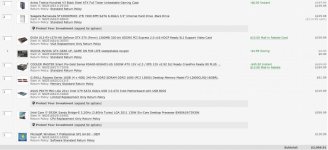
After some research, this is what I've come up with...suggestions/comments?View attachment 49456Disk Drive will be a Pioneer BDR-207

Everything looks great on that list, except for the hard drive. You have done your homework very well, except for that. Adobe Premier 5.5 will absolutely scream running in that configuration. For with 6 cores and Intel's hyperthreading, Premiere will be able to have 12 threads all running at the same time when rendering video. And it will make use of the CUDA GPU's on the graphics board too, for even further acceleration.

One can buy a 3 Gig Seagate Barracuda hard drive for only $200 That would be a much better deal than only getting a 1 TB drive. That is the only item I would change on your purchase.

Check this out here:http://www.tigerdirect.com/applications/SearchTools/item-details.asp?EdpNo=1310560&CatId=4357

Since your motherboard has a UEFI BIOS, it should have no trouble supporting a 3 TB hard drive.

For your graphics card, I would recommend using that same chipset, but simply in a different brand card from Asus. A few dollars cheaper than that one you are looking at, but a much superior design, with dual cooling fans.

Check it out here:http://www.newegg.com/Product/Product.aspx?Item=N82E16814121432
 
Here is a good video from Adobe that shows how Premier Pro 5.5 takes advantage of multi-processor systems, as well as NVIDIA CUDA GPU's. On your system, you will have 12 CPU's instead of only 8 as in this demo video:

[video]http://www.video2brain.com/en/videos-5355.htm[/video]
 
Back
Top