New Panasonic 4K 60P Camcorder HC-X1000

http://youtu.be/Nc5baozw5GA

Here you go. This is the launch event all shot on the HCX1000. Some of the shots (what I would say are the nicer ones....) were manual, others were on iA due to the run and gun nature (plus I wanted to see how well the iA performed). The voice over is from the camera mic (I tried to get a H4 into their sound system but they didn't have a feed) and I haven't got my own microphone yet! (Suggestions btw?!)

The footage was pretty awfully grainy in places. This version hasn't been altered in post - what you see is straight off the camera - 1080 50p 100M.

Very nice edit
 
So far I've found one side by side comparison with the GH4, the HC-X1000 looked pretty bad in comparison.

https://www.youtube.com/watch?v=sWYx7ixBpD8

It was slightly worse, but I don't think by much. Perhaps that's just me! There's a lot of coulda/woulda/shoulda targeted at Panasonic - but that's the same with every camera. The GH4 is a great camera and it's held its own - but a video camera is ultimately much easier to shoot on, and the HC-X1000 is extremely versatile, which is exactly what I wanted :)
 
It was slightly worse, but I don't think by much. Perhaps that's just me! There's a lot of coulda/woulda/shoulda targeted at Panasonic - but that's the same with every camera. The GH4 is a great camera and it's held its own - but a video camera is ultimately much easier to shoot on, and the HC-X1000 is extremely versatile, which is exactly what I wanted :)

It's not just you, nathanjrb. I totally agree with everything you wrote.

Have both of these cameras and must say I've never bothered comparing the footage between them - and most likely never will. Why? Because I didn't buy either of these cameras to pixel peep and fret about whether one looks better than the other when scaled up to resolutions I'm not likely to use when editing. Or at which my target audience isn't likely to view the end product. For me it's all about functionality and acceptable quality for real world uses and delivery. If my footage doesn't call attention to itself and bump my audience out of the viewing experience due to unacceptable quality, I could care less.

My primary shooting is wildlife footage. And for that the X1000 has proven to be just about the perfect camera for me. In fact, haven't used my GH4 for video since getting the X1000. Not once. My GH4 has been relegated to shooting stills. That's not to say I wouldn't use the GH4 for video if I needed stealth, didn't have the space to carry the X1000, needed to shoot in very low light, or was doing a narrative. And I'm fairly confident I could make these cameras reasonably match in a 2 camera shoot, under the right conditions. Even for a 2 camera interview. But this is why I hang onto my AF100s.

The GH4 is a great camera. So is the X1000. Both in their own right. I consider myself very fortunate to have both and therefore have so many terrific options to choose from.

Just a thought - a comparison of straight 1080 footage coming out of the GH4 versus straight 1080 from the X1000 would likely shake the pixel peepers up a bit. :)
 
Just a thought - a comparison of straight 1080 footage coming out of the GH4 versus straight 1080 from the X1000 would likely shake the pixel peepers up a bit. :)

I would be interested in a comparison between a scene shot 4K and edited in a 1080p timeline vs. the same scene shot and edited 1080p. Could someone share if they have this? Thanks.
 
Last edited:
1080p from the X1000 (exposed properly) is much sharper and cleaner than 1080p from a GH4. No pixel-skipping, etc. The 1080p from the X1000 is a full and proper downscale from the full-raster sensor.

The downconversion to 1080p from 4K looks quite good in the X1000; it looks on par sharpness wise to a downconversion done in post. The advantage of doing it in post is that you'd get the benefit of 10-bit and 4:4:4 color sampling, but if you don't need that, just shoot 1080p in the first place, it does a superb job in 1080p.
 
Hi Nathanjrb,

I thought you did a good job with what you had available. Vision really good for the dark area. Audio I found a bit sharp for my old ears, maybe you could have added some bottom end to the speakers to round them out a bit, and the lift in the music level between speakers could have been more subtle for my taste. Bet they were happy with your job though. Very creative editing.

Cheers,

Vaughan

I don't want to digress too much - but thanks for the feedback! I agree! Audio is something I'm still working on :)
 
I actually finally got to try out the camera today at a store. They allowed me to take it outside the store for to take a sample clip that you see here.

It was originally shot in 2160p60 but unfortunately when you upload that file, YouTube will not make a 4K version unless you upload a 2160p24/30 file instead. When I did an experiment with a 2160p60p file in the past, YouTube would make a 720p60 file, 1080p60 file and 2160p30 file. As mentioned, they don't convert to 4K anymore. The link to the Vimeo version is in the description area of the YouTube video. It's currently being converted. If you'd like to download the file, check out the Vimeo one.

Other settings were a shutter of 60, Aperture set to automatic, white balance set to automatic and ND set to 1/4.

For sure if I had the camera even longer, I'd be able to get better samples. I could have locked the aperture but I sort of wanted to see how it would handle while on auto.

Anyway, it seams like the audio might have been set incorrectly. I didn't mess with any audio settings. Plus, I didn't mess with any picture profiles so I don't know if what the camera was set it was ideal.
If you'd like to download the file freshly off the memory card, go here:
https://vimeo.com/114920817
Just remember that you need to be logged on and choose "Original". The file is nearly 1GB.
I wish I had a 4K screen to really see how my clip turned out. That's basically the best way to see the quality.
 
I actually finally got to try out the camera today at a store. They allowed me to take it outside the store for to take a sample clip that you see here.

It was originally shot in 2160p60 but unfortunately when you upload that file, YouTube will not make a 4K version unless you upload a 2160p24/30 file instead. When I did an experiment with a 2160p60p file in the past, YouTube would make a 720p60 file, 1080p60 file and 2160p30 file. As mentioned, they don't convert to 4K anymore.

Other settings were a shutter of 60, Aperture set to automatic, white balance set to automatic and ND set to 1/4.

For sure if I had the camera even longer, I'd be able to get better samples. I could have locked the aperture but I sort of wanted to see how it would handle while on auto.

Anyway, it seams like the audio might have been set incorrectly. I didn't mess with any audio settings. Plus, I didn't mess with any picture profiles so I don't know if the settings were ideal.
If you'd like to download the file freshly off the memory card, go here:
https://vimeo.com/114920817
Just remember that you need to be logged on and choose "Original". The file is nearly 1GB.
I wish I had a 4K screen to really see how my clip turned out. That's basically the best way to see the quality.

-Edit-
Just thought of something important. Unlike my AC90 in which gain is engaged if you keep spinning the wheel after f/1.5, their is a separate gain selector on the X1000. It wouldn't surprise me if the gain might have been engaged. I'll probably go to that store again and check the setting on the camera.
 
Last edited:
I received the camera today from B&H. Unfortunately no U.S. Warranty, looks like they sent a Latin American version ( HC-1000pp). Invoice says HC-1000K So requesting a return. I didn't expect this from B&H.

Edit: Looks like mistaken on this, additional warranties were in the manual
 
Last edited:
Hi Vanvideo,

You can set the HDMI port resolution to suit your monitor. Choice of 2160p, 1080p, 1080, 720, downconvert or auto.

Cheers, Vaughan
 
As far as I can tell, there's no way to display info on an external monitor when shooting 4K 60p - that menu item is then grayed-out. Very disappointing for using the X1000 on a jib. And I'm no fan of the Panny Image App due to poor image quality and lag.

Am definitely missing the wireless remote that was included with the AC160 and AF100 cams. In general, very handy and also included a button to toggle display info. It was the same remote for both cams. Am not understanding why they couldn't have included it for the X1000, which is not exactly an inexpensive camera.
 
For clarification on what Vaughn and tflak said... you CAN monitor 4K output. The HDMI output does output 4K @ 60p.

However, the "VIDEO OUT OSD" menu item becomes disabled when you're in 4K/60p. It's available in 4K/30p, but not 4K/60p. So you won't get the text overlays on the screen when shooting 4K/60p.
 
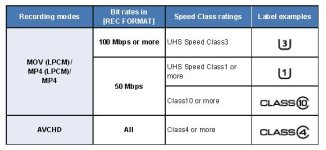
I'm wondering what SDXC cards people are using with this camera. I typically buy SanDisk. I see in the user's guide it says to use Speed class 3 at bitrates of 100Mbps or more. Is this SanDisk extreme (http://www.amazon.com/SanDisk-Extre...8&qid=1420404473&sr=1-4&keywords=sandisk+64gb) fast enough for the camera; only 60MBs write rate. Or are people using the Speed Class 1 cards, like the SanDisk Extreme Pros, which have a much faster write rate at 95 MBs.
 
They are fast enough. U3 speed is the minumum, se manual page 20


I have 2 SanDisk Extreme 64GB UHS-I/U3 SDXC and 2 32GB.
 

Attachments

  • SDXC X1000.JPG
    SDXC X1000.JPG
    33.7 KB · Views: 0
Back
Top