New iPad Pro XDR even better

Thomas Smet

Veteran
Apple just announced the updated XDR iPad Pro. Some performance improvements from the M2 chip but to me as one who edits HDR its the display thats the most exciting. I have the current XDR iPad Pro along with a 14" XDR MBP and I absolutely love them for grading HDR. Sure not 100% perfect but I cannot afford a $30,000 HDR reference display right now. HDR is being held back in the industry by this limitation and Apple, love them or hate them is doing more to making working with HDR a reality for 99% of those that work with video.

The iPad update now has over 2500 local dimming zones vs the over 1000 my current XDR iPad has. That will help the blooming even more by allowing much smaller points of light. We will finally get to use the XDR iPads in reference mode thanks to iPadOS 16.1. This means using the iPad through Sidecar as a HDR grading display with Resolve and FCP. Something those of us working with HDR have hoped for since the XDR iPad came out.

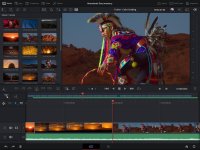
The bigger news was the new Resolve for iPad that Apple showed off in a video. It appears to be a stripped down version of Resolve without Fusion, Fairlight and advanced export options but its still really exciting to hear its coming. This for the first time opens up a serious option for production on the iPad and not just wannabe NLE apps. Combined with BMDs Cloud Store, real external monitor support in iPadOS, Stage Manager and an even better XDR Display this is turning out to be one interesting portable production tool.

https://www.apple.com/ipad-pro/
 
A lot of this sounds pretty cool (especially Resolve!) although I feel like getting colors and contrast I can trust involves a constant battle with Apple's OS (which is why I use an I/O device when grading these days).
 
A lot of this sounds pretty cool (especially Resolve!) although I feel like getting colors and contrast I can trust involves a constant battle with Apple's OS (which is why I use an I/O device when grading these days).

I do wish gave us better calibration tools and ability to fine-tune the XDR displays. With that said the Apple displays tends to be pretty accurate. I use a calibration tool and my 14" MBP tends to be very accurate when measuring the white point. Much better than any other display I have used. I have used it to figure out the white point difference which we can enter for the HDR display modes on XDR. This at least allows us to get really close.

I agree however we need better adjustment options on Apple displays. I also prefer to use a I/O device but right now our really good HDR options are rather limited. Plus calibrating for HDR isn't really within the budget levels for most either. Thats why right now I'm ok trusting Apples displays which at least attempt to be accurate out of the box. I have a pro level calibration tool which works great but not so much for HDR. I would need to invest thousands into p[roper HDR calibration tools. Another thing that unfairly removes accurate HDR from the reality of most of us.

So for now I trust my Apple displays to get me close enough and at least create HDR content today vs just sitting back and waiting.

I also don't use the XDR 1600 mode on the XDR displays. I use the HDR Video mode which sets a sustained nits of 1000 and better suited to grading HDR content. Its more in line with a HDR reference display. The XDR 1600 mode is really just for consuming content. Some do not like the HDR video mode since it locks in the screen brightness but it does so to create the most accurate sustained 1000 nits HDR image. The environment should then be adjusted to best match the display. I then manually set my white point to that reported by by calibration tool and viola.

I hope iPadOS allows us to do the same. I'm pretty much a XDR shop now however. 14" XDR MBP and 13" XDR iPad Pro. I have a Samsung 50" and a Vizio 65" that are HDR. The Samsung supports up to 1500 nits. The Vizio is only up to 400 nits but it has one of the most accurate rec2020 colors of any consumer TV out there. My entire house is HDR including my iPhone. Even my 32" LG computer monitor supports HDR up to 350 nits which is far from great but it works. I only really use my 14" XDR to grade HDR and keep the 32" SDR to see how the SDR version will look or how the details look within the SDR range. If I really need to see HDR details in the 100-1000 nit range I blow up the FCP viewer on the 14" and pan around the frame to make sure noise and focus are good.

I may at some point in the future just get the Apple 32" Pro Display. I'm hoping they come out with an updated model that has more than 512 local dimming zones. I wouldn't mind a 4k version that costs less as well. I doin't really need a 6k display although it is an optimal DPI for a 32" display. I'm also hoping we get better HDR reference displays in the future that do not cost more than my car. Osee has a super impressive 21.5" HDR display meant to use on productions. Ticks a lot of boxes for $1,300 but still not the best option for a grading reference display. The company has reached out to me on Facebook about what I would like to see in a post production monitor. That means it is something that they would like to produce in the future.
 
Sorry I was mistaken. The current iPad also has 2500 local dimming zones. Not sure why I thought it was around 1000. Must have been thinking of another monitor. So the display does seem pretty much the same.

Thats not a bad thing at all. The XDR iPad is a phenomenal HDR display. Its hard to really improve on it right now minus switching to micro LED or at least greatly increasing the local dimming zones. This also means the m1 iPad Pro will not be out dated anytime soon which is good. It already has insane performance that no iPad software takes advantage of right now. The little spec bump of the m2 is nice but getting a low cost m1 version is still a solid option.

If one already has a m1 iPad keep it. If one does not they may want to consider the new m2 iPad for the added performance.

Whats really important is the new display reference modes we will get in iPadOS 16.1, fullscreen support and Resolve to finally make some use of that hardware. Any Apple Silicon Mac user is about to have access to a $1000 1600 nit, 1000 nit sustained accurate 13" P3 HDR grading reference monitor. Great option to add to an affordable m1 Mac mini or MBA. I upgraded from my M1 MBA to a 14" MBP to get a XDR Display. Glad to have the extra performance as well. At the time however I would have been happy to use my m1 MBA with my iPad as a HDR reference display. If I get a Mac Studio to keep at my desk it will be nice to be able to use a XDR Display since we can't really use a MBP display with another Mac.

So having a XDR iPad provides more flexibility to use it with any Apple Silicon Mac including the future Mac Pros.
 
I have an old iPad mini that mostly saw use as a media player and ebook/PDF reader. I almost never felt I could do serious work on it.

I still can't imagine doing real work on an iPad—especially since my 14" MBP is nearly as portable—but as a travel monitor for use with the MBP this is appealing (with the added bonus of a usable iPad).

At this point Apple should ditch the iPadOS and let users have the Mac OS on the iPad (or at least on the pro models).
 
I'm looking to get one of the new iPad Pro's 12.9". My main production CPU is a Windows machine with a BMD Decklink 4K so I am going to try using the soon to be released Accsoon Seemo Adapter (which works for both iPhones and iPads) to be able to use the IPad Pro as a monitor/display. I'm assuming that there will be further future products down the line like the Accsoon Seemo Adapter. Maybe BMD could release an alternative direct connection.

https://accsoonusa.com/product/accsoon-seemo-ios-hdmi-adapter/

https://www.newsshooter.com/2022/10/12/accsoon-seemo-hdmi-to-usb-monitoring-adapter-review/

https://www.youtube.com/watch?v=f3XqQ23fHvw

https://www.youtube.com/watch?v=r2SxwTCIwDM
 
I have an old iPad mini that mostly saw use as a media player and ebook/PDF reader. I almost never felt I could do serious work on it.

I still can't imagine doing real work on an iPad—especially since my 14" MBP is nearly as portable—but as a travel monitor for use with the MBP this is appealing (with the added bonus of a usable iPad).

At this point Apple should ditch the iPadOS and let users have the Mac OS on the iPad (or at least on the pro models).

Using 3rd party tools to do so and now the Sidecar feature on Macs. Sidecar works exceptionally well. Its a really nice solution to having two displays when away from the desk.

Besides that yeah the iPads have limited usefulness for real work. I have the Affinity apps as well and have never used them on my iPad Pro. Always use my 14" M1 Pro instead. The iPad just isn't well thought out for certain types of work. Thats not to say one couldn't do it but that for some there are better tools to get the job done.

I get some new users only know the iPad and mobile in general and the platform makes more sense to them. With that said iPadOS still has too many limitations that make it only 50% of the proper OS and platform. It is getting better but its a huge investment for a neat toy really.

With that said I use it for its strengths.

Its an amazing HDR monitor and soon will be able to be used for grading HDR with Sidecar and a Mac. Its essentially a portable battery powered 13" 1600 nit HDR reference monitor. Nothign else out there really like it for what it allows. Too many display in this price range have too many compromises to be decent for HDR grading. XDR is far from perfect but I feel it gets closer than any other solution close to this price.

Its a great consumption device. I check out HDR videos I create and other content on my iPad and its just about perfect. The HDR display combined with 3D spatial sound from my Air Pods Pro creates one of the best movie watching experiences possible.

I do live DJ streaming and the DJ app I use has a iPad version which I love to use. Its kind of a perfect use case for a touch screen tablet. Other control panels are great on tablets as well. Panels to control a NLE, grading, 3D animation or audio controls are really nice on a tablet.

Soon Resolve on the iPad will allow creators to check material on set as needed. A rough cut and grade can be created from just about anywhere utilizing Cloud Store from BMD. Pick up in the studio to do the rest. I agree we can pretty much do the same thing now on a MBP and I actually prefer it. Still its nice to have the tool to make use of the iPad. The iPad is easier to hold standing up or walking around. Makes more sense to grab a shot, adjust the grade a bit and give a thumbs up.

Its really just providing an alternative workflow for those it makes sense for. This is not a dump a MBP and switch to an iPad situation. Its a situation if you have an iPad now you can use it for something productive. If you want to. To me the iPad is worth every penny as a HDR display. Soon that will have even more value for any Apple Silicon Mac users who want a decent HDR display that requires zero effort to setup and start using for HDR content.
 
I'm looking to get one of the new iPad Pro's 12.9". My main production CPU is a Windows machine with a BMD Decklink 4K so I am going to try using the soon to be released Accsoon Seemo Adapter (which works for both iPhones and iPads) to be able to use the IPad Pro as a monitor/display. I'm assuming that there will be further future products down the line like the Accsoon Seemo Adapter. Maybe BMD could release an alternative direct connection.

https://accsoonusa.com/product/accsoon-seemo-ios-hdmi-adapter/

https://www.newsshooter.com/2022/10/12/accsoon-seemo-hdmi-to-usb-monitoring-adapter-review/

https://www.youtube.com/watch?v=f3XqQ23fHvw

https://www.youtube.com/watch?v=r2SxwTCIwDM

I reached out to that company to see if they will support HDR and they do not. The video is limited to h264 right now so its SDR only. That may be fine for many people. I personally would not want to use my phone as camera monitor. Its a nice device but there are much better solutions out there that cost less than this adapter. My phone handles a lot more important communication and I really don't want to limit its usefulness by trying to shoehorn it into something its not meant to be. Thats why I also don't like the concept of shooting movies with just an iPhone. Seems odd to me to bog down my device thats my communication and connection to the world as a camera. Much better tools for the job vs trying to alter something to be something its not the best at. Its cool it can be done but I just don't find it to be all that practical.
 
I reached out to that company to see if they will support HDR and they do not. The video is limited to h264 right now so its SDR only. That may be fine for many people. I personally would not want to use my phone as camera monitor. Its a nice device but there are much better solutions out there that cost less than this adapter. My phone handles a lot more important communication and I really don't want to limit its usefulness by trying to shoehorn it into something its not meant to be. Thats why I also don't like the concept of shooting movies with just an iPhone. Seems odd to me to bog down my device thats my communication and connection to the world as a camera. Much better tools for the job vs trying to alter something to be something its not the best at. Its cool it can be done but I just don't find it to be all that practical.

Yeah, not looking to use this for my phone at all. I have SmallHD and Atomos monitors for that. Only looking at it as the best way to use the new iPad monitor with a Windows machine and get a clean non-OS affected signal from the Decklink 4K with Davinci Resolve. I'm sure better options will eventually be released. But for $179 this seems to be the only option I've seen so far unless there are other options that I don't know about.
 
. I upgraded from my M1 MBA to a 14" MBP to get a XDR Display. Glad to have the extra performance as well. s.

This is probably a stupid question, and only tangentially related. I have an M1 Max 16" MBP and I've noticed bleed around the outline of bright objects against dark backgrounds, particularly when watching star trek. Like some of the light carrying over into the darkness. Have you noticed anything like that? Or is it more likely a facet of my settings, the material I'm watching, or a faulty/damaged screen? I haven't noticed it on work-related material, although one thing that annoys me is a kind of delayed after image on cuts. For example, when I review an export in QuickTime and it cuts from, say, a full screen image to an image in the center of the screen with black margin on the sides, the previous image lingers in the margins for just long enough to notice. Something like that. Probably a consequence of ProMotion or something, I assume.

I never noticed either of these issues on my 15" i7 MBP (which are apparently selling for like $600 now :grin:)

I assumed thay my issues were a result of fancy local dimming and motion smoothing type features. But they haven't bothered me enough to figure out how to shut them off, especially if they're benefiting me in other ways
 
This is probably a stupid question, and only tangentially related. I have an M1 Max 16" MBP and I've noticed bleed around the outline of bright objects against dark backgrounds, particularly when watching star trek. Like some of the light carrying over into the darkness. Have you noticed anything like that? Or is it more likely a facet of my settings, the material I'm watching, or a faulty/damaged screen? I haven't noticed it on work-related material, although one thing that annoys me is a kind of delayed after image on cuts. For example, when I review an export in QuickTime and it cuts from, say, a full screen image to an image in the center of the screen with black margin on the sides, the previous image lingers in the margins for just long enough to notice. Something like that. Probably a consequence of ProMotion or something, I assume.

I never noticed either of these issues on my 15" i7 MBP (which are apparently selling for like $600 now :grin:)

I assumed thay my issues were a result of fancy local dimming and motion smoothing type features. But they haven't bothered me enough to figure out how to shut them off, especially if they're benefiting me in other ways

That's blooming due to local dimming zones. Traditional SDR LED monitors use a single backlight to light the entire screen. This is why they have good accurate color and detail but poor contrast. The black colors are more of a dull gray.

OLED has every single pixel emitting its own light. This allows perfect black colors at the pixel level but OLED struggles with brightness due to those tiny light emitters.

Mini LEDE tries to bridge between the two by creating an array of LED lights. The more dimming zones the display has the more accurate small areas can adjust the light emitting or turn off entirely for super black. The problem with dimming zones like you just described. Bright objects against black like space scenes or titles on black.

While 2,500 local dimming zones seems like a lot its really not and that divides the screen into a 50x50 array of lights. Assuming the same amount for the width and height of course. The dimming zones are likely square so there are more for the width but for simplicity I'm just saying 50x50 for now. That means each dimming zone represents over 50x50 pixels on the iPad Pro. If a title or spaceship against space falls in the middle of those dimming zones then you will see a 50x50 area brighter than the rest of the black area which can turn off the LED.

It sucks but this is the tech reality right now and not Apples fault really. OLED is super expensive and typically really difficult to get super bright. Most OLED TV's struggle to hit 800 nits and quickly drop off to 250 nits with over a 50% coverage. Thats barely over SDR for large scenes of brightness. OLED gives an illusion of HDR due to its super blacks but that is also true of SDR content. SDR never had an issue with 0-100 nits. SDR benefits from the darks of OLED just as much as HDR does. HDR is about specular and highlights. The stuff above middle gray and more specifically above 100nits. Content exposed properly for middle gray will look just as good as SDR or HDR on a OLED display. Its the specular why we even bother with HDR as a format. SDR clips at 100 nits. Its gone after that. We can curve a bit to extend its less crappy look in how it clips the highlights but 100 nits is 100 nits. When we expose video we already get everything we could want from 0-100 nits. Meaning super blacks. Its whats above 100 its that really matters for HDR. OLED is amazing but its just amazing in general no matter the content. To truly see the benefit of HDR you need 1000 nits or greater. Mini LED allows us to get there and even much higher. The HDR spec is up to 10,000 nits and OLED will never get there. It struggles with 1000 nits and thats not even close to sustained for larger displays.

Micro LED is another promising new tech for displays but its super expensive. Its essential a dimming zone 1 pixel in size so every pixel has a LED light. Thats why its super expensive. Not only is that a lot of lights but its difficult to make the lights that tiny for a smaller display. Theaters and much larger home TVs will likely be the only displays that see micro LED utilized for some time. Not to mention making a LED that tiny that actually emits a good amount of brightness. Samsung announced some micro LED TVS at CES this year but those are still around $80,000 or more right now. No where ready for the market yet. None of us will be buying a $10,000 iPad either for that display tech.

So right now we either deal with horrible contrast, blooming with dimming zones or low brightness and burn in of LED. Its all a tradeoff right now unless we spend some serious big bucks. This is why those high end HDR reference displays cost so much. Its not just a name or because they can. Its because they do provide 1000 nits or greater with each pixel illuminating.
 
Yeah, not looking to use this for my phone at all. I have SmallHD and Atomos monitors for that. Only looking at it as the best way to use the new iPad monitor with a Windows machine and get a clean non-OS affected signal from the Decklink 4K with Davinci Resolve. I'm sure better options will eventually be released. But for $179 this seems to be the only option I've seen so far unless there are other options that I don't know about.

Why not just buy a portable monitor for the same price of the adapter and not mess around with the iPad if you only care about SDR? For a Windows system and SDR there are a ton of portable monitor solutions out there. None HDR but if thats not your thing then you have a ton of options. Plus you may want a better 10bit workflow to a display vs some h264 hardware encoded adapter with latency delays.
 
Thomas Smet. Great to hear your thoughts on using the latest MBP for HDR grading. I’ve transitioned entirely over to the MBP from my LG OLED for grading, aside from checking things like focus, grain, noise and what effect if any haloing has on the image. Though I see haloing even on the OLED because of my aging eyes. In many ways, I prefer the MBP to my LG CX - no auto-dimming, no dozen enhancement features to disable, it’s calibrated to industry standard P3-D65, no risk of image retention or burn-in, greater color volume, over 1,000 nits full screen brightness, and the ability to instantly swipe between windows to do things like compare videos uploaded to YT to the originals. Peak brightness is unquestionably one of the key considerations when selecting an HDR monitor.

According to Ross Young, CEO of Display Supply Chain Consultants (DSCC), Apple will be releasing a 27” mini LED display in Q1 2023. Back in March, Ross said the new monitor would have around twice as many MiniLED zones and >7X more LEDs as the current XDR display (double that of most other 27” mini-LED monitors).
 
I just updated to MacOS Ventura and my M1 iPad Pro XDR to 16.1. The new reference mode is amazing. Using Resolve from my 14" MBP XDR and the display on both is equally good for HDR grading. Reference mode is just like the HDR Video mode on MacOS. Locks brightness for a sustained 1000 nits. On the iPad we can even fine tune the white point just like in the MacOS mode. So I can use my calibration tool to read the actual white point to adjust the iPad so it matches all my other displays.

This is super impressive and really puts a new value on the XDR iPads. Any Apple Silicon Mac user now has access to a really good HDR grading display for $1,100. Yo can even find a lower cost M1 right now. It's not perfect but pretty darn close. It allows the other 99% of producers to create HDR content today for clients to enjoy.

Very few other portable HDR displays are this good right now. Especially for $1,000. You get a portable computer along with that display for pretty much free.

Also used it with FCP and it works great for HDR as well. FCP can only send the viewer to the iPad which works but it's a bit more clunky. The scopes also share that space so you would be grading a really tiny window. Resolve can send a clean feed right to the iPad in fullscreen which is very nice. Even if I never use the iPad version of Resolve this is a game changer for laptop and desktop Resolve users already. We can now use any M1 or M2 laptop and get a full HDR output to the iPad and use the laptop display for the UI. Pick up a cheap portable LCD monitor for extra UI panels and you can have a 3 monitor Resolve setup on the road for HDR grading and editing.

Since I already use a 14" XDR MBP I'm not sure I will use the iPad in reference mode as much but it's still a great tool to have. An affordable M1 Mac mini and a M1 iPad Pro will soon be a really killer HDR studio combination for under $2,000.
 
Is Resolve actually sending a clean feed to the iPad? How does this work? (I haven't used an iPad in this way before—my iPad is too old to function as a second display with my MBP).
 
My interest in the iPad Pro M2 is also as a HDR preview monitor for Resolve from my Studio Max. Another interest is using to playback Resolve timelines to my Sony TV over Airplay to check on a real TV. Could fine tune edit/colour and then take back to Studio Max for export encoding. Or even take project to my PC for encoding. I already use source files on external SSD so that I can go between the Studio Max and the PC so there will be no change here for me including the iPad Pro. May encourage me to arrange a better external SSD system.
 
Is Resolve actually sending a clean feed to the iPad? How does this work? (I haven't used an iPad in this way before—my iPad is too old to function as a second display with my MBP).

Yes it is. Using Sidecar through MacOS the iPad becomes an extra display. Resolve can then use that for a clean feed and it works for HDR with 16.1 and Ventura. I think you may need an Apple Silicon Mac for Sidecar to work.
 
Back
Top