GH3 New GH3, please help me with setup for manual exposure.

Stab

Well-known member
I just got the GH3 and I promise I will post test footage soon... But first of all, I can't set it up properly, even after reading the manual ...

I want to set the exposure settings to 'manual' in the movie mode and don't use any of the creative filters but I can not get it to work...

I cannot select any other exposure mode and can not set a picture style. The options are simply not available.

It's probably something really easy, but after 1 hour I'm getting bored of it. Manual didn't help me.

Thanks for your help!
 
I haven't seen a GH3 yet, but if it's anything like the GH2 you need to first select "motion picture" mode (on the GH2 this was a movie camera icon with an "M" next to it). Once this is done go to your menu system and look for the "motion picture" menu. Again, if it's like the GH2 look for EXPOSURE MODE, choices will be PASM. You'll want "M" for manual (and this is likely manual ONLY for "motion picture" mode.

Just some guesses on my part.
 
Thanks Bruce. There is indeed a video mode, but neither in that mode or the manual mode I can select a manual exposure settings. It has probably something to do with some function / setting bein turned on and therefore the manual settings are 'locked'. I can see the settings, but I cant acces them ... Not really clear why and not really an intuitive menu I have to say.
 
I just got the GH3 and I promise I will post test footage soon... But first of all, I can't set it up properly, even after reading the manual ...

I want to set the exposure settings to 'manual' in the movie mode and don't use any of the creative filters but I can not get it to work...

I cannot select any other exposure mode and can not set a picture style. The options are simply not available.

It's probably something really easy, but after 1 hour I'm getting bored of it. Manual didn't help me.

Thanks for your help!

1. turn on the camera

2. rotate the top dial so the "film camera icon with an M" next to it is in line with the little white marker (9 o'clock position)

3. click the "menu/set" button on the back of the camera to bring up the menu.

on page 1/5 of the "motion picture" menu you will see the "exposure mode" setting (4th down) click into it and select "M", this will give you full manual control in video mode.

once you select "M" it will take you back out to the main "motion picture" menu, on the same page 1/5, 1st on the list you can select "photo style" to change the recorded look at preferred sharpness/contrast settings etc.

you should be able to find and change these settings with ease mate, if not i've no idea whats up with your frankenstein GH3 :)
 
Last edited:
Thanks Bruce. There is indeed a video mode, but neither in that mode or the manual mode I can select a manual exposure settings. It has probably something to do with some function / setting bein turned on and therefore the manual settings are 'locked'. I can see the settings, but I cant acces them ... Not really clear why and not really an intuitive menu I have to say.

the high thumb wheel on the back of the GH3 scrolls through the settings. also the low rotating wheel is also a directional pad so you can click it up, down, left, right.

panasonic menu's are some of the best menu's around, clean, simple and easy to use. have you ever tried sony menu screens? hahaaa now they are maze like!
 
Thanks guys.
But, it doesnt work. I already found the exposure mode in the motion picture menu, but I cannot acces it... It is grey, as opposed to the settings I can accces, which are white...
 
HHAHAHAHAHA wait ...

Jesus christ I am retarded. I was never actually in the motion picture mode, because I took the 'on / off' switch as a indicator for which mode I am on, and not the stripe on the left.

Hahaha sorry guys, I should kill myself now, really.
 
To give this topic at least 1 decent question: Which recording format is best? Mov. I suppose? And then All-intra or the 50m/bit mode?
 
HHAHAHAHAHA wait ...

Jesus christ I am retarded.

:) i was starting to wonder what kinda freak GH3 you had, turns out the GH3 is fine and your the freak! hahaa just kidding mate, glad you finally found your way into manual movie mode :)

i've mainly been shooting the MOV formats, 72mbps All-I 1080p 25fps mainly yet i've heard and seen some clips showing the 50mbps IPB 1080p 25fps looking really good!

now you've found the on switch have fun :)
 
Thanks guys, I will make some test shots as soon as I bought some more stuff, today or tomorrow.

Question: Is it possible to extend the ISO range in the Motion Picture mode also? I could do it in the 'M' mode, but didnt have the option in the Motion Picture mode. How does that work?
 
The same problem

The same problem

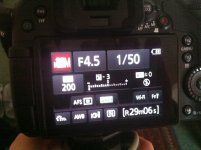
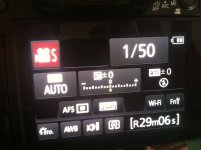
Thanks for explanation, but I have the same problem. All is set to "M" mode, but exposure is still setting to auto exposure. But if I select exposure mode "S" I can change the exposure. Look at the photos:

IMG_0268.JPGIMG_0269.JPG

Thanks!

1. turn on the camera

2. rotate the top dial so the "film camera icon with an M" next to it is in line with the little white marker (9 o'clock position)

3. click the "menu/set" button on the back of the camera to bring up the menu.

on page 1/5 of the "motion picture" menu you will see the "exposure mode" setting (4th down) click into it and select "M", this will give you full manual control in video mode.

once you select "M" it will take you back out to the main "motion picture" menu, on the same page 1/5, 1st on the list you can select "photo style" to change the recorded look at preferred sharpness/contrast settings etc.

you should be able to find and change these settings with ease mate, if not i've no idea whats up with your frankenstein GH3 :)
 
Thanks for explanation, but I have the same problem. All is set to "M" mode, but exposure is still setting to auto exposure. But if I select exposure mode "S" I can change the exposure.

According to your photos, when set to "M"(the first photo), you actually ARE getting manual exposure. In that photo, the exposure meter is reading 3-stops under, probably because you have the lens cap on.
In the second photo (set to "S"), your exposure meter reads in the center, as you'd expect when on a form of auto-exposure.
 
:) When it is set to "M" - on the fist photo - it is changed automatically (AUTO exposure) when I am shooting. That's the problem. I want it to be fixed and not jump when I am going from dark to light or from light to dark. As it is seen on the first photo - there is 3-stops under when I am pointing on the floor (there is no lens cap on).

When it is set to "S" - the second photo - the exposure is fixed (MANUAL exposure) - and that is what I need. It is pointing on the floor, but is still fixed. But I can't control aperture that way. :)

So, any suggestions?

According to your photos, when set to "M"(the first photo), you actually ARE getting manual exposure. In that photo, the exposure meter is reading 3-stops under, probably because you have the lens cap on.
In the second photo (set to "S"), your exposure meter reads in the center, as you'd expect when on a form of auto-exposure.
 
Last edited:
Control Aperture with the wheel in the back, shutter with the wheel on the top. Or use the touch screen.
 
:) When it is set to "M" - on the fist photo - it is changed automatically (AUTO exposure) when I am shooting. That's the problem. I want it to be fixed and not jump when I am going from dark to light or from light to dark. .
Hmmm. All I can say is that shouldn't be the case. When set to "M", you should have manual control over both the aperture and the shutter. That's how my GH3 works, and that's how it's supposed to work. So, I don't know why yours is changing while you are recording.

One thing to note: I see by your pictures that you have iDynamic turned on. That is best turned off. It may even have something to do with your exposure problem.
 
Hmmm. All I can say is that shouldn't be the case. When set to "M", you should have manual control over both the aperture and the shutter. That's how my GH3 works, and that's how it's supposed to work. So, I don't know why yours is changing while you are recording.

One thing to note: I see by your pictures that you have iDynamic turned on. That is best turned off. It may even have something to do with your exposure problem.

When set to "M", I can control anything, aside of exposure. It is controlled on other modes, e.g. "S", as seen on second image. I've set iDynamic to OFF, nothing changed. Can you please look again at your GH3, set it to "M" and inform me if your exposure acts as AUTO or MANUAL? Make a photo of menu if possible. Maybe I need to change something in menu? Thanks!
 
When set to "M", I can control anything, aside of exposure. It is controlled on other modes, e.g. "S", as seen on second image. I've set iDynamic to OFF, nothing changed. Can you please look again at your GH3, set it to "M" and inform me if your exposure acts as AUTO or MANUAL? Make a photo of menu if possible. Maybe I need to change something in menu? Thanks!

I can assure you my camera is set to M and that I have manual exposure. This is how it works and this is how my Gh1 and Gh2 worked since 2009. My LCD screen looks like yours.
I have to ask, when you say that the exposure "jumps" when going from dark to light, are you saying the IMAGE changes, or that the METER changes?
An easy way to tell whether your GH3 is correctly doing manual exposure is this:

1.Set the Exposure Mode on page 1 of the Motion Picture menu to M

2. Make sure you are NOT on Auto ISO. Set it to 200, for example.

3. Start recording.

4. Pan from a brightly lit window to a dark part of the room.

5. As you are doing this, look at the display on your LCD and see if the meter is moving up or down (it should go down when it's dark and up when it's bright). If it does this, then that is manual exposure and your camera is working correctly.
If the meter stays in the same position, this is auto-exposure and something is wrong with your camera.
 
Last edited:
M is by definition manual exposure (changing the aperture and shutter speed controls how much light hits the sensor = exposure). Are you sure you're not seeing the effects of auto brightness on the screen or something? As in, did you observe the exposure levels change in the actual video played back?
 
I can assure you my camera is set to M and that I have manual exposure. This is how it works and this is how my Gh1 and Gh2 worked since 2009. My LCD screen looks like yours.
I have to ask, when you say that the exposure "jumps" when going from dark to light, are you saying the IMAGE changes, or that the METER changes?
An easy way to tell whether your GH3 is correctly doing manual exposure is this:

1.Set the Exposure Mode on page 1 of the Motion Picture menu to M

2. Make sure you are NOT on Auto ISO. Set it to 200, for example.

3. Start recording.

4. Pan from a brightly lit window to a dark part of the room.

5. As you are doing this, look at the display on your LCD and see if the meter is moving up or down (it should go down when it's dark and up when it's bright). If it does this, then that is manual exposure and your camera is working correctly.
If the meter stays in the same position, this is auto-exposure and something is wrong with your camera.

When I am saying the image changes it actually changes compensating with exposure. The camera works as you explained in points from 1 to 5. But when I mean MANUAL exposure, I mean it stayed fixed, until I will change it manually (as it is in "S" mode - I can tap on it and change manually only), and not going anywhere down or up. When I set up the image by manual settings, I want it look the same everywhere. That's what is "manual". If it changes automatically, going down or up depending from the amount of light it gets - it is automatic exposure, because it changes without my action.

I have a Canon 7D as well. And when I am setting to "M" mode nothing changes without my permission: ISO, aperture, shutter, exposure. All is fixed and may be changed only manually by me. So when I am shooting the footage and it goes from dark to light the image does not changes. So it is over-exposured as I want.
With the GH3 the manual mode seems to be not so "manual". I am setting my ISO, aperture, shutter... but exposure isn't controlled by me. So when I am shooting the footage and it goes from dark to light the image changes (and changes are very jumpy).

Maybe I am missing something, maybe I am not understanding some fundamental photo rules, but I just don't want camera to decide how light or dark should be my footage.
 
Back
Top