tried this setting and works well on 1080p but stops on 720p on certain scenes(was using cl6). will test some more with cl10.......tried lowering GOP to 6 ,it works for me even outdoors and raising video buffer to 740000.... low light is just excellent.great patch rigs! my 100mbps patch from lpowell keeps freezing with my 32 transcend class 10 card so this patch makes up for it

Navigation
Install the app
How to install the app on iOS
Follow along with the video below to see how to install our site as a web app on your home screen.
Note: This feature may not be available in some browsers.
More options
You are using an out of date browser. It may not display this or other websites correctly.
You should upgrade or use an alternative browser.
You should upgrade or use an alternative browser.
New GH1 stable 24p patch
- Thread starter rigs
- Start date
dizzydevil
New member
tried the rigs patch with my class10 transcend card using GOP3 and video buffer maximum, i think you guys should give it a go.... my lens was 28mm 2.8 blogon carl zeiss G lens and was set to iso 1600
am getting outdoor bitrates of 41mbps, clips are sharp no crash on bushes and detailed scene
blues you use GOP3 settings for 720p and 1080p resolution?
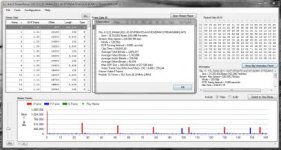
I tried out Rigs' GH1 24p patch on some of the most challenging scenes I've used to test my own patches. The target bitrate of this patch is set to 115Mbps, which is the highest of any stable patch that I've seen. Stream Parser, however, reports that the peak bitrate the patch can produce is over 220Mbps, very close to the maximum advertised bitrate for Sandisk Extreme 30MB/sec SD cards.
On the most brutal tests, I did see persistent recording failures, typically after 8-12 seconds. However, in these cases the patch produced extremely dense I-frame bitrates of 9Mbits, while maintaining average bitrates below 45Mbps. This indicates that the patch should produce very high quality video images under all but the most stressful conditions.
Here's an example of a scene that produced a corrupted MTS file after 11.5 seconds:
On the most brutal tests, I did see persistent recording failures, typically after 8-12 seconds. However, in these cases the patch produced extremely dense I-frame bitrates of 9Mbits, while maintaining average bitrates below 45Mbps. This indicates that the patch should produce very high quality video images under all but the most stressful conditions.
Here's an example of a scene that produced a corrupted MTS file after 11.5 seconds:
Strange thing, but I couldn't make this patch give me 24p video. Sony Vegas always shows 25p frame rate of clips from camera even though I have NTSC settings selected. Btw, not like with other patches, this one doesn't require to restart camera after switching from PAL to NTSC and vice versa. Is this only me?
I also just tried 100Mbps Max Latitude Native 24/25p Patch and it gives me 24p, no problem.
I also just tried 100Mbps Max Latitude Native 24/25p Patch and it gives me 24p, no problem.
Geoff Gilson
Active member
I've had an unique problem with 720p 50 mode and this patch.
The bit rate stuck at 2 Mbps, everything looks extremely muddy and blocky.
Could this be the amount of detail, the unchanged GOP for 720p 50, the bit rate?
I have a Japanese GH1, so before writing the patch, I changed these options in ptool:
- All Interface Languages
- 30min limit removal
- PAL<->NTSC Menu
Although I don't see why these would have strange effects.
More details and video here:
http://vimeo.com/30215543
Password: gh13
The bit rate stuck at 2 Mbps, everything looks extremely muddy and blocky.
Could this be the amount of detail, the unchanged GOP for 720p 50, the bit rate?
I have a Japanese GH1, so before writing the patch, I changed these options in ptool:
- All Interface Languages
- 30min limit removal
- PAL<->NTSC Menu
Although I don't see why these would have strange effects.
More details and video here:
http://vimeo.com/30215543
Password: gh13
Attachments
Geoff Gilson
Active member
Strange I didn't notice that before. Thanks for the info, I know to avoid this in future.thats just low Mb mud in general. generally if you shoot higher than say 34Mb in 720 lower than 1/50 1/60 fps bitrate will drop down to what you are seeing.