New FS100 user: getting lost with PP"s...(Green color cast)

RebelFilm

Member
Hi all, I just got my FS100! Really happy with it, upgraded from a 550D so nice to have all the usual camera features. I've rented the FS100 for a weekend before, and was a dream to work with. I've got my own last week and put 2.0 firmware on there right out of the box. When I rented the FS100 I used the AbelCine_Norm PP. Worked like a charm. But with this one everything has an insane green color cast, no matter what PP I use... The examples of those PP look just fine, it looks fine on my FS100 LCD, put as soon as I put the MTS files in CS5.5 everything looks like it's shot trough a green tinted piece of glass :( I tried converting to ProRes using ClipWrap, but doesn't make any difference. I'm looking for a PP that's similar to the tuned down Neutral picture profile many DSLR shooters use. I'm sure this is just a new user error, so could someone help me out?
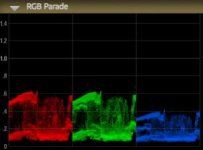
Screen Shot 2012-04-30 at 10.25.45 PM.jpgScreen Shot 2012-04-30 at 10.31.09 PM.jpg
 
What are your PP white balance settings at? Also, I am sure you are, but be sure to black balance and balance to a card before you rely on white-balancing manually.
 
@Bindas No I have not calibrated my monitor, it's just 2 Samsung 23" P2370's. Never had this problem before though and the RGB Parade definitely shows a dip in the blue channel.

@Kyle For the example, I was using your PP ;) Since I have a job coming up in a couple of hours I've put on the AbelCine PP's via download to SD, to be sure I haven't made any mistakes putting in the PP's. I black balanced before this shot and manually white balanced to 3200K. Don't have a white balance card though.
I've tried out the AbelCine PP's, PP1 also gives a weird green cast, PP2 seems fine though. Exact seem WB and exposure settings.

Screen Shot 2012-05-01 at 8.33.13 AM.jpgScreen Shot 2012-05-01 at 8.33.40 AM.jpg
 
Even great screens need calibrating atleast once a month... I'm not saying that's your problem, but man... please don't grade or do graphic work on a non calibrated monitor :S
 
I forgot to actually load the camera profile van AbelCine, so was on the old PP's I was messing with last night. PP1 now seems ok, still a slight bias towards red and green, so I might dial that out. Will test properly on a job in a couple of hours. Have a 550D packed, just in case.
 
It looks like you have white balance shift set in your picture profile. If you have a wb shift set, you need to manually adjust your white balance with a card using the manual dial, it wont be the correct value because of the wb shift, but then your whites will be correct and so will everything else in the scene, thats how those PPs are set up. :)
 
This may sound a little 'obvious' but let's start at the beginning:

- When entering in the Picture Profile settings, did this involve changing the Colour Depth info? (RGBCMY values)

- If you turn Picture Profiles OFF, does the colour cast go away?

- Do you have a way of connecting your camera to a live WFM/Vectorscope (as in Premiere) so you can tweak values live?

Here's what I'm getting at: I have two EX1s, and if I share Picture Profiles between them, including white settings and 'Colour Levels', the two cameras do not match and can be tricky to pull together. If I put all the Colour Levels at 0, they don't match but they CAN be dragged together with lightweight colour correction. However, I had two Z1s, and one was particularly warm - always was. They were real sods to match until they got 'looked at' by an Engineer.

Cameras of the same make and model do often have slightly different colour balances, which is why we're given the option to fine tune them in Picture Profiles. Getting two cameras to white-balance from the same card in the same position still doesn't guarantee perfect results. So, you fix in post, or you tweak the two together using a live WFM/Vector/Parade.

As a side note, I'd apply other people's PProfiles' Colour Level and WB info with caution, as somebody's correction can be someone else's colour tint.

I know dealers who have engineers who can help tweak things with their own test charts and measurement gear, but I wouldn't expect that level of service from box shifters. If you were to want to return it to Sony, they may spit it back with the usual 'within manufacturing tolerances' speil (like my over-warm Z1), so you either learn how to do it yourself, or find an engineer with experience in this field and buy them lunch or something. OTOH, this does look pretty severe.
 
Thnx for the extensive reply Matt! If I turn the PP off, I still have the cast, though far less pronounced. That's why I think the camera has a bias towards green... Don't have a way to hook up my FS100 to my Mac, no DeckLink card or anything only HDMI on my 5770. Yes, the PP's do change the Colour Depth. I've copied the AbelCine_Norm PP to PP6 and dial the green cast out, also changed the WB Shift to level the RGB even. Took some trial & error, by recording, looking, changing, etc but it's nice and level now. Will also do the same for the Kyle's PP and take of couple of extra beauty shots today with both PP's and see which one grades the best.
 
A obvious question that doesnt appear to have been asked, what type of light was illuminating the scene?
 
Just a tungsten lightbulb in my room, set WB manually to 3200K. But I checked and have the green tint in daylight to, WB set to 5600K.
 
I black balanced before this shot and manually white balanced to 3200K. Don't have a white balance card though.
The problem is quite simple and has nothing at all to do with your picture profile. I sounds like you just haven't white balanced the camera properly. Setting the white balance is a completely separate issue from the picture profiles and must be done no matter what PP you are using. Two different things.

I don't understand what you mean when you say that you don't have a white balance card? Any piece of white paper will do, you don't need a special card. The important thing to remember is that you MUST set the white balance with a white (or neutral gray) card in the exact same lighting where you are shooting. It doesn't sound like you have done that.

Also, I don't know what you mean by "maually white balance to 3200". Dialing the white balance to "3200" is NOT setting a manual white balance. That's just dialing in a random color that may or may not have any relevance to the lighting where you are shooting. For example, if you dial in a 3200K white balance, but you're shooting in a location where the lights have a strong green cast or green spike to them (even walls, carpet, etc. can cause an unwanted color cast), then you will have done nothing at all to neutralize that green color. That's what white balancing does. If you want good color under artificial lighting you can't use a preset white balance and you can't just dial in a color. You have to aim the camera at a white card, press the white balance button, and let the camera do the work it was designed to do. There's no getting around that simple step.

Obviously your final image will also be affected by the PP settings (especially if you have offset white turned on), but that is an entirely different issue from setting a proper white balance.

http://www.vortexmedia.com/DVD_FS100.html

If you turn off the PP settings, set a proper manual white balance with a white card, and you still have a green cast, then you have a broken camera.
 
Thnx Dough for clearing that up! I come from a DSLR background, where I just dialed in the custom kelvin degrees. Never had a problem with that. I've put the PP off, pointed the camera at a white piece of paper, and white balanced to the A preset with the WB button, while the white paper filled the whole image. I'll will get a white balance lens cap or X-Rite WB Mini card.
 
Hold on. You can't white balance with a lens cap because that is often not the samec color of light that is striking your subject. You need to take a reflected reading from a white card, calibrated gray card, or some other reference that is being illuminated by the same light as your subject. For example, in a typical interview setup, the camera is usually several feet away from where the lights are pointed an in an entirely different environment from the talent. You want to set the white balance to match the light that is hitting the subject you're shooting - not the camera. That can only be done properly with a relected reading. That's why professional TV/video cameramen have been white balancing with cards for 40 years. There's no other way to do it and still get consitent results. A professional video camera, such as the FS100, requires more precision for white balance and exposure than an SLR.

If you really want to understand how to properly set a white balance, I recommend that you download the WarmCards User Guide I wrote. Even if you choose not to use WarmCards, I think you'll still get some valuable information from it.
http://www.vortexmedia.com/WC1.html
 
Last edited:
Thnx Dough, will look in it some more, great advice! I just got a Lasolite EzyBalance, works like a charm! Off to shoot a interview right now, so putting it to use already ;)
 
Yeah, if you want a straight-forward normal white balance with no warming, then the Lasolite looks like it would work . . . but so would a piece of white typing paper. The important thing is that you use something to set the white balance - and that way you'll solve your color issues. Good luck with the shoot.
 
I feel kinda dumb now, haha. Used the Lasolite, worked like a charm, perfect even RGB parade now! Grades very nicely, used Kyle's PP(thnx for sharing!). Amazing just how sensitive the FS100 sensor is! I was at 85mm F2, with a Kino Flo 4ft 4Bank with 2 banks on and needed a 0.9 ND to get correct exposure!

Screen Shot 2012-05-01 at 7.38.20 PM.jpg
 
Back
Top