Need workflow advice for new iMac/150/Final Cut Pro configuration

rezlem

New member
Hey there - Just purchased a new Panasonic HMC150 (much in thanks to the reviews I read on this forum) as well as a new iMac 27" with OSX version 10.6/quad core i7 processor / 4 GB RAM.

The camera doesn't actually arrive until early next week so I'm trying to sort out workflow issues so I can get shooting as soon as possible. The hitch I think from what I've read will be dealing with the AVCHD format, especially considering I'm currently strapped with an older version of Final Cut Pro-- version 5.0.4. I'm under the impression that it won't be able to handle the footage. Do I need to update? Or is there some sort of work around that can happen with it or by using the installed Quicktime or something else?

Many thanks for any and all advice. I'm pretty handy on the production side but after a while all this technical talk does my head in.
 
FCP 7 doesn't support native AVCHD editing. However you can "Log and Transfer" your clips. Specifically, you can transcode the camera's .MTS clips to any version of the Apple ProRes codec and edit with no problem.

Otherwise you need something like Clipwrap to convert the .MTS files to ProRes prior to importing into FCP 5.xx

-paul.
 
I think the earliest version of FCP that works with Log and Transfer is 6.05 but I could be wrong. You can check the Apple site, but in anycase you might want to check out the FCP area on this group, you will find great info and help. Another great resource is the LAFCUG site which you can google as well ask Noah Kadner and Hal Long's site: http://www.callboxlive.com
They have great info and tutorials.
The short answer is upgrade, the log and transfer process works. Native editing just is not happening on the Apple platform ...yet.
You will love the camera,btw! Welcome!!!
 
alright. I'm updating my Final Cut. It kinda hurts to have to spend so much money to get myself off the ground, but I cannot wait to get this all together and shooting. it's going to be awesome. thanks again.
 
As others have said, 5.0.4 is not compatible with Intel Macs at all, nor will it work with AVCHD footage. Moreover, even if you could convert, you would be stuck with AIC.

No pro res codecs are installed by 5.0.4.

Once you update, convert to pro res 422 LT to a fast external FW800 drive.
 
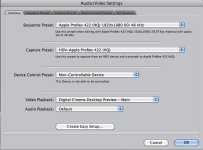
When you Upgrade your FCP set your preferences to this:

http://www.dvxuser.com/V6/attachment.php?attachmentid=20479&stc=1&d=1283757865

Plug in your SD card.

Open up an untitled FCP project.

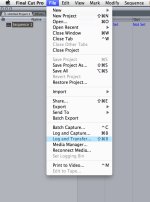
Under File, select "log and transfer."

http://www.dvxuser.com/V6/attachment.php?attachmentid=20480&stc=1&d=1283758197

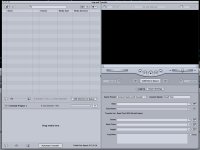
The window that opens will be self explanatory.

http://www.dvxuser.com/V6/attachment.php?attachmentid=20481&stc=1&d=1283758490

Good luck, you won't regret the upgrade.

++++++++++++++++++++++++++++++++++++

I forgot. The HMC Files are absolutely enormous. Get a new 1 Tb hard drive to use as your scratch disk for HMC150 content.
 

Attachments

  • FCP Settings.jpg
    FCP Settings.jpg
    156.9 KB · Views: 0
  • LogTrans.jpg
    LogTrans.jpg
    165.1 KB · Views: 0
  • LogImport.jpg
    LogImport.jpg
    135.2 KB · Views: 0
Last edited:
arhgg. so i excitedly purchased the upgrade and didn't look to see that you're not allowed to upgrade Academic versions of the software. and what's worse is that of course I didn't realize that until I'd undone the plastic making it un-returnable. current plan is buy old version of final cut that does work and will upgrade so i can install it and work around. makes sense? i hope.
 
Last edited:
Back
Top