Need help getting the anamorphic look!!

Ray_7D

New member
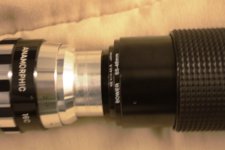
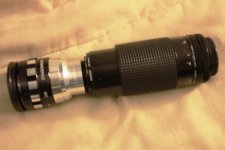
Hi guys! I'm a new member, and I just recently received the Canon 7D in the mail. I have a newbie question: after seeing some stunning shots made with the Sankor 16-C (Akira you kick ass!!), I decided to go ahead and make a similar setup. The problem is, when I import the shots into FCP, they are still in the regular 16:9 aspect ratio. What gives?

BTW, here are some pictures of the setup, in case it may help solving this issue. Thank you guys so much, I have learned so much just by browsing these threads!
 

Attachments

  • IMG_0009.JPG
    IMG_0009.JPG
    252.7 KB · Views: 0
  • IMG_0010.JPG
    IMG_0010.JPG
    276.5 KB · Views: 0
Try setting the pixel aspect ratio of your FCP sequence to 1.33.

In either 1080p or 720p, the pixel aspect ratio is 1:1 (square), which gives you an overall image aspect ratio of 16:9. When you set the pixel aspect ratio (which controls the shape of the individual pixels) to 1.33, then you get: (1920*1.33=2554)x1080 or (1280*1.33=1702)x720.

2554/1080 = 2.36:1
1702/720 = 2.36:1
 
Last edited:
The sankor is a 2x anamorphic stretch which works out to be a 3.55:1 aspect ratio. I do my H.264 to prores conversions in compressor. You can do a custom setting in compressor, click on the geometry tab and select a custom frame size, in this case it would be 1920x540. You could also make it wider and taller than 1920x540 pixels and then crop it in the same geometry window.
 
On 7D you will get different aspect ratio cause sensor catches 16:9 crop from 3:2,anamorphic needs 4:3,so you will get this:
http://img44.imageshack.us/img44/3105/clipboard1h.png

You would have to crop it to 2.35:1 but it wont be so anamorphic looking anymore ,it needs 4:3.
I dont have final cut but you can just stretch this back 60% in many free apps,like virtualdub.
I think 50% stretch is too much ,58 is ok but sooo wide,i tend to leave 60% sometimes 62% or crop to 2.35:1

Why zoom lens ,buy yourself 58mm ,You can use 58mm with anamorphic attachment without vignetting,with 50mm it will vignette.
 
Last edited:
Thanks for your responses!!

Thanks for your responses!!

Thank you guys for taking the time to respond! The thing is, I assumed the lens would help in creating a true anamorphic look without having to mess with the original pixels in post. But I guess I was wrong.

bwwd: Yeah it's true, I do get vignetting with the 50mm zoom. I was mostly using this as a placeholder and a test to see the look I can get out of the Sankor. It's a very exotic lens. I also have another anamorphic setup, a Canon FL 58mm 1.2 plus a Panasonic AG-LA7200 adapter, that I'm trying out right now.

Once again, much appreciated!
 
Thank you guys for taking the time to respond! The thing is, I assumed the lens would help in creating a true anamorphic look without having to mess with the original pixels in post. But I guess I was wrong.
I suggest that you read about anamorphic lenses in order to get a better understanding of what they really do.

The whole point of an anamorphic lens is to horizontally squeeze a wider image into a not-so-wide frame, which can then be "unpacked" later. That's what "anamorphic" means. For example, an anamorphic DVD is the same resolution as a non-anamorphic DVD (720x480), but the raw video looks horizontally squished (or vertically stretched). Anamorphic is not the same as letterboxing. The whole point of anamorphic is to avoid the resolution loss from letterboxing.

I'm curious, so I hope that you don't mind me asking: How did you think that anamorphic worked?
 
Last edited:
ydgmdlu: Right, that's what I thought. I'm just getting the hang of this tech. I am a photographer by trade, and I don't deal with video very often, so that's why it seems that I'm asking stupid questions.
 
Back
Top