C100: Need advice on camera set up for run and gun big shoot

puredrifting

Major Contributor
Met with a client yesterday for camera tests for a big project I will be DPing with our C100 and the Ninja Blade. I have convinced the client to let us shoot WDR. The challenge is, her client will be on set certain days, looking at the monitor. She wants to make sure that the picture he sees is very warm, friendly with bright colors that pop. As we all know, WDR is not super warm and does not have super bright colors that pop. We will be shooting on the streets of LA with actors playing "real people", along with some "real people" who are employees of the client. The cast will be racially diverse with a lot of different skin tones and colors. We will be attempting to shoot in shade with shaded backgrounds, I am praying that some of our June gloom as of late holds so we get some clouds and overcast but it is LA, so the chances are, I will be fighting Nuclear bright sun most of the time. I want the most dynamic range for the image, but there is no way I can shoot C Log as the client's client will freak out looking at the monitor. Trying to explain grading and protecting highlights generally doesn't work with creatives who are not film/video savvy. We do not have a monitor with LUT capability so there is no way I can shoot C Log. It seems that WDR would be a good compromise between getting more dynamic range and presenting a somewhat baked in look. I will have a small crew with a grip PA but it is mostly run and gun. We will have permits but we have to cover a lot of ground in 8-9 shoot days. The shoot is 85% exteriors, although there is a chance I will be shooting an interview with the mayor that will be an interior.

I will have a translucent Flexfill, flags, silks, probably a C-stand or two but I am not sure where to go with setting up the proper look with the C100 to give the client what she wants for her client but protecting the dynamic range as much as possible. I am trying to encourage shooting sunrise to 9:00 AM and 5:00 PM onward as much as possible and downtown will offer us some shady streets as early as 2:00 or 3:00 PM because of the skyscrapers. But as far as setting up the camera:

1. To achieve my goal for the image, is my best choice to shoot WDR? I have the Abel Cine looks installed so I have the JR45Video and Cine, EOS Match, AB Norm, AB Low Light, etc. but I believe WDR to have superior dynamic range to the AB setups.
2. Assuming I shoot WDR, how would you dial in a warmer look that would not affect the DR too much? Obviously, I can just set a manual color temp of say 4800k in 6k or 7k sunlight but I could also go into the WDR pre-set and fine tune the color matrix/gamma curve, etc. I did tell the client that baking in the look could be risky for certain setups and certain skin tones and we won't have time to mess with the looks as we shoot so I need an all purpose exteriors setting that I know will work. What are the up and downsides of just setting a warmer WB versus fine tuning the WDR preset? I generally tune the presets by turning down sharpness and detail but I have not played with the color matrix, gamma, etc. within the presets.
3. Any other tips or tricks with the C100 to proitect the highlights while still giving the client what they want?

Thanks for your advice. This project is definitely a compromise, usually my clients just let me make these decisions as far as look and how the post workflow needs to address the look, but I usually shoot interiors, green screen, sets, it is rare for me to run and gun on the streets for such a high profile project so hearing from DPs who have done this would be very helpful.

Thanks.
 
Wouldn't the simplest solution be to warm up the image, increase the contrast & chroma on your field monitor and not say anything about grading to your client?
 
Wouldn't the simplest solution be to warm up the image, increase the contrast & chroma on your field monitor and not say anything about grading to your client?

Not a bad idea but the client will be showing their client dailies and quick turnaround rough cuts. The client will be the editor and said she needs the footage to have most of "the look" baked in as she won't have time to do color correction until the final delivery.
 
You're going to mostly be in the Color Matrix portion of the Custom Picture for these adjustments.

I have tried to do something similar, and immediately found out that my first inclination, which was to change to color matrix to EOS Standard, actually desaturated the skintones slightly, which I found odd.

So you can just boost the overall saturation in your image by using the Gain Function in Color Matrix, or you can really get in there and mess with the Reds (R-G and R-B).

Primarily I mess with R-B, as you increase that, you're increasing the Red's saturation and shifting the blue's slightly towards cyan, so a slight bump there can really pop the skintones. Put your hand in front of your lens and watch your vectorscope as you make the adjustment.

I'm on a MK II, and I have a Skin Detail Option as well, there you can change the hue and chroma of your skintones specifically. I've never used it, so not sure how well it works or if it's even on a MK I, but if it is, it's worth a quick test.

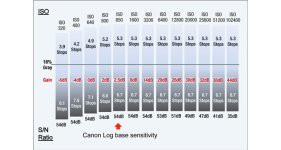
Also just because you are talking about highlight protection, I'm always surprised at how often I see shooters at ISO 320 outside because naturally they assume they can be at the lowest ISO, when in fact, anything below ISO 850 you are sacrificing highlight protection and shifting your dynamic range distribution in favor of the shadows. So my rule of thumb is never shoot lower than 850 when I'm concerned at all with highlights.
 
You're going to mostly be in the Color Matrix portion of the Custom Picture for these adjustments.

I have tried to do something similar, and immediately found out that my first inclination, which was to change to color matrix to EOS Standard, actually desaturated the skintones slightly, which I found odd.

So you can just boost the overall saturation in your image by using the Gain Function in Color Matrix, or you can really get in there and mess with the Reds (R-G and R-B).

Primarily I mess with R-B, as you increase that, you're increasing the Red's saturation and shifting the blue's slightly towards cyan, so a slight bump there can really pop the skintones. Put your hand in front of your lens and watch your vectorscope as you make the adjustment.

I'm on a MK II, and I have a Skin Detail Option as well, there you can change the hue and chroma of your skintones specifically. I've never used it, so not sure how well it works or if it's even on a MK I, but if it is, it's worth a quick test.

Also just because you are talking about highlight protection, I'm always surprised at how often I see shooters at ISO 320 outside because naturally they assume they can be at the lowest ISO, when in fact, anything below ISO 850 you are sacrificing highlight protection and shifting your dynamic range distribution in favor of the shadows. So my rule of thumb is never shoot lower than 850 when I'm concerned at all with highlights.

Thanks for the advice, I will try that.

Just like ade says, I read the thread that said the same thing, that 850 was native for C Log and 640 was native for WDR but I have not seen official word from Canon if that is true. I usually leave it in 850 for WDR, I have my Tiffen Variable NDs, but I should run some gray scale tests in 850 vs. 640 to see if I can see any differences.
 
Ninja Blade has view assist functions that let you mess with the gamma curve. But if you are just going to handing this footage off and they want a baked in look I'd probably just deliver what they want.

I'd use WDR and bump up the color matrix gain and play with black shadow gamma until I was happy with contrast and saturation. Shooting outside I find Clog to be immensely helpful, but sometimes you just have to do what the client wants.
 
It would be great for you to be able to film this the way you want to in C Log. Would it be possible for the client to view the footage on the Ninja Blade monitor? The Blade has the capability of applying a baked in LUT to C Log footage to obtain a more vivid image closer to standard REC 709. This capability is not covered in the manual and is buried in one of the display options menus so you might not be aware of it. Additionally, would there be a way to do a quick and dirty grading on sample footage and use that to educate the client on color grading? I realize that might not be possible depending on the temperament of the client.

Best wishes on the project!
-Bob
 
Puredrifting,
I somehow can't believe an experienced shooter like you can't get a client to except that you either get some sort of flat image with headroom to do some magic in post, or a baked in image.
I just haven't met anyone who would hire me but wouldn't trust what I tell them, especially when it comes to simple given facts like a flat vs. baked-in picture.
That includes jobs for clients like Nike or Adidas who usually bring an entourage of people all in desperate need to add their very own flavor of salt to the soup...

If the agency wants the best possible outcome, you must shoot Log or WDR. Period.
If they need a punchy picture for their client on set, they either need to pay for renting a monitor that can import LUTs or hire a DIT to correct the dailies on set.

I would probably just bring my MacBook, take 5 and let them witness how a flat picture turns to a saturated one in under 5 minutes.
I'm by no means an expert in grading, but I can dial in a look that looks decent enough to get my point across.
Once they saw that, a contrast and saturation adjusted client monitor should suffice for the rest of the shoot.

Again, no offense, I'm sure the situation is as you say, but maybe you need to put the foot down more forcefully:)
 
Last edited:
Good advice here. FWIW, my client will be the editor. She is on an older Mac Pro, doesn't know or want to know about LUTs, applying LUTs and has specifically requested a baked in look. Remsyatassi nailes it, sometimes you just have to give your client what they want, not what is best for them. There is great trust between client and me, she knows that shooting C-Log would be best but when she is on a project, under deadlines, stressed and she has an older computer that is not a hot rod, she doesn't want to have to render everything to send her client a preview. To me, WDR is a good compromise. It won't have the DR of C Log but it does have pretty good DR overall compared to the other presets we have.

I am going to tweak my WDR preset with the specifics mentioned by Macaholic, that sounds like a good place to begin. Spartacus, the laptop thing isn't happening, there is no down time, there is no sit around and discuss and show samples. We have a huge shot list, all over the city, limited crew, fighting LA traffic, limited time permits, chasing daylight, talent availability, etc. It's really not a matter of trust, it is giving the client what they want, when they have made very clear exactly what they want. If my client had a faster tower, was up to speed on LUTs and didn't have to render, I could convince her to shoot C-Log, adjust the on set monitor to compensate and work with the C Log footage but that is not the case here. I feel as if WDR will be an acceptable compromise. The question becomes, should I expose it at 640 or 850 ISO?
 
Back
Top