
Navigation
Install the app
How to install the app on iOS
Follow along with the video below to see how to install our site as a web app on your home screen.
Note: This feature may not be available in some browsers.
More options
You are using an out of date browser. It may not display this or other websites correctly.
You should upgrade or use an alternative browser.
You should upgrade or use an alternative browser.
Need a great moire post fix
- Thread starter jsauce
- Start date

anybody know any great fcp tricks to neutralize moire/aliasing
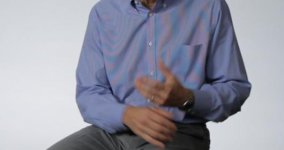
i have some really bad stuff going on with a striped shirt
Re-shoot with a different shirt.
Which NLE? I've had some luck with Vegas (Chroma Blur + NeatVideo). http://www.dvxuser.com/V6/showthread.php?226593-Tokina-11-16-D7000-Moire
what's an nle? im on fcp. im getting the rainbow colored moire, red and blue buzzing. yay!
Which NLE? I've had some luck with Vegas (Chroma Blur + NeatVideo). http://www.dvxuser.com/V6/showthread.php?226593-Tokina-11-16-D7000-Moire
here it is in all its nastiness. man i can't wait for the af 100
Non Linear Editor, in your case FCP. Don't know anything about that one, sorry. Can you post a screengrab or some footage?
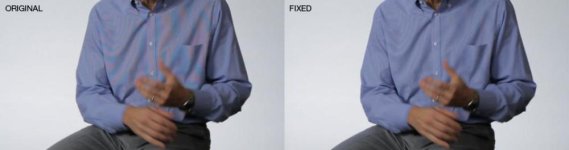
I can give you the steps for fixing this in Photoshop. I used the same methodology in Vegas and it should work in FCP - I just don't know the FCP terms for the steps.
1) sample the correct shirt color - I used the bright part of the sleeve near the right hand
2) Create 2 solid color layers and fill them with that color - change the blend mode to "color only"
3) Sample the red moire pattern and use that as a mask for the first color layer
4) Sample the blue moire pattern and use that as a mask for the second color layer
5) adjust the sample range as needed on 3 & 4 until you don't see the colors.
1) sample the correct shirt color - I used the bright part of the sleeve near the right hand
2) Create 2 solid color layers and fill them with that color - change the blend mode to "color only"
3) Sample the red moire pattern and use that as a mask for the first color layer
4) Sample the blue moire pattern and use that as a mask for the second color layer
5) adjust the sample range as needed on 3 & 4 until you don't see the colors.

Rick Burnett
Section Moderator
How long is the footage?
Given the blue is pretty contained, I would use After Effects. You can use the Rotobrush tool to easily select the shirt which should work well. Use some feathering and then employ some of the color tools for reducing out the colors (Ie, you could monochrome the shirt basically and then add color back to it), or mess with the channels and stuff.
I actually think it wouldn't be too hard.
Given the blue is pretty contained, I would use After Effects. You can use the Rotobrush tool to easily select the shirt which should work well. Use some feathering and then employ some of the color tools for reducing out the colors (Ie, you could monochrome the shirt basically and then add color back to it), or mess with the channels and stuff.
I actually think it wouldn't be too hard.