Native 24P/25p settings/problems discussion

Yes i'm now just going to add preset patches back into the C settings one at a time and at different rates. All in 50i of course and see what the effect is. Not expecting much as confirmed by Chris's tests. Might disable L and H as well.
R

What part of Chris's test are you referring too. I interpreted as the H & L was causing failures- where as the patches, there was no verdict. He posted up pictures of his test graphs- however the photo's were super small to read.

So your gonna try a patch at a time- why are there two anyhow- they are labeled the same- however do they have different functions- Any opinions?

Pappas
 
okay. I'll just get passed over. All I want is a yes or no. How do you shoot 24p without 1/24? This is my question.

This isn't a direct answer, but most people find that the best shutter speed when shooting 24p is double the frame rate (or closest you can get to that). So for us, that would be 1/50. This gives a natural look without too much motion blur while not looking harsh/grainy. I know you are looking to shoot a lot less than that, but that might just introduce too much motion blur. In any case, my GH1 doesn't seem to allow shooting video at less than 1/30.
 
Pappas.... I see your settings here...

Native 24p/25p= XXXXX- NOT CHECKED
Video Bitrate FHD/SH=64000000
Video Bitrate H= XXXXX- NOT CHECKED
Video Bitrate L= XXXXX- NOT CHECKED
Overall Bitrate=72000000
Limiting Bitrate=80000000
Preset bitrate=640
Preset bitrate 2=640

Is there an actual place to set "preset bitrate" or "preset butrate 2"? I don't see it in ptools 3.40d

I'd like to do some testing... maybe im missing something?

Also... I can't use the suggested "c" settings in ptools 3.40d and shoot still grass or star chart with a sandisk extreme III 30mb class 6... the best I've found for stability including star chart shot is the reccomended "b" settings.... wondering if you've had similar results.?? I'm noticing that you're pumping out some pretty high settings... are you having stability issues??
 
Last edited:
I tried Pappas' settings and on highly detailed scenes they crash the card quickly (usually I can get about 2 seconds). The difference is that it gets recorded to the card and is not lost like when 24p is checked. The fastest rates I've been able to get on high detail scenes at 60i are 54/56/58 with presets at 540. Even going 2-4 mbits higher can stop the camera after 10-15 seconds (again, footage is saved). This is on a Panasonic Class 10. Comes in at just under 50 mbits in quicktime.

As for 24p shutter speeds, I've tried adjusting them along with many other variables with no luck. Also fooled around briefly with 25p, doesn't help. I've tried many combos of low-high bitrates, presets 1-2 with higher-lower values and vice versa, spiking the limiting bitrate up to 120000000 (the max ptool allows) while keeping the others low, turning on H and L, nothing seems to fix the problem. Longest running times came when using low bitrates but it still pulses and can ultimately fail if run long enough.

If you can't find the preset bitrate boxes download the latest ptool and look under patches for testers.
 
This isn't a direct answer, but most people find that the best shutter speed when shooting 24p is double the frame rate (or closest you can get to that). So for us, that would be 1/50. This gives a natural look without too much motion blur while not looking harsh/grainy. I know you are looking to shoot a lot less than that, but that might just introduce too much motion blur. In any case, my GH1 doesn't seem to allow shooting video at less than 1/30.

didn't mean to be rude with last post. late friday night. a few drinks. enough said. ha!
I understand that you can pick the closest workable shutter for 24pN. I am trying to posit the question: what if the problem with 24pN is not the patch, but the lack of a 24pN shutter speed?
 
In my experience, I've not seen any interactions between the 24pN patch and the MJPEG patches. The 24pN patch appears to provoke a sporatic frame-encoding malfunction that no one has been able to fully explain. When video recording fails with the MJPEG patches, it is not due to an encoder flaw, but simply because the data rate exceeds the limits of the SD card.

I've used shutter speeds down to 1/30 sec with my 35Mbps MJPEG in-camera playback patch with no errors. Below this shutter speed, my understanding is that the camera will cut its sensor frame sampling rate in half to 15fps in order to hold the shutter open for longer than 1/30 sec. The video will still contain 30fps, but each frame will be doubled after being sampled at 15fps. Since I've not tested it myself, it's quite possible that this altered frame sampling rate could produce SD card write errors with the 35Mbps patch.
 
The 24pN patch appears to provoke a sporatic frame-encoding malfunction that no one has been able to fully explain.

Okay. Just wondering if shutter speed makes any difference. In particular, lack of 1/24.

I've used shutter speeds down to 1/30 sec with my 35Mbps MJPEG in-camera playback patch with no errors. Below this shutter speed, my understanding is that the camera will cut its sensor frame sampling rate in half to 15fps in order to hold the shutter open for longer than 1/30 sec. The video will still contain 30fps, but each frame will be doubled after being sampled at 15fps. Since I've not tested it myself, it's quite possible that this altered frame sampling rate could produce SD card write errors with the 35Mbps patch.

I've repeated this error a couple times. I didn't look into what was causing it. Not a big deal because I wouldn't use less than 1/30 in real situations. That explanation makes sense. Thanks.
 
I don't even have this camera, but after seeing hacked GH1 footage on Vimeo I'm really intrigued. I now have a migraine reading all of this information. Glad I did, I definitely want one if the Native 24P gets situated. Thanks for all the knowledge.
 
When I checked the 24p Native, My footage seemed to be in slightly fast motion when placed on a 24p Timeline. It said it was the correct framerate but was actually a little fast. Strange.
 
Well that is a pretty common wrapper for PAL and NTSC cameras, so it should be fairly easy to find out with a Google search. Obviously with 25p wrapped in 50i it is much simpler.

Wiki has this http://en.wikipedia.org/wiki/Progressive_segmented_frame
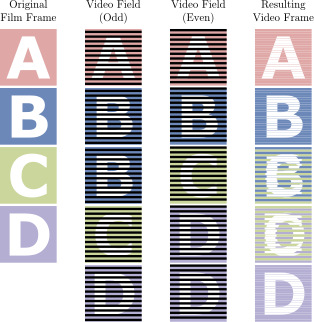
Courtesy of another Wikipedia article may I present the following graphic illustrating "2:3 pulldown", or how you take 24P footage and turn it into 24PsF (60i).

314px-32pulldown.svg.png


As you can see, 24PsF stream contains two duplicated fields (upper B and lower D) per 10 field sequence. If I'm doing my math correctly that means native stream will have 20% extra bandwidth thrown at its progressive footage than progressive-split-frame stream with equivalent length and bitrate.
 
I've been testing below settings on GH13 for about a week now and have not had any issues whatsoever, so it's time to share.

Code:
[Information]
Comment=Working Settings:<br>1) Native, Surfer AVCHD, graduated H/L and Preset @ <br>50Mbit<br>2) modulr's MJPEG settings with 4:2:2 color
SD_Card=Sandisk Extreme Class 10
Camera=GH1 v1.32
[Settings]
Prevent version compare=Checked
720p30 420->422 color sampling=Checked
E1 Quality=188
E1 Table=4
E2 Quality=188
E2 Table=4
E3 Quality=188
E3 Table=4
E4 Quality=185
E4 Table=4
Native 24p/25p=Checked
Video Bitrate FHD/SH=50000000
Video Bitrate H=40000000
Video Bitrate L=32000000
Overall Bitrate=56000000
Limiting Bitrate=60000000
[B]Preset bitrate=500
Preset bitrate 2=500[/B]
 
Last edited:
I've been testing below settings on GH13 for about a week now and have not had any issues whatsoever, so it's time to share.

Code:
[Information]
Comment=Working Settings:<br>1) Native, Surfer AVCHD, graduated H/L and Preset @ <br>50Mbit<br>2) modulr's MJPEG settings with 4:2:2 color
SD_Card=Sandisk Extreme Class 10
Camera=GH1 v1.32
[Settings]
Prevent version compare=Checked
720p30 420->422 color sampling=Checked
E1 Quality=188
E1 Table=4
E2 Quality=188
E2 Table=4
E3 Quality=188
E3 Table=4
E4 Quality=185
E4 Table=4
Native 24p/25p=Checked
Video Bitrate FHD/SH=50000000
Video Bitrate H=40000000
Video Bitrate L=32000000
Overall Bitrate=56000000
Limiting Bitrate=60000000
Preset bitrate=500
Preset bitrate 2=500


I'm sticking with 60i 24psf- after watching someone shooting in 24PN "C" settings loose 5 minutes of footage cause the first 4min + was fine until a write error happen around the five minute mark on a documentary and all footage on that clip to be expunged from the memory for good; I decided I wasn't gonna play Russian Roulette with footage.

This should be made clear to people- that 24PN if your recording and you have 10mins of perfect footage in a clip running, and on the the 11th minute into that clip, you get the write error, you loose all footage shot in the clip.

With 60i 24psf you retain all your footage you recorded to the point right before the write error.- So if you recorded 10 minutes of unrepeatable material, you get to keep those ten minutes. Another good thing is you can start recording within a second your two ( no more than 3 sec ) and be back into recording. With 24P native you need to wait for the camera- or pull the battery. to get back to recording. Now that's not the worst. Lost footage for good is. It all depends on what you shooting too. I prefer the safety net of 60i 24psf- and I can crank the settings to 20%+ higher bit rate than 24P Native can withstand, giving me a smother tonality image, which is important to me.


Pappas
 
Last edited:
That's pretty much where i ended up Pappas, agree 100%.

I setup GH13 with 20mm FD on a rice bag on the dashboard of my car and drove till the battery ran out, no errors on a class 6 card with 50i and the exact same settings posted above but with Native 24/25p not ticked.

Half of the footage was out thru the windscreen the other pointing directly at the driver. With all the constant motion the bitrate was varying between 20 - 32mbps so the trees, passing cars etc just had a nice blur, no mud, very sharp detailed backgrounds.

Ran a similar test with 720p, same result, but 16 - 28Mbps.

GH13 did not even get warm to touch anywhere, footage plays beautifully and is fascinating to watch (never knew my eyeballs moved so much while driving .......hahaha)
 
New settings?

New settings?

PAL, 50i, 50 FHD, no H or L ticked, 52, 60 overall and limiting and only preset bitrate ticked, 500 not preset 2. very stable, very good low level.
 
I'm sticking with 60i 24psf- after watching someone shooting in 24PN "C" settings loose 5 minutes of footage cause the first 4min + was fine until a write error happen around the five minute mark on a documentary and all footage on that clip to be expunged from the memory for good; I decided I wasn't gonna play Russian Roulette with footage.

This should be made clear to people- that 24PN if your recording and you have 10mins of perfect footage in a clip running, and on the the 11th minute into that clip, you get the write error, you loose all footage shot in the clip.

That's pretty much where i ended up Pappas, agree 100%.

This was the case with old "C" settings. Those two little "Preset Bitrate" patches make all the difference ... ;)
 
Back
Top