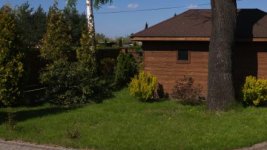
FS7: nasty artefact on clear blue sky with FS7 kit lens

Sony is always a double edged sword.. sometimes too clever for their own good.

Very efficient compression VS odd artifacts sometimes
Lens 5Xcheaper than proper eng lens (that has no AF or IS) VS pulsing iris and AF and IS

take your choice. but dont expect a free lunch


etc etc.

You IMO have to learn to take and leave from Sony - so you might use that lens for crashing about in an interview but not use it for fine landscapes etc etc.

I have the 18-250 lens (the worst one) .. I use it 1 in 100 shots, but for that one shot it is excellent.

Usually the stuff made from brass and gun metal that costs the same as a small car is what you need if you have top end standards.

S

Of course Sam - I do realize there is no free lunch. Will be investing in more lenses, but it'll have to wait a bit :) BTW, the 28-135 is a pleasure to handle - the 3 rings are better than what I've been used to, on my EX1's lens...

Piotr
 
just because you have the iris set to manual there is still a conversation going on between the lens and the camera and the command is coming from the camera often..

Frame 12345 iris? F16 (iris closses to 15.9)

Frame 12346 iris? f16 (iris closes to 16)

Frame 123457 iris? f16 (iris closes to 16.01)

Other settings the convo would be
iris? auto F11.
iris? auto F8

As to your above reasoning - it's possible to be happening this (or similar) way, but the fact is that when I turn the Iris ring away from it "parking at Auto" position at one of the two ends (marked in red E letter, if I'm not mistaken - all communication between camera and lens should cease (apart maybe from Push Auto Iris). Here is why I think so: Auto Iris mode can be activated on the camera provided the Iris ring on the lens is in the "E" position; it's enough to turn it slightly, and you're out of Auto mode...And of course while shooting the offending clip, it clearly was turned away from E as I used it for manual aperture control. Just thinking aloud, like you :)

Piotr
 
Well certainly I dont understand electronics, protocols, software and the like and Ive never had the lens in my hand.

I think you should bring this up on the sony forum (community.sony) and your only hope is a firmware fix (or using a proper lens!)

S
 
Good idea - will wait until Ben says what his opinion is; perhaps its normal for this lens (in which case harassing Sony for a fw upgrade would make sense), or it's faulty - in which case my 2-year Sony Prime Support should replace it for me...

Piotr
 
Hmmm. If I go looking for it in Catalyst Browse, I'm seeing a bit of blocking in the sky - but not any kind of pulsing or oscillating.

I've tried it in Prem Pro with the LC709A LUT and a quick tweak - no pulsing at either 1080 or 3840. I wonder if you're experiencing some kind of "clamping" in your post setup - where levels are hitting a knee and being crudely clamped or limited. I've seen that create oscillations in mid/highlights before.

Sam - have a butchers in Resolve - here's the download link:

http://mbf.co/jozPO

Ben.
 
Hmm... due to my poor upload speed, I wanted to cut out a minimum length clip off the original still showing it; is it possible that Browse - while copying from between my in-out markers to a new file - changed anything?
 
Looking at the scopes, I'm seeing a bit of what looks like mid-range noise, particularly in the red channel. The blocking is slightly more obvious in Catalyst Browse - but that's realtime playback, but not when rendered in Prem Pro, using maximum render quality in ProRes 422HQ.
 
Hmm... due to my poor upload speed, I wanted to cut out a minimum length clip off the original still showing it; is it possible that Browse - while copying from between my in-out markers to a new file - changed anything?

I hadn't realised you'd cut it down. Yes, I'd suggest trying to upload the whole original clip, for us to be sure.
 
Interestingly, I can see it in the cut-out clip... Perhaps you're looking for too much of an "oscillating artefact", Ben? It was quite obviously oscillating in the EVF when I tilted up the lens from the dark-green bushes so the sky became part of the scene, and saw the ""Auto-Iris-type" of oscillation happening in the sky; it quickly settled down to form this thin almost white line, which can even be seen in my 4x blown pic (the sky with a red arrow) - just open it in another tab, and "Ctrl+" enough times - you will see it...Almost like a faint jet condensation trace...

Piotr
 
Last edited:
I hadn't realised you'd cut it down. Yes, I'd suggest trying to upload the whole original clip, for us to be sure.

I actually didn't cut the clip in an NLE - just copied a portion with Browse, Ben. Do you think it may change anything? If so - and you still do not find what I'm talking about - please give me some time (I do another job, and am away from my camera and editing tools); I'll try to catch it again with the same codec settings but perhaps in HD, so that uploaded clip will be smaller. Is that OK? Thanks,

Piotr
 
I actually didn't cut the clip in an NLE - just copied a portion with Browse, Ben. Do you think it may change anything? If so - and you still do not find what I'm talking about - please give me some time (I do another job, and am away from my camera and editing tools); I'll try to catch it again with the same codec settings but perhaps in HD, so that uploaded clip will be smaller. Is that OK? Thanks,

Piotr

The problem is that every time you pass it through any kind of manipulation - Catalyst Browse, NLE etc - you're potentially decompressing to baseband and then recompressing again and introducing additional compression artefacts.

My feeling is that the artefacts you're experiencing are compression artefacts due to something in your post production/browse workflow. That would account for a "line" - where the bits have been chucked away and the gradation lost.

I would expect an iris issue to show on the scopes right across the entire waveform - but I'm only seeing a very slight shimmer of noise in the midrange.

Try uploading the full untouched MXF overnight otherwise.
 
I saw it more clearly in my EVF than in my post... Anyway - I'll send an entire, but shorter clip soon. Thanks, Ben :)

Piotr
 
Just checked the subclip I sent you, Ben, against the original in Resolve - and indeed, the "waving" artefact in the sky, although still visible, is much less pronounced. This is also a bad news for me, as I thought Catalyst Browse makes an excellent free tool for copying to my HDD just the good portions of the clips from my QXD cards. But you seem to be right that doing so, Browse is "decompressing to baseband and then recompressing again" - just beats me how it's able to do it so quickly? Oh, and what "decompressing to baseband" means, exactly?

Piotr
 
Just checked the subclip I sent you, Ben, against the original in Resolve - and indeed, the "waving" artefact in the sky, although still visible, is much less pronounced. This is also a bad news for me, as I thought Catalyst Browse makes an excellent free tool for copying to my HDD just the good portions of the clips from my QXD cards. But you seem to be right that doing so, Browse is "decompressing to baseband and then recompressing again" - just beats me how it's able to do it so quickly? Oh, and what "decompressing to baseband" means, exactly?

Piotr

It decompresses it to uncompressed video and then recompresses it. CODEC = COmpressor / DECompressor. I don't know as fact how CB divides files - I was just speculating, based on previous knowledge. Let's have a look at that full untouched file.
 
Dear Ben,

Could you please try again watching the clip I sent you closely? I did in Davinci Resolve, and - after some tweak to contrast and WB (white birch trunk being excellent reference), the sky is deep blue and I can see those very faint, thin white-ish, semi-horizontal lines sort of rolling down below the dark cable in the distance... It continues till the end of the clip - believe me. I see no reason for sending you entire, uncut clip = the only way Browse can split a clip is Smart Render, so nothing is changed.

Please help me find a clue to what this phenomenon could be, as - if my kit lens is faulty - I could send it for replacement. Thanks,

Piotr

PS. And I'm now almost sure the lens is defective, because the line is stationary relative to it - so it's movement down (and sometimes slightly up) against the sky is synchronized with the camera tilt! In other words, it's as if the line was on the glass itself - it cannot be dirty, as the line is white, but it definitely follows lens movement...
 
Last edited:
I'm posting a full-frame screen grab with the line; it's somewhat below the black cable, running semi-horizontally across the sky. The line definitely moves up and down as my camera tils, so it's fixed to the lens. Also, I hope Ben has nothing against posting the link to a short clip the screen has been taken from; please analyze it and you will sure find the line.

https://www.dropbox.com/sh/tqdms049wg37qyq/AAAoZaizyABRdaTDFUQtXPOca?dl=0

What can it be - a scratch on the glass? I'll repeat: there is no line like that in footage taken with my other lenses, so it's not the sensor!

Thank all for their patience,

Piotr
 

Attachments

  • white_line.jpg
    white_line.jpg
    20 KB · Views: 0
Last edited:
I see it on the jpeg. Looks very neat - if I was asked to guess what might cause it, I'd think codec/encoding blip - as it runs between the house tiles and the birch tree. There are similar coloured artefacts around the tree and cable too.

I'm still not seeing it in the video clip though - which makes me wonder if there's something going on in your post flow to cause it.

Keep testing - I'd try some new clips and see if you're getting repeat issues.

Ben.
 
Just an update: I watched all my footage taken before I first noticed the faint, white horizontal line (looking like "attached" to the 28-135 kit lens, as it moves up and down with camera tilts, and is not present with any other lens), but haven't found any other occurrence. I'm waiting for clear blue sky type of weather to repeat the test, as it might just appear against light, clear blue - but it's been overcast here for a couple of days. So no, it wasn't a false alarm; I can see it clearly as does Ben. I have practically excluded interference from iris circuitry, so my last suspect is OIS which was on during that shot. As soon as I have the same scenery conditions, I'll repeat my test and update this thread.

However, as nobody else from the many FS7 owners confirmed this artefact as also happening on their camera when shooting with the kit lens, I'm afraid the answer to my question in the first post of this thread - "whether it's a malfunction, or a feature" - is definitely going to not be the latter:(

Piotr
 
I'd like to return to my "white line compression artefact" problem and sincerely ask you guys for some more help (and patience). For those who never participated in the baked-up thread of mine, or even read it: the header I gave it turned out to be misleading; it's not my kit (28-135mm) lens that is the source of the problem. Ever since I first noticed it, it keeps coming back with all lenses I have (and I'm using 4 of them); it doesn't depend on the recording format (although most noticeable in 4K and QFHD) - but it's present regardless of bitrate and codec flavor (XAVC-I as well as L-GoP) or fps (50 as well as 25). I can notice it in both HG and Slog material..

It's still present in the same part of the frame (upper half), and has a form of what looks like a very thin white line crossing the blue sky perfectly horizontally. To be honest, I'm not 100% positive it's never present elsewhere - but whenever I have blue sky in my scene will it appear. Upon closer inspection, what looks like ever so thin "line" on a PC screen turns out to be compression errors in the form of macroblocking along the said "line"; it's almost like the blue color is not present inside (a white "hole" surrounded by macroblocking)...

I can see my original short clip (straight from camera) is still hosted by Ben here:

http://mbf.co/jozPO

- and some full size screen grabs - under the links in my post above (thanks Ben)!

So I'm very kindly asking you guys for some more suggestions on what my options are. Of course, my camera is still under warranty - but how do I convince Sony service anything is wrong with the camera, if I didn't convince you? Please help!

Piotr

PS. My biggest concern is the suspicion there is a flaw in my FS7's sensor - otherwise, why should macroblocking (or any other compression artefact) be created along a precisely horizontal line, and seemingly only on the blue background color?

PPS. I forgot to mention that when such a "line" of macroblocking appears, it's not fixed to a given scene location - as when I pan camera (e.g. down or sideways), it follows the camera movement so it stays in the very same position in relation to the frame. This is why originally I suspected my lens - but since it happens with any of my 4 lenses, it's even more probable it has something to do with the sensor...

http://moldcad.idsl.pl/artefact.PNG
 
Last edited:
I downloaded the MXF file with the sky in question, imported it to Resolve, applied an LC709c LUT on it and then exported as a TIFF frame - I can see the line but barely, I also played with gamma and saturation in Resolve and exported again, even when sky is darker and more saturated I can barely see the problem. It is even less visible when simply zooming in on that area in Resolve (but this may have something to do with how Resolve displays zoomed in image in real time, I don't know). Were you able to spot the problem when looking at the footage as video?

Według ministra Jana Szyszki są to chemtrails...
 
Back
Top