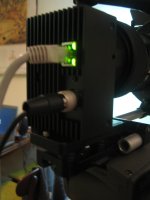
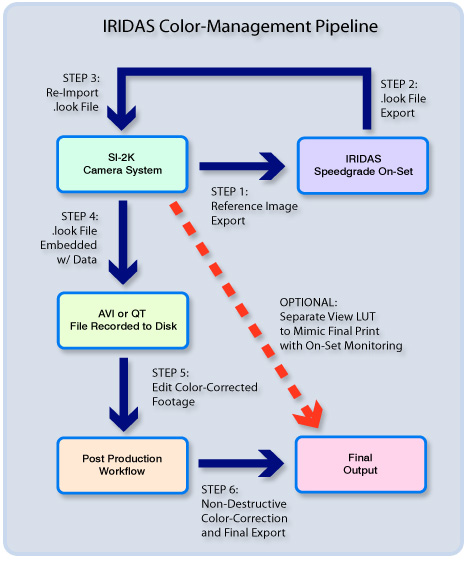
My Mini 2K is here!

BTW, Chris, please re-download the .zip file, I forgot two LUT curves that need to go into it for it to work correctly in Speedgrade. Place the two LUT curves in the LUT directory in the Speedgrade OnSet folder. Place the .look file in that zip in the /Data directory of your SiliconDVR folder.

To use Speegrade, first, do a Save Image with SiliconDVR to export the DPX file you will use as the reference file.

Next, open Speedgrade, *not* the .look file (double-clicking .look files don't open Speedgrade, they register them with CineForm on a machine that doesn't have the .look installed/registered-this is so CineForm knows how to find the .look file)

Next, go into the file browser in Speedgrade and open your DPX image.

Once in the main interface of Speedgrade, go into your .look browswer at the bottom of the screen and surf to your /Data folder for SiliconDVR. You should see the .look files appear.

Before modifying one of the existing .look files, duplicate it . . .. Speedgrade modifies the file on the disk as you adjust (so there's no need to save a file after it's creation), so if you start tweaking, you'll end up modifying the .look file and having no way of going back.

Also hit the "s" key to bring up the settings. Under the .look settings make sure you are set to 64x64x64 instead of 8x8x8.

Once you have make your new .look file and it's setup the way you like, quit Speedgrade (or click off the .look file in the look browser), and re-open Gig-e app. In the SET LOOK directory, import the .look file.

For more information you should probably read the Speedgrade documentation.

Thanks,

Jason
 
Also Chris, the .look file is an ASCII file, not an image file . . . you import an image file (in our case a 10-bit DPX file) into Speedgrade, and the .look file contains the description of the modifiers to the image file to make it "look" like something else. The .look file is the 3D LUT, not an image.

BTW, you have to make sure that your 3D LUT is a 64x64x64 sized LUT, we don't support 8x8x8 LUT's since those are not high-enough precision for high-quality results.
 
OK, I'm off today to try to find a tripod/fluid head. If I'm successful I'll post some pics of the set up.

THANKS Jason for all the help and info. I'll try downloading that when I get back. I appreciate it. Cheers!
 
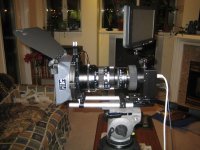
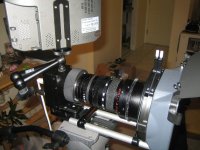
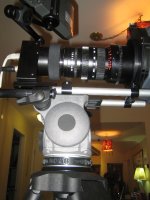
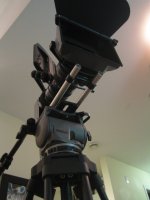
Went shopping today. Got a Cartoni Focus fluid head and Chrosziel matte box and Cartoni 2 stage tripod. The follow focus was $1700 so I politely declined.

I should have some footage uploaded tomorrow night, but here are some still of the Mini with some new clothes.
 

Attachments

  • IMG_2934.jpg
    IMG_2934.jpg
    155 KB · Views: 0
  • IMG_2935.jpg
    IMG_2935.jpg
    160.2 KB · Views: 0
  • IMG_2936.jpg
    IMG_2936.jpg
    149.6 KB · Views: 0
  • IMG_2944.jpg
    IMG_2944.jpg
    103 KB · Views: 0
  • IMG_2947.jpg
    IMG_2947.jpg
    100.2 KB · Views: 0
I'm pretty pleased. :) I'm even more pleased that the lens is now stabalized enough to shoot with! The matte box doesn't quite fit my lens, so I have to track down an odd sized adapter, or rig something myself to keep the light from bouncing from behind, off a filter, and back into the lens.

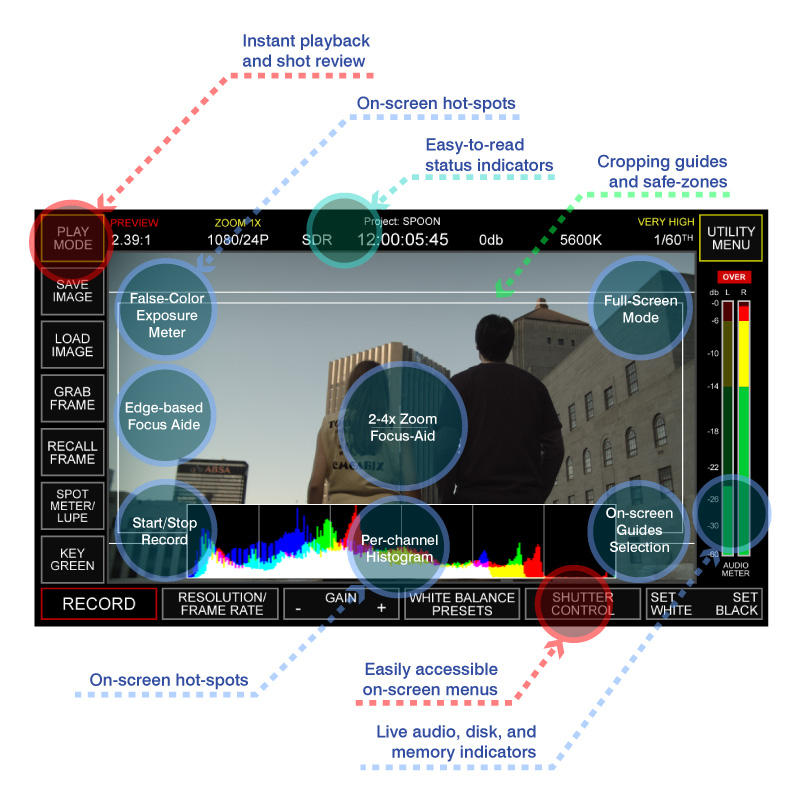
I'm also not so sure that I like that the LCD is mounted directly onto the camera block. That will change when I get the rest of the rig shipped from Silicon Imaging.

Cheers!
 
The Full Monty

The Full Monty

Mars United said:
I'm pretty pleased. :) I'm even more pleased that the lens is now stabalized enough to shoot with! The matte box doesn't quite fit my lens, so I have to track down an odd sized adapter, or rig something myself to keep the light from bouncing from behind, off a filter, and back into the lens.

I'm also not so sure that I like that the LCD is mounted directly onto the camera block. That will change when I get the rest of the rig shipped from Silicon Imaging.

Cheers!

Thanks Mars United. Looks great. Looking forward to the footage.

So how much have you invested thus far?
Mini $13,000, Dell Laptop $3,000, Matbox $300, Tripod $700, Lenses ?
Total Cost $17,000+?

What else am I missing or mispriced? Thanks
 
BTW, you might want to use a piece of gaffe tape or something to constrain that gig-e cable to the tripod . . . you don't want direct strain on that connector . . . the connector itself is actually quite robust, but if somebody yanks on it really hard it could damage the RJ-45. The board that the RJ-45 is on is not the sensor board, so you won't be screwing that part up, but the gigabit board is still not "free" if you did damage it.

Even the 12-bit hirose, while considered a strong "locking" connector, can, with enough force, be pulled from the board. Again, you won't ruin your sensor, but you can damage the gigabit board.
 
Ari,

That's what I'm talking about. I'm sure that Chris is pleased with how incredibly compact the system is.

The Iridas touchscreen control monitor is simply brilliant - I cannot wait to see more stills of this thing in action! We've gotten to a point of maximum density of buttons versus space within the shrinking professional video form-factor, so I'm glad to see that one mfg. has finally given us the next generation of cameras with functions consolidated into one intuitive central interface.

Jason or Ari, can you talk a little more about the speedgrading functions. How will I use those in a fast-paced environment like a music video or commercial shoot? What does this speedgrade function give me that I would otherwise do in post?

e
 
Lduke32 said:
Thanks Mars United. Looks great. Looking forward to the footage.

So how much have you invested thus far?
Mini $13,000, Dell Laptop $3,000, Matbox $300, Tripod $700, Lenses ?
Total Cost $17,000+?

What else am I missing or mispriced? Thanks
You can buy a matte box for $300, and tripod for $700, those are choices you have to make according to your budget and needs, however:

SI-2K Mini - $13,500 USD (with PL mount)
Dell M90 Laptop - $4700 CAD
Cartoni Focus Fluid Head and Tripod Combo- $2100 CAD
Chrosziel Matte Box - $750 CAD (not bad for a Chrosziel!)
Rods Adapter - $160 CAD (for supporting MB)
Zeiss 12-120mm Zoom lens - $8,000 CAD
Xenarc (modded) LCD Touch Screen Monitor - $800 USD
Chrosziel Base Plate and Rods - $590 USD
Software Prospect 2K, Speedgrade, Premiere Pro - $2400 USD

I won't do the addition or convert CAD to USD, but you get the idea. Most of that stuff isn't the camera, though. You need software, a computer, rods and plates, tripod, etc etc to run any cam. But, you asked.

I've also decided to buy a lot of what could easily be rented. In fact, for a while I will rent a follow focus when I need it rather than pay $1700 right now. But, I do want my own small arsenal of lights, however, I'll rent an HMI should I need one (plus someone who knows how to use it).

You could get MUCH cheaper lenses and cut costs in other areas as well.

I still have $2600 worth of batteries and charger on the way, battery holder and plate, and a handle and such for the camera. So, I'm not out of the woods yet.

I'm doing things the wrong way. I think most pros would RENT.

:happy:
 
Jason Rodriguez said:
BTW, you might want to use a piece of gaffe tape or something to constrain that gig-e cable to the tripod . . . you don't want direct strain on that connector . . . the connector itself is actually quite robust, but if somebody yanks on it really hard it could damage the RJ-45. The board that the RJ-45 is on is not the sensor board, so you won't be screwing that part up, but the gigabit board is still not "free" if you did damage it.

Even the 12-bit hirose, while considered a strong "locking" connector, can, with enough force, be pulled from the board. Again, you won't ruin your sensor, but you can damage the gigabit board.
Thanks, Jason! I'll definitely do that. I still have to download that .look blank stuff and figure that out. Cheers! :beer:
 
overlandfilms said:
Ari,

That's what I'm talking about. I'm sure that Chris is pleased with how incredibly compact the system is.

The Iridas touchscreen control monitor is simply brilliant - I cannot wait to see more stills of this thing in action! We've gotten to a point of maximum density of buttons versus space within the shrinking professional video form-factor, so I'm glad to see that one mfg. has finally given us the next generation of cameras with functions consolidated into one intuitive central interface.

Jason or Ari, can you talk a little more about the speedgrading functions. How will I use those in a fast-paced environment like a music video or commercial shoot? What does this speedgrade function give me that I would otherwise do in post?

e
I know you're addressing this to Ari and Jason, but I'll chime in on the interface. It is so simple and straight forward it isn't funny. All functions are accessible via three main screens: "preview/record", "play", and "utility". The buttons are large and clear and after playing for a little bit, you zip around the interface really fast. NICE! And wait until you see the features!
 
BTW, "Speedgrade OnSet" is a program from IRIDAS for on-set color-correction and "look" creation. You can see more at www.speedgrade.com.

The point of the IRIDAS workflow is that you can make the camera a "blank slate" to create the color-correction effect you want in-camera . . . or create the shooting "stock" you want. For instance, you can create your own low-contrast look if you want to shoot that way, or you can create a "wamer" look, or something "cooler", etc. Whatever you would have done in color-correction, or what you would have done tweaking a camera menu to get the look from the camera you want, you just save our a still frame from the camera, color-correct it to look exactly like what you want, and then load the resulting 3D LUT from Speedgrade back into the camera . . . the camera is now shooting WYSIWYG with the color-corrected image in Speedgrade.

So for instance, with a music video, if you want a radical look, rather than being surprised in post, make the look on set, shoot with it, light it so that it "looks" good, and you don't have to be surprised in post . . . you know what you're shooting before you get there. You producer can see dailies immediately straight from the set with the appropriate color-correction already applied (or at least something close so they're not wondering what your artistic intent is going to be and second-guess you). Your DP and director can effectively communicate using visual tools, not verbal explanations, the artistic intent for a shot, and in the end nobody is surprised by what they're getting when it comes to exposure and color.

IRIDAS Speedgrade Onset opens up the doors for a number of possibilities . . . but the most important is that no matter what you do, every "look", and WB setting, etc. in the camera using CineForm raw is all metadata . . . no information from the RAW file is ever clipped, and as a result, you never loose information, and you always are in contact with the RAW "latent" digital negative straight from the camera's sensor, just like you would have on a high-end DSLR in a program like Aperature or Lightroom. Since we're doing all the work at the codec level though, we're not locked into one program as is the case with Aperture or Lightroom. And gone are the days of fighting the baked-in default "look" of a camera . . . you have total and complete access to everything that the sensor head delivered at the point of capture, and you can manipulate it accordingly.

So like I said, if you want a radical look, you can do that with Speegrade, or you can create a low-contrast, wide-dynamic range look to suite whatever shooting/post-color correction style you want. It's all about enabling maximum flexibility and creativity for the end-user.
 
Last edited:
.Look Selection in SI-2K

.Look Selection in SI-2K

Here is the user interface for .look selection from SET LOOK button.

You can quickly switch between the 4 active looks. You can change the active look(s) at anytime by clicking on the one you want to change and browsing to another look file on a local drive or anywhere on the network (remember...we are IT-centric). Any look used during a project is automatically duplicated and stored in the project folder which contain your film clips and then will always travel with your removable media.

For those who may have seen previous UI photos will notice we have now combined the meters on the main screen with Audio Level, HDD Available and RAM buffer usage.
Look%20scr.jpg


Previously you would click on the meters to cycle between them
SiliconDVR_Interface_Main.jpg
 
****in wow.... too bad im poor i cant just pay up like that. I could do a monthly thing but man....
 
The "Overland Films Look" being poorly-lit reality?

:cheesy:

I can light... really I can! I swear, my electrician is starting to feel like a sound guy. Uh, oh... lights? Yeah, I guess we should have some - how long is it going to take?

Ari, that is amazing. So, like the MXFs we're accustomed to using the HVX, the SI RAW data resides on the drives, unaltered, while you manipulate the AVIs with SpeedGrade on-set? Did you say that there is no rendering required to make this happen in real-time?! I can't fathom not having to render everything out to see the grading?

What happens when you get into the editing of a project with the full-resolution (1/4 size proxies)? Is all the Speedgrade (metadata?) carried right into the timeline? Is the AVI effectively a negative or would you call that the underlying RAW data, where effects are applied to the rendered master only (in whatever format that takes)?

I'm trying to bridge the concept with my background in film workflow. I guess the short question is, do we ever conform the negative (original RAW files)?

e
 
For the IRIDAS stuff, please reference our workflow chart here (this is on our website . . . there's a lot of information there):

IridasColorManagementPipeline.jpg


Basically what you looking at is you're shooting the scene with the SI-2K. You save out a DPX reference image (using the "Save Image" command on the front-page there which saves out a DNG, DPX, BMP, and JPG).

You then import this DPX file into Speedgrade OnSet. You color-correct the DPX (which is a RAW file in 10-bit log of the scene that the camera saw) file so that you get the color looking exactly the way you want it to for whatever effect you wanted.

You then take the .look file (which is a 3D LUT) from Speedgrade which describes all the color transformations you did, and import that back into SiliconDVR (the name of our software). That "look" now resides on the camera, and what you see in the camera screen is WYSIWYG with what you saw in Speedgrade OnSet.

When you save out an AVI or QT file, the metadata is also saved along-side the AVI/QT. When you edit with the AVI or QT, you still see the exact same "look" that you saw on-set in Speedgrade. Since this is metadata, it can be changed at any point in time.

The final "conform" (like cutting your negative), is when you render out of the RAW file format into a delivery format, or some other format that doesn't support RAW data. So for instance, after you're all done editing, you will render out to another format for DVD or digital projection, etc. Those formats of course will not support the metadata that we have in CineForm RAW.

Also if you are exporting to another editing system that doesn't natively support Quicktimes or AVI's, i.e., the big Discreet stuff or Quantel, etc., then you're also going to have to conform you footage at that point too.
 
Back
Top