My GH3 rendered 1080p 59.940000 looks twitchy played back on media box asus oplay

meinyvr

Active member
I encoded the 1080p 60 fps footage on sony vegas pro using high quality settings. Looks fine on computer but on playing back on media box player there is a jerkiness choppiness to the viewing. Not nice. I have an Asus O'play hdrp1. The player is capable of playing 60p files.

Can some suggest the area I'm screwing up?
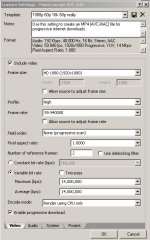
10_10_2013_2_03_53_PM.jpg

thanks
 
Last edited:
You could encode a section at a lower bitrate to see if the Asus will have smoother playback at lower bitrates.
 
You could encode a section at a lower bitrate to see if the Asus will have smoother playback at lower bitrates.


Thanks Jive; I tried that at 2000bps and still same problem. Choppy choppy. As a lark I tried encoding it in WMV 240000bps! and it played fine. So clearly the vegas pro mp4 codec is not playing nice with the asus oplay air media box. I'll try it with premiere encoding....

Alternatively...can you suggest (or anyone) what other media players actually work with raw GH3 mov files?
 
It also might be the "high" profile. There are 3 types of encoding profiles available there; high, main and baseline.
Main is the average one, baseline is for low powered CPUs (such as mobile devices and set top boxes) and high assumes a more powerful chip is going to be doing the decoding. Your PC has a powerful fan-cooled multi-core multi-threaded CPU, so it can handle the high profile. Dedicated media players might not have the horsepower required. Lowering the bitrate helps, but as you noticed, if it is still asking the CPU to more than it can handle, low bitrate can still choke.
 
You should try checking the "2-pass" option, which will better utilize the amount of bits the encoder has to work with. Using 2-pass, you may be able to cut the data-rate in half with little change in the finished video.

Also, it looks like you are encoding with Sony Vegas Pro, so you might want to try using the Sony AVC/MVC encoder, to see if it does a better encoding job. ( I normally use the Sony encoder over the MainConcept one )
 
You should try checking the "2-pass" option, which will better utilize the amount of bits the encoder has to work with. Using 2-pass, you may be able to cut the data-rate in half with little change in the finished video.

Also, it looks like you are encoding with Sony Vegas Pro, so you might want to try using the Sony AVC/MVC encoder, to see if it does a better encoding job. ( I normally use the Sony encoder over the MainConcept one )

Those are both good pieces of rendering advice, but he wasn't complaining about the quality of the render. Only that his set top box wouldn't play it properly, even when the bitrate was reduced.
 
Only that his set top box wouldn't play it properly, even when the bitrate was reduced.

All encoders are not the same, so he may have better luck using the 2-pass option or using the Sony encoder when it comes to generating finished files that play better on his playback unit. ( assuming his playback unit can handle some version of the format he's using )
 
All encoders are not the same, so he may have better luck using the 2-pass option or using the Sony encoder when it comes to generating finished files that play better on his playback unit. ( assuming his playback unit can handle some version of the format he's using )

Yes, we had this discussion in another thread. Encoders are not the same.
But the speed of a decoder is directly related to the bitrate and codec used. Having a multi-pass rendering can improve the quality of the image stored by the encoder, but it won't effect the speed or CPU time required for decoding. The decoder shouldn't notice a difference at all, except that it will probably output a better looking image.
Changing the encoder is the same sort of thing- As long as you are using the same H.264 profile and bitrate with both, the decoder should run just as smoothly. It is being asked to do the same amount of work by definition. They might not look the same- but again, that's not what the OP is talking about.
 
But the speed of a decoder is directly related to the bitrate and codec used.

CODECs have lots of features that some encoders use and other encoders don't, and even in the actual CODEC implementation things can be coded quite differently, so you can't assume that one encoder or one implementation of a CODEC will produce the same results, and this may include how efficient or how compatible the encoded video is with the decoder that is trying to assemble it back into it's original image stream.

CODECs and video standards are not absolutely standardized between different manufacturers, so don't expect to get the identical results when using another company's implementation of the same CODEC, and don't expect all features of a single company's CODEC to work equally efficiently when using different features of the CODEC. There are lots of variants in the exact implementation of the algorithm ( and the resulting machine-code ) that is being used to create the encoded data stream.

And all of this may effect playback compatibility with the decoder on the playback device, so what should be the "same" file, will playback quite differently by varying the settings of the encoder, or by switching to another company's implementation of what is supposed to be the "same" CODEC. ( i.e. they are not the same )
 
CODECs have lots of features that some encoders use and other encoders don't, and even in the actual CODEC implementation things can be coded quite differently, so you can't assume that one encoder or one implementation of a CODEC will produce the same results, and this may include how efficient or how compatible the encoded video is with the decoder that is trying to assemble it back into it's original image stream.

CODECs and video standards are not absolutely standardized between different manufacturers, so don't expect to get the identical results when using another company's implementation of the same CODEC, and don't expect all features of a single company's CODEC to work equally efficiently when using different features of the CODEC. There are lots of variants in the exact implementation of the algorithm ( and the resulting machine-code ) that is being used to create the encoded data stream.

And all of this may effect playback compatibility with the decoder on the playback device, so what should be the "same" file, will playback quite differently by varying the settings of the encoder, or by switching to another company's implementation of what is supposed to be the "same" CODEC. ( i.e. they are not the same )

::sigh::
I know you are just trying to help the OP with what you think is a set of useful tips, and I respect that so I really don't want to argue with you here.
But I believe there are quite a bit of misapplied concepts in your response above. I wouldn't even know where to begin. At some point, you are no longer helping the OP or even talking about the same thing anymore.
 
At some point, you are no longer helping the OP or even talking about the same thing anymore.

Lets just say that we disagree on a number of things, and I am basing my thoughts on 20 years of actual encoding and compatibility experience working with standard professional encoding software. ( all the way back to CDi MPEG-1 encoding in the early 90's )

My suggestions were also aimed at helping the the OP, and I stand by them: Try a different manufacturer's CODEC ( i.e. Sony over MainConcept ), and try different encoding settings ( i.e. 2-pass encoding vs single pass ), the resulting video files will be different and may prove to be more compatible with the playback device.
 
Back
Top