My first p2 error.

Joe Lawry

Well-known member
Righto,

So i have a 16gb card thats about half full. I went to offload it today onto my Macbook running 10.5.6 and FCP 6.0.5 and P2CMS via FW through my original HVX.

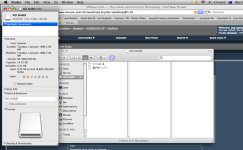
The Card loads up in finder, however sometimes it will show up with a normal file structure and others it will show up with some random shi*. - See attached pic.

Now i have a feeling i know what the problem was, i think i STUPIDLY turned the camera off before stopping recording, i have no idea what i was thinking, but it happened.

Now as you can also see from the screen grab you can definitely see there is media on the card as when i get the info it tells me how many gigs are free etc.

I can confirm this by putting the card into the camera, and playing back every clip, except the last one.

Luckily this was not a paid gig, it was a free skateboarding comp i was filming for fun.

Now the final clip is a 5 minute clip of the prize giving, if i cant get it back, shi* happens.

But i'd really like to be able to cut 720p instead of having to dub this down to DV - which im going to do asap just as a backup.

When i choose to repair the last clip in MCR mode it says there is nothing to repair.. weird, the final clip also doesnt have the red X on it.. which broken clips normally do.

I write protected the card as soon as i finished shooting.. and the tab has only been touched when i tried to repair the clip, cause obviously i cant alter a clip that cant be written too. Everytime i've attached it to the mac its been write protected.

So, any other suggestions? this is the first time in a long time i've tried to offload a card with my camera.. i usually use a PBG4.

Why on why did i turn the camera off - Joes an idiot.
 

Attachments
  • p2weird.jpg
    p2weird.jpg
    234 KB · Views: 0
Last edited:
Unfortunately I've had broken battery tabs on my camera for a year now..
and occasionally the gaffa that's holding the battery slips and I get a power off while shooting...

As I recall I had to use P2 Log Pro to salvage my clips...

Cheers
 
p2 files close themselves every 2 seconds. they do this so if you do have a power failure or whatever kind of error, only the last 2 seconds of your shot are at risk. i've accidentally powered down while shooting with no issues. sounds like something else. sorry i can't help. just some insight...
 
They say that but I lost a whole card once because I turned off the camera while it was recording.

I've had batteries go dead before and have never had an issue. But that one time something happened and I lost everything on the card. tried to repair it and no dice.

Sometimes weird things happen.

I was filming a Vienna Teng concert Saturday and I have the same song on two different clips on the same card. One clip has the entire song from start to finish. The other clip cuts off the beginning but goes all the way to the end.

So how do I get two clips with the same song on it? I'm not talking spanned clips between cards, I'm talking two clips with the same song on it like it double wrote the file but only got about 3/4 of the song on the 2nd clip.

So, they say it can't happen if you turn off the camera but it does every once in a while.
 
if you view under CMS or the thumbnails menu in the camera, does it have an X over the clip, like is the clip a thumnail at all cause you can always try repair, I ejected the wrong P2 card during recording, but repair clip fixed it perfect.
 
Repair clip works great for me when this happens. It has happened to me many times, accidentally shut off camera while rolling, AC power went out while powering the camera, etc.

I haven't lost a clip yet. Can't recall if the original HVX has a repair clip function? The 170 definitely does and I think that function might have been in one of the firmware updates?

If not, P2 Log Pro has a repair clip function as well.

You are not hosed.

Dan
 
Maybe try just going into FCP and Log and Transfer everything straight from your p2 card? That seems like it might work.
 
If you read my post fully you'll see i said there was no red x.

Yes the original HVX has clip repair, but it doesnt do anything.

The one time i managed to get the card to show up in P2CMS all thumbnails showed up except the last clip.

The card will not show up in FCP log and transfer at all.

Dubbed the whole card to DV last night. The last clip wouldnt play of course - the camera came up with playback error.

Currently in an Adrenaline suite for the next 5 hours grading, but will give everything another go this afternoon.

Will be trying everything via my PBG4 from now on.

Will DL the trail version of P2 Log Pro as well and give that a shot.

Cheers for the replies will keep you updated.


Edit: apologies for the short answers.. been onlining since 6am. Need more coffee.
 
Right so i just threw the card into my pcmcia slot on my g4. Showed up fine with none of the issues from my first post.

Loaded it up in P2CMS.. the last clip was there.. however when you open it it just comes up with the usual p2 pixilation you get when you screw something up big time.

I exported out all the clips off the card apart from the last one which worked fine. Opened that folder on my MacPro and logged and tranfered everything in fine.

So footage wise apart from the last clip - i have everything at 72025p, which is gooood.

Next i tried to open the card in p2 log pro, however the trail version will only allow you to import the first clip.. rats.

Then i thought of the smart idea that seeing as i had gotten all the clips off it.. i would just delete all clips except the last one.

Well the HVX didnt like this idea and proceeded to yell at me saying - System Error - P2 Micon Error.


Nice.

I also tried to copy the card at finder level to a folder.... however the mac didnt like that.. and just for some reason would stop half way through - corrupt clip maybe? haha.

Then i got bored and formatted the card. Tested it, recorded 10-15 minutes with no issues. So the card is fine, and the camera is sweet, the clip is just gone.

Oh well, a great lesson, im just so lucky it wasnt a real job.

Moral of the story.. stop recording before you turn your camera off!

(Sounds rather camera 101/Its my first day on set) :D
 
glad to see you got all but 1 clip. I bought P2LogPro and repaired such a broken clip with it.
I also had an issue like this with a clip on the FS-100 once and managed to repair that as well. I wish there was an utility that would allow us to fix those files easier instead of having to run the utility. To me its just a matter of inserting the "end of file" tag.
 
So let me get this right... you've reformatted the card... did you copy to a hard drive the complete contents of the P2 card prior to doing so...

And when you tried to import first.. did you try it off the card or from a folder???

I always copy my cards first.. test to see if I can import.. or at least see all the clips in P2 Log.. before reformatting anything.. Card is left locked until I'm happy everything is safe...

I would not have mucked around to much trying to repair clips until I had a safety backup of the card...

Just my 2c..

PS... basically what I'm saying is I rarely import from the card.. always from a back up on a hard drive...
 
Last edited:
So let me get this right... you've reformatted the card... did you copy to a hard drive the complete contents of the P2 card prior to doing so...

And when you tried to import first.. did you try it off the card or from a folder???

I always copy my cards first.. test to see if I can import.. or at least see all the clips in P2 Log.. before reformatting anything.. Card is left locked until I'm happy everything is safe...

I would not have mucked around to much trying to repair clips until I had a safety backup of the card...

Just my 2c..

PS... basically what I'm saying is I rarely import from the card.. always from a back up on a hard drive...

That's exactly what I do. Today I had a P2 Micon Error while trying to copy from the Card to my Macpro. This was using an HVX200 as a reader. Such problem never happened before. I normally use a G4 to dump my P2 cards. What I did was try to read the card in P2 CMS. It did, and I ingested trough the software. The card imported fine.
 
I normally always copy my cards via an Export with P2CMS with full data checking going on.

P2CMS would not copy the clip.

Finder would also not copy the card structure as i said in my previous post, it kept giving me an error.

I always back up the card structure and then import off a hard drive as well.
 
Back
Top