FS5: MXF wrap software for Windows

I shoot 4K on my FS5 Mk1 for a client of mine. His oldish Premiere on Windows does not like MXF files.. so he has them re-wrapped to MP4 by his editor on a high spec PC prior to ingestion, although this workflow does not work on his older system - either from not having access to Pro Codec plugins or because of his older, non-CC Premiere. I don't have details of his setup.

I can wrap on Edit Ready for Mac but I am not a Windows user and I am not at his location.

So I need a recommendation for a workflow for Windows that can wrap 140GB of 4K MXF.
Either Wrap Software or a Premiere workaround.

TIA
 
In view of the speed with which technologies change I'd refer to a pre-CC version of Premiere as 'ancient' rather than 'oldish' -- with the final release of sc6 coming in around 2012.
So it also brings up the question of what their hardware will actually handle...
However, they should take a look at Sony's Catalyst Browse software - which will allow both transcoding and color correction.
Or if they have a more capable computer (assuming that their issue is that they don't want to spend the money for an Adobe subscription) they might just look at the free version of DaVinci Resolve from BlackMagicDesign -- which should be at least as capable in the edit category as an ancient version of Premiere...
 
Hi OnSet - Thanks for quick response. yep, as a Mac user I have a hard time troubleshooting his "ancient" kit... so try not to! I think he has already tried Catalyst Browser - but does that wrap?

We are now trialing converter/encoders rather than re-Wrappers which is a compromise I wanted to avoid.... I just need a recommendation of a Win rewrapper.. as the MP4's previously rewrapped on a different PC play fine on the ancient timeline. PS My Edit Ready for mac MP4s crash his Premiere.
 
As far as I know, Catalyst transcodes.
I haven't used re-wrappers since my early EX1 days, so I'm probably the wrong person to ask. My impression is that if Premiere has problems with the mxf version of something, anything that is merely re-wrapped will experience similar problems, and that it may need a transcode. Obviously if you get a re-wrapping program you should test the output on his machine while still in the free trial period...
My most ancient current desktop PC (10 years old this month and still running, though the graphics card was upgraded a few years ago) runs Catalyst Browse just fine.
 
I shoot 4K on my FS5 Mk1 for a client of mine. His oldish Premiere on Windows does not like MXF files.. so he has them re-wrapped to MP4 by his editor on a high spec PC prior to ingestion...

Paul I don't know how your client is "re-wrapping" Sony H.264 XAVC files to MP4? Re-encoding yes but not re-wrapping which is the question you are asking. XAVC PCM audio files are not a supported audio codec in MP4 containers. Some vendors violate this; for example Sony puts PCM in the MP4's generated by their A7 cameras. If your client is on Windoz with an earlier Premiere NLE the best way he can handle these is to put them into an AVI or MOV container/wrapper which can handle the PCM audio tracks. Again on Windoz I would suggest not using .MOV as that requires QuickTime which is no longer supported on Windows and at it's best was only ever working in a 32-bit environment in Windoz. Re-wrapping to AVI will create files that will work fine in earlier Premiere on Windoz and have no quality loss whatsoever as both the video and audio streams are just copied and re-wrapped as AVI. One of the fastest demux and re-wrap apps I know to do this is "Axiom-FFMpeg

https://axiomui.github.io/

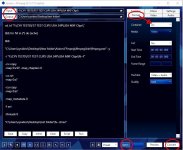
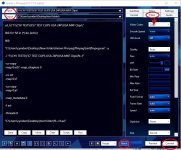
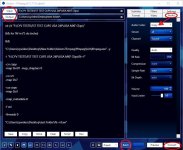
This app can batch encode by just selecting "BATCH" at the bottom of the GUI then choosing a source folder under the "INPUT" tab. In the GUI you then set up both the video and audio under their respective tabs to "COPY." Under "Format" you select "AVI." Then it's just a matter of selecting an output folder under the "OUTPUT" tab. Once those steps have been taken it's then just a matter of hitting "CONVERT" on the convert tab. On a reasonable CPU based PC this app will then blister through your files in very short order. The video and audio essence of these new AVI files is 100% the extracted video and audio files from your original XAVC MXF files be they 422 10-bit or 420 8-bit but now playable in a wide range of NLEs and players.

Chris Young

Axiom Format.jpgAxiom video COPY.jpgAxiom audio COPY.jpg
 
Thanks Chris - I will relay this to my client.

My EditReady (Mac) rewrapped clip crashed Premiere (but not my players on Mac) - so maybe the reason is as you suggest - the audio.

Client is editing now with transcoded clips and they seem stable. Not a great workflow but it works.
 
Back
Top