ALL: More consistent skin tones?

Firefox39

Active member
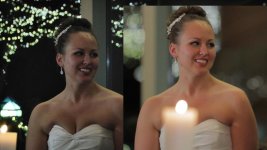
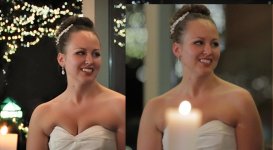
Is there a setting I can use to get more consistent skin tones? Moving over to Panasonic from Canon (60D and XH-A1) I notice the skin tones are not as consistent, and to me, does not look as appealing, looks more "video-ish". I am hoping there is a way to get my 130 to look more like my Canon. I tried to make the picture profile warmer, it helps but the skin tones still look less consistant to me.

What are your thoughts? I have played around with the settings, but still not there.

Left 60D, Right 130

M_24P_POST_1.jpg

Left 130, Right 60D
M_24P_POST_2.jpg

Left 60D, Right 130
M_24P_POST.jpg
 
Your exposure looks a bit low compared to the 60D. Perhaps a bit more gain would help?
 
Your exposure looks a bit low compared to the 60D. Perhaps a bit more gain would help?

Good observation. I did have the "Auto IRIS LEVEL" to -1. I did this so the skin was not over-exposed, which I did to try to get more consistent skin tones. The 130 has a bigger range of the exposure on the skin it seems, so it is less consistent?
 
Is color correction in post not an option? Or you would rather just get it right in camera so you don't have to worry about it later?

It's not perfect, but this is about 10 minutes of work (vegas 9) on one of those grabs

M_24P_POST_2cc.jpg
 
The controls on the Panasonic camcorders are rather deep. Barry Green's books give a lot of helpful information about setting the scene files.

In general, Canon has always tended toward the warmer side as default, and Panasonic has been a bit more neutral, so if you pulled a Canon and Panasonic camcorder out of their respective boxes and started shooting, you could expect the Canon to always be a bit warmer.

Exposure plays a role, but the exposure between your two cameras wasn't drastically different from what I can see in your sample images. It does make a difference, but if it were me, I'd first play with the scene file settings or use the sample scene files in Barry's book (assuming you have it) as a jumping off point to find something that you like, or to match it to the Canon look you are used to getting.
 
Is color correction in post not an option? Or you would rather just get it right in camera so you don't have to worry about it later?

It's not perfect, but this is about 10 minutes of work (vegas 9) on one of those grabs

View attachment 47662

Nice job on the color correction. I can get pretty close also but to me the Canon still looks more real. I am hoping to dial my 130 to give me a closer look to the Canon look that I am use to.
 
The blacks look blacker on the 130 - the canon seems to grey blacks out a bit. Either black up those greys or grey up those blacks..I don't know.. The mid-tones seem to be handled differently even. The mids seem more towards the highs end of the scale on the canon showing a sort of 'flatter' image, whereas the 130 seems to push the mids down a bit deeper..

The gamma looks different?
 
Good observation. I did have the "Auto IRIS LEVEL" to -1. I did this so the skin was not over-exposed, which I did to try to get more consistent skin tones. The 130 has a bigger range of the exposure on the skin it seems, so it is less consistent?

I would advise that you take control of the iris and use manual instead.
 
Using a monitor with waveform and vectorscope will enable you to 'tee up' both cameras to match as close as possible than you can save as your custom presets. They're so different you'll never get a perfect match during production but you should be able to make it look decent in post.

-Noah
 
Back
Top