Hi All,
Technical question. My understanding of digital acquisition is that one wants to "shoot to the right" (in still camera parlance). That is, shoot the highest exposure you can without clipping. Shooting in RAW for stills makes this easy- just check the histograms and make sure nothing is bunched up at the top end. One should do this for the red, green and blue channels separately, and also double check the combined histogram just in case. One can often end up under- or (more usually) over-exposing compared with where one might want the zones to end up in the final image, in order to capture a clean "digital negative". It is always better to get the maximum number of signal electrons on the sensor without filling any sensor wells (=clipping) and down-scale later according to the desired gamma- this always give one optimal signal-to-noise.
When shooting in JPEG mode, my experience is that one wants to get closer to the "intended" exposure, because you are applying a strong perceptual lossy compression scheme (and losing bits of resolution, too). So it is not wise to over expose by a couple of stops and turn it down in post because you might end up devoting some of your precious 8 bits and data to detail you really won't care about in the final image. There's no sense capturing lots of (noise ridden) detail in deep blacks if you know they are going to be crushed in the final output.
But it is still very important to make sure none of the individual RGB channels clip, because if they do, you've lost colour information. So while you light and expose for the final image, you still may want to turn the wick down on the saturation just enough to make sure that a bright red dress isn't clipping badly in the red channel. You want to get a nice full range of tones, so you don't want to turn the saturation down too much either, but you must avoid clipping.
Presumably, one wants to work on largely the same principle for digital video. The problem is that the readout of RGB is done way higher up the acquisition and processing chain in a video camera than it is in a stills camera, even in a stills camera shooting JPEG, because the RGB signals from the individual colour components of the Bayer pattern on the sensor are combined into Luma and Chrominance signals before you even get a chance to monitor them.
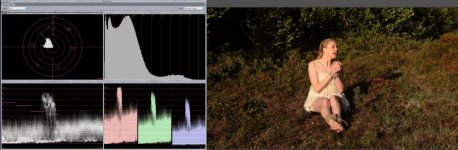
So... I know how to avoid luma clipping- watch for signals above 100% IRE. And the AF101 has several tools provided to do just that, with multiple Zebra settings and a waveform monitor.
What I don't know how to avoid is chroma clipping. Suppose I'm shooting a girl who is wearing a bright red satin dress. The luma component of the signal from the dress might be sensible, but the individual red channel pixels might be clipped to hell. How do I spot that on set? I'm not familiar enough with the vectorscope to know if that will show this up, and if it does, how to spot it.
Do I just look for chroma values outside the ring of target boxes?
Can I use colour bars to get "pure" colours and calibrate for that in some way?
Is there a way of seeing what's going on further up the acquisition chain and checking that the individual RGB channels aren't clipping straight off the chip?
Cheers, Hywel.
Technical question. My understanding of digital acquisition is that one wants to "shoot to the right" (in still camera parlance). That is, shoot the highest exposure you can without clipping. Shooting in RAW for stills makes this easy- just check the histograms and make sure nothing is bunched up at the top end. One should do this for the red, green and blue channels separately, and also double check the combined histogram just in case. One can often end up under- or (more usually) over-exposing compared with where one might want the zones to end up in the final image, in order to capture a clean "digital negative". It is always better to get the maximum number of signal electrons on the sensor without filling any sensor wells (=clipping) and down-scale later according to the desired gamma- this always give one optimal signal-to-noise.
When shooting in JPEG mode, my experience is that one wants to get closer to the "intended" exposure, because you are applying a strong perceptual lossy compression scheme (and losing bits of resolution, too). So it is not wise to over expose by a couple of stops and turn it down in post because you might end up devoting some of your precious 8 bits and data to detail you really won't care about in the final image. There's no sense capturing lots of (noise ridden) detail in deep blacks if you know they are going to be crushed in the final output.
But it is still very important to make sure none of the individual RGB channels clip, because if they do, you've lost colour information. So while you light and expose for the final image, you still may want to turn the wick down on the saturation just enough to make sure that a bright red dress isn't clipping badly in the red channel. You want to get a nice full range of tones, so you don't want to turn the saturation down too much either, but you must avoid clipping.
Presumably, one wants to work on largely the same principle for digital video. The problem is that the readout of RGB is done way higher up the acquisition and processing chain in a video camera than it is in a stills camera, even in a stills camera shooting JPEG, because the RGB signals from the individual colour components of the Bayer pattern on the sensor are combined into Luma and Chrominance signals before you even get a chance to monitor them.
So... I know how to avoid luma clipping- watch for signals above 100% IRE. And the AF101 has several tools provided to do just that, with multiple Zebra settings and a waveform monitor.
What I don't know how to avoid is chroma clipping. Suppose I'm shooting a girl who is wearing a bright red satin dress. The luma component of the signal from the dress might be sensible, but the individual red channel pixels might be clipped to hell. How do I spot that on set? I'm not familiar enough with the vectorscope to know if that will show this up, and if it does, how to spot it.
Do I just look for chroma values outside the ring of target boxes?
Can I use colour bars to get "pure" colours and calibrate for that in some way?
Is there a way of seeing what's going on further up the acquisition chain and checking that the individual RGB channels aren't clipping straight off the chip?
Cheers, Hywel.