C300: mkii color out of wack

bdemenil

Member
I used a c300 mkii for a shoot last week. The colors came out totally out of wack. I recorded internally to CFAST using clog2, and 10 bit canon xf-avc intra codec. 709 color space.

I've tried the stock luts from canon to get to a starting point. but the color is just plain horrible. so out of kilter that fixing is a major operation if possible at all. I tried using resolve temp and tint controls to help it along a little. but the color is a long way off that of the Red camera I shot with.

I've included below a link to some screen shots for comparison. The C300 ii was a rental camera, and it's possible something in the settings was off. I took a cursory look through the settings and didn't notice anything. I've heard such great things about this cam, I don't understand what might be wrong. It's like i'm in the wrong color space, but not sure why. Any help would be much appreciated.

https://www.flickr.com/photos/bdemenil/albums/72157664882994298
 
Since you used 709 color, don't use a LUT. Just do a simple curve to set gamma / contrast. Then tweak WB if necessary, then saturation etc.

For future rental, yeah, it's a good idea to to a Reset to Factory settings before getting started.

Quick test in Photoshop: mostly a curve to set gamma/contrast, then WB, and blue/magenta tweak to more closely match RED (what are actual colors- did you shoot a color chart or gray card?).

ColorC300II.jpg
 
The colors are way off even with no LUT. Canon's LUT for this setting seems to apply only to tone.

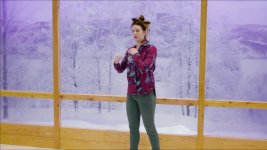
I've uploaded a new frame export of a rough grade with no LUTS employed. I did quite a bit of correction with color gamma curves. but it's still a long way from the RED footage. I've also noticed when zooming into the canon footage that it looks like quite a bit of noise reduction was applied. detail isn't great. I had the c300 ii set to iso 800.
 
Your grade looks better than mine. Still, I'm surprised by the c300 ii's color. before correction it was way way off.

No, unfortunately I didn't shoot a color chart. But the red footage looks fairly accurate. It also just seems to have a lot more nuance. Both were shot in 4K. The RED with DNxHR HQX. I think both were set to the same color temp.
 
On the C300 II you've got to set Noise Reduction (Other Settings) from Off to -1 to get the least NR (it's still pretty clean (pixel-peeped at ISO 400 (I typically shoot 400 vs. 800 in good light (don't need max DR); so far 400 seems to look better by eye). The C300 II won't ever be as noisy as RED).

I've shot almost exclusively on the C300 II with Cinema Gamut, Log 2, and Production matrix (ARRI settings with ARRI LUTs in post), and the Canon LUT enabled during shooting (haven't found any LUTs for use in post which exactly match Canon's in-camera LUT, which is odd (trade secret?)). I'm currently testing settings which look great straight out of camera (for little to no post work) / live (live streaming). For indoors, and not super high DR shots, I'm still getting decent highlights not using Log 2: Wide DR, 709, and EOS Standard are looking good (need to tweak the Color matrix, possibly WB tuning to optimize for skin tones to match closer to what I can get with the 1DX II and a custom picture style).

So far I've only tinkered with Resolve over the years. It does have a shot matching feature that could be helpful here: https://filmora.wondershare.com/davinci-resolve/tips-on-shot-matching-in-davinci-resolve.html

Your latest grade looks better- I think you can match closer to the RED if you keep at it. Might need to do secondary corrections to finalize (vs. only global corrections) and/or use Resolve's Shot Matching feature. The RED color doesn't look 100% right/natural to me- perhaps something in-between what I got coloring your C300 II frame.
 
It doesn't look like there was anything wrong with the camera. The wood and skin tones are within the range of Canon's color science. It looks like you might have had a very odd color matrix setup. A heavy bias to red. You should still use a LUT to correct for the clog2. The Rec 709 is just the intended color space and doesn't have a huge effect on the way the colors are interpreted. It looks like your background might have fallen into the maroon vs blue color discrepancy that people complain about with the C300 II. Was the background an artificial projection or were you actually shooting through a window?

In any case, the LUT won't fix your color problem. It is just going to require a bunch of seondary's to try matching. It might also be easier if you pull some of the green out of the RED footage.
 
Thanks for the pointers JCS. Next time i get a crack at a c300 I'll give a try with the settings you recommend. I may not have had cinema gamut enabled. I think I had NR Off rather than -1. So off isn't really off? -1 is least possible NR?

I thought iso 800 is native for the c300 ii. 400 gives better results?

Am I understanding correctly that you recommend using Log 1, or no log at all, for indoors?

I think I read than the c300 uses mpeg4 encoding for its 10bit format. Is this inferior to prores? Could it be the case that an external recorder with prores will get better results?
 
cpreston, the wood wall and window frame in the back were real. The winter scene behind the window is photograph illuminated by blue light. The interior lights were warm temperature.

I'm guessing there must have been some unusual color settings in the camera. The colors are so far off that I can't believe this would be default. I thought maybe it was a color space issue because I've scene similarly wacky colors when I've had a color space mismatch - for instance not assigning BMD color space to Bolex D16 footage.
 
And, did you black balance the camera?...usually, when the colors are too off, its a BB issue....

Jim Martin
CinemaWorks
 
800 is native for the C300II for the log profiles I believe. Some of the other profiles function fine at lower ISO's. Reducing the ISO below 800 can result in clipping whites below 100 IRE for certain profiles.

The magenta background is due to the blue lights being used to illuminate the background. The C300 II tends to push highly saturated blue lights towards the red spectrum, especially with LED lights. The neutral color matrix seems to handle blue backgrounds the best, although about the only way to really fix the problem is to pull some of the red from the blue in the picture profile settings. It is a big problem.
 
Thanks for the pointers JCS. Next time i get a crack at a c300 I'll give a try with the settings you recommend. I may not have had cinema gamut enabled. I think I had NR Off rather than -1. So off isn't really off? -1 is least possible NR?

I thought iso 800 is native for the c300 ii. 400 gives better results?

Am I understanding correctly that you recommend using Log 1, or no log at all, for indoors?

I think I read than the c300 uses mpeg4 encoding for its 10bit format. Is this inferior to prores? Could it be the case that an external recorder with prores will get better results?

800 is native to get max DR. For the primary studio set up our C300 II has been used in, dropping ISO to 400 looks better than a higher aperture or lowering the lights etc. (on the big screen TV used as a live monitor). The point is, don't be afraid to vary ISO to get the look you want. If you are using higher ISO, test first to make sure the noise is still OK for your needs (Neat Video is super helpful for post NR, however it's extra time in post to render). For most shots you don't need max DR, so you might as well get what looks best to you.

Yes, Off isn't Off. -1 is the most "off" currently available, however it still appears to be doing NR (it's super clean, esp. at ISO 800 and lower from recent testing). The good news, is skin tones retain a lot of detail.

The C300 II uses XFAVC H.264. That's a professional flavor of H.264 (MP4/MPEG4 typically refers to the 8-bit 420 IPB consumer flavor). For 4K XFAVC that's 10-bit 422 ALL-I (each frame is an I-frame (like a high quality JPG)), and it's superior to ProRes: newer technology and more efficient (smaller files). ProRes is basically Apple's tweaked MJPEG (very old tech: not very efficient, however low CPU to decode on computers, so still useful). XFAVC H.264 requires more CPU/GPU to decode, however most PC/Macs/GPUs can handle it. I've recently been doing detailed testing with the C300 II's 1080p RGB 444 12-bit (225Mbps). Since it's RGB 444 12-bit, that's basically the same quality of data you'd get after deBayering RAW (provided you can't see any compression artifacts), with a massively smaller file size. I'll do more tests, and I suspect 12-bit RGB 444 scaled up to 4K with a little grain added and sharpening will compare very favorably to 4K YUV 422 10-bit (410Mbps), especially for YouTube / online "4K" targets.

I have been using the ARRI-compatible setting for everything, indoors and out (Canon Log 2, Cinema Gamut, Production Matrix). Lately, after developing Filmic Skin for DSLRs, I've been interested in getting great looks straight from the camera (optimized for skin tones, not max DR etc.). For example, while the ARRI settings have worked great, including with Premiere Pro's & FCPX's ARRI LUTs, I really love the look coming out of the HDMI with Canon's LUT. Unfortunately, Canon's supplied LUTs don't look anything like the live LUT. I've done a first pass at choosing the right combination of Gamma, Color Space, Color Matrix and final adjustments with the Color Matrix Tuning to match the look I can get with Canon DSLRs. I was able to match the C300 II to the 80D with very minor adjustments in post. Will do further refinements so ideally live shots will match pretty well (e.g. 1DX II / 5D4 and C300 II (80D doesn't have clean HDMI out). I think many folks use Wide DR, 709, and Neutral for a decent low-post look straight from the camera.

Since you didn't do a full camera reset, it's possible the person who rented the camera before you made custom Color Matrix Tuning and/or Other Settings / White Balance (R & B tuning). I've shot on RED and I am impressed with how far they have come in improving their color science. If you need high resolution and slow motion, it's a superior camera to the C300 II. However, if you need ARRI-compatible color (not perfect but close enough), and most importantly, don't have a skilled DP to pull focus (or are a single shooter), Canon's DPAF is priceless (it's why I haven't upgraded to anything from ARRI: they need "professional AF" ASAP: they're certainly smart enough to do it...).
 
Most definitely problems from the sensor.
My consumer Canon S95 that i use to take some inconsequential snapshots does this from time to time too:
IMG_1905_s.jpg
 
Most definitely problems from the sensor.
My consumer Canon S95 that i use to take some inconsequential snapshots does this from time to time too:

That's some sensor problem. You can't even see the back seat! :tongue:

The pink areas look like a clipping problem (green too early?), could also be a firmware bug.
 
Unfortunately, Canon's supplied LUTs don't look anything like the live LUT.

I've found that I've been able to get the exact same look as the BT.709 LUT in camera when using the CinemaGamut_CanonLog2-to-BT.709_WideDR LUT.

In Premiere though I have to use the technical LUT "Full to Legal Range" first though, and in DaVinci set the Clip Attributes to Full Range.

What program are you using the Canon luts in?
 
I've found that I've been able to get the exact same look as the BT.709 LUT in camera when using the CinemaGamut_CanonLog2-to-BT.709_WideDR LUT.

In Premiere though I have to use the technical LUT "Full to Legal Range" first though, and in DaVinci set the Clip Attributes to Full Range.

What program are you using the Canon luts in?

Thanks I'll check it out. Premiere Pro CC. Where did you get that LUT? Here's what I found from Canon that's close: CinemaGamut_CanonLog2-to-BT709_WideDR_33_FF_Ver.1.1.cube (also 17, 65 versions). FF means "Full to Full". If a Full to Narrow op is needed first, something is broken (unless your LUT requires Narrow/legal).
 
Thanks I'll check it out. Premiere Pro CC. Where did you get that LUT? Here's what I found from Canon that's close: CinemaGamut_CanonLog2-to-BT709_WideDR_33_FF_Ver.1.1.cube (also 17, 65 versions). FF means "Full to Full". If a Full to Narrow op is needed first, something is broken (unless your LUT requires Narrow/legal).

That's the same LUT I use, was just saying it from memory. 33 size is fine for me.

I use the Full to Full version as you've shown as well, but what I've found in Premiere is that it thinks the footage is legal range, and then it performs a Legal to Full scale, as most NLE's do. However, it's actually scaling away 0-16 information and 235-255, which is there in original footage. So by using the Full Range to Legal Technical LUT, it scales the footage down to legal, and then Premiere still does it's Legal to Full scale UP, but now no information is lost. Imagine it like squeezing it down then stretching it back out, as opposed to by default Premiere just stretching it out and loosing that info.

Test it out, shoot something that is just near clipping on camera in Canon Log or Log 3, and then bring it in premiere. You'll see the information clipped out, and then brought back in once you use the Full to Legal technical lut.
 
That's the same LUT I use, was just saying it from memory. 33 size is fine for me.

I use the Full to Full version as you've shown as well, but what I've found in Premiere is that it thinks the footage is legal range, and then it performs a Legal to Full scale, as most NLE's do. However, it's actually scaling away 0-16 information and 235-255, which is there in original footage. So by using the Full Range to Legal Technical LUT, it scales the footage down to legal, and then Premiere still does it's Legal to Full scale UP, but now no information is lost. Imagine it like squeezing it down then stretching it back out, as opposed to by default Premiere just stretching it out and loosing that info.

Test it out, shoot something that is just near clipping on camera in Canon Log or Log 3, and then bring it in premiere. You'll see the information clipped out, and then brought back in once you use the Full to Legal technical lut.

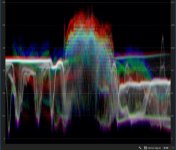
Hmm. Here's the waveform of a 4K 422 XFAVC 10-bit clip with Canon Log 2 (ARRI emulation):
WF.jpg

It's not near clipping the whites, but you can see it's full range as blacks are not elevated above 16 (on the left blue goes all the way down to 0 and clips). Using PP CC's Alexa 709_EE LUT, it looks OK re: gamma, though unsaturated (easily fixed by raising saturation), and skin tones look pretty good. Using Canon's LUT, black is crushed (fixed by lifting blacks with an RGB curve (line)), highlights are OK, color is saturated OK, however the skin tone color has a magenta bias and doesn't look anywhere near as good as the built-in Alexa 709_EE LUT. It looks like the Canon LUT has some issues. Have you tried PP CC's Alexa 709_EE LUT vs. Canon's?

In low(er) light I have seen quantization using Canon Log 2 (+ Cinema Gamut + Production matrix) + PP CC's Alexa = > 709 LUT (probably need to ETTR, especially for low light). I'm currently tuning completely custom settings (including color matrix tuning) and may not use the ARRI setting anymore. Here's an example shot (1080p RGB 444 12-bit 225Mbps XFAVC) with a really low CRI fluorescent green-biased light (camera set to 2700K). All I had to do in post was 8.5 magenta in Lumetri (used the YUV vector scope to precisely adjust to the skin tone line (also use color calibrated Dell monitors)). This could be done in camera with a color matrix phase adjustment (or add R + B (= magenta) in the custom WB setting) e.g. for live/streaming/zero-post shots:
C300II_FS_JS.jpg

This is looking better than what I was getting with Canon Log 2 ARRI settings which always required a bit of tweaking in post beyond the LUT. It also matches fairly close to what I am getting with Filmic Skin for Canon DSLRs (picture styles tuned for skin tones). Reminds me of what we could get with 5D3 14-bit ML RAW: really good skin tones with very little work in post beyond setting WB (which looks better than what I'm seeing with the C200 RAW Lite posted online so far (which seems to have a magenta bias in many examples). Really not going for any kind of look- just want accurate, pleasing, natural, (saturated*) skin tones with the least amount of effort!

* low saturation is a great way to minimize weak color quality, especially for skin tones.
 
Last edited:
It's not near clipping the whites, but you can see it's full range as blacks are not elevated above 16 (on the left blue goes all the way down to 0 and clips).

But Canon's white paper states that black on Canon Log 2 falls at 95 on a 10 bit scale, so it should be falling no lower than 23.5 on an 8 bit scale. Remember it is a Log curve and the blacks are supposed to start elevated, then you bring them down to 0. The only time you would see clipped whites is if they were *near* clipping in camera. Right now in that image you just probably have slightly stretched whites because nothing was anywhere near clipping. Also the white clipping only really happens in Canon Log or Log 3 because white is mapped to full 1024 on those curves, so any stretching will clip. But on Log 2, whites are in the 880's, so any stretching won't clip it will just make it an improper starting point for the Canon LUTs.

Just give it a shot, using the Full Range to Legal Range LUT first on your footage, and then the Canon Wide DR LUT on top of it and I bet you'll be much happier with them.
 
But Canon's white paper states that black on Canon Log 2 falls at 95 on a 10 bit scale, so it should be falling no lower than 23.5 on an 8 bit scale. Remember it is a Log curve and the blacks are supposed to start elevated, then you bring them down to 0. The only time you would see clipped whites is if they were *near* clipping in camera. Right now in that image you just probably have slightly stretched whites because nothing was anywhere near clipping. Also the white clipping only really happens in Canon Log or Log 3 because white is mapped to full 1024 on those curves, so any stretching will clip. But on Log 2, whites are in the 880's, so any stretching won't clip it will just make it an improper starting point for the Canon LUTs.

Just give it a shot, using the Full Range to Legal Range LUT first on your footage, and then the Canon Wide DR LUT on top of it and I bet you'll be much happier with them.

This looks like a bug. 4K 3840x2160 10-bit 422 outputs full range as seen in the Lumetri waveform (blacks down to 0). 1080p RGB 444 12-bit outputs lowest blacks around 23.5 as you noted (except indoors / low light as noted below).

Perhaps a bug in PP CC's importer?

4K 10-bit 422 reported as:
MXF File details:
Wrapper type: MXF OP1a (type: SingleItem SinglePackage MultiTrack Stream Internal)
File generated by: CANON, EOS C300 Mark II (1.00)
AVC Unconstrained
Bitstream Format: Sony

1080p 12-bit 444 RGB reported as:
MXF File details:
Wrapper type: MXF OP1a (type: SingleItem SinglePackage MultiTrack Stream Internal)
File generated by: CANON, EOS C300 Mark II (1.00)
AVC Intra 444

I shot tests outdoors and indoors (major difference in WB and DR/total light). Outdoors, 1080p 444 12-bit shows nothing below 23.5, indoors it dropped down almost to 0 (blue). 3840 422 10-bit drops well below 23.5 outdoors (to around 13), and indoors goes down to 0. All settings the same: only changes are resolution+bit-depth+YUV/RGB (camera profile change only: exposure/ISO/aperture/shutter/light not changed). Indoors 1080p 444 RGB also drops below 23.5 (mostly blues), however you can see it's mostly holding above 23.5.

Can you verify this bug?

[EDIT]: Tested all clips in Resolve 14. Used the built in ARRI Alexa LogC to Rec709 3D LUT on a 12-bit RGB 444 clip, then copy-pasted onto the 4K 10-bit 422 version and it looks exactly the same (color-correction-wise). This is a Premiere Pro CC bug (v12, build 224). There's a new version just out, will try it.
 
Last edited:
This looks like a bug. 4K 3840x2160 10-bit 422 outputs full range as seen in the Lumetri waveform (blacks down to 0). 1080p RGB 444 12-bit outputs lowest blacks around 23.5 as you noted (except indoors / low light as noted below).

Perhaps a bug in PP CC's importer?

Nothing should be below 23.5 in Canon Log 2 as per Canon's spec. If anything falls below that, there is some improper scaling going on. Your best bet is to just shoot a black capped off shot in various formats. Check that against Premiere and DaVinci. In Premiere the levels will fall lower, at least on the YCC footage. It might treat all RGB footage as full range properly.
 
Back
Top