Mjpeg vs avchd codec tests- the good, the bad and ugly

Gop 15 is just fine- Good enough for convergent designs NanoFlash, good enough for this. Plus if your using 24PN- it automatically is 12GOP. Thing is, when you lower gop- you need to increase the bit rate as well. 15gop is good for 24 over 60i... and 12 is good for 24PN.

This is how I understand it- I could be entirety wrong..

Barry Green could elaborate on this more though...


Tonight I shot anamorphic with 58-60-68 24PN with GOP unselected since it automatically is 12GOP by default. Looks good.

Pappas
 

Attachments
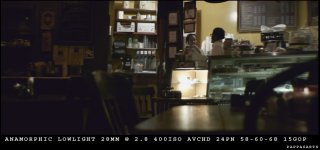
  • Picture 42.jpg
    Picture 42.jpg
    127.6 KB · Views: 0
Last edited:
In Mpeg 70 setting, panning is very jumpy, while in the same conditions AVCHD C setting with not native is smooth like oil..

Did anyone else notice it?

Sorry if I am asking an old question, very hard to follow all this hack details...
 
My tests indicate that the Patriot 32gig class 10 card can only be stable at around 53-54mbp/s. any spike above that and it fails. Believe me it's very disappointing for a class 10 card.

How are you testing? You have to be careful since some of the card readers on the market will actually bottleneck benchmarking programs you run on SDHC cards.

I'm not saying these cards are good at all, but maybe I've been lucky, they seem to work OK for me.
 
Thing is, when you lower gop- you need to increase the bit rate as well.
That's exactly correct. The shorter you make the GoP, the higher the bitrate needs to be. The longer you make the GoP, the lower the bitrate can go.

We're talking about a long-GoP codec here, not an intraframe codec. The whole point of a long-GoP codec is to USE the GoP.

A GoP codec gets its efficiency from only encoding the changes between frames. The shorter you make the GoP, the less opportunity it has to do that.

In a long-GoP codec, especially one like this one without B-frames, there are two types of frames: the Intraframe, and the Predicted frames. In each Group of Pictures, there is one Intraframe followed by a series of Predicted frames (I = Intraframe, P = Predicted, and the Group of Pictures looks like this: IPPPPPPPPPPPP). In that group, the I frame might take up half the available bandwidth, and the P frames all combine to make up the second half of the bandwidth. So one frame takes up 50% of the bandwidth, and then 11 frames combine to take up 50%. So what happens if you make a GoP of six instead of 12? Well, you've just doubled the number of I-frames per second (instead of IPPPPPPPPPPPP it's now going to be IPPPPP IPPPPP). And each I-frame takes up the same amount of space, so -- the I-frames alone are going to use up the same amount of bandwidth as the ENTIRE group of 15 frames used to! So where does the bandwidth to encode the 10 "P" frames come from? Yep, you have to *increase* the bitrate, to make room for those frames. Note, you're not increasing quality, you're just trying to accomodate the additional I-frame you've added into the mix.

Experiment with the GoP all you want, we're all interested in hearing your experiences, but don't go into it thinking that there's some absolute correlation that says "smaller GoP = higher quality" because it may not work out that way. You may find that lowering the GoP just unnecessarily inflates the bitrate without delivering an actual increase in visual quality. Then again, because it's still in the testing phase, you may indeed find that lowering (or raising) the GoP results in a small or big jump in quality. Try it, try everything, experiment, let's find out.
 
Last edited:
im using 58-67-74 gop12 24pn ..with sandisk extreme iii 16gb class 10 ..ok what i have found out with my card is that if i go beyond 58 i will start getting the blocking and artifacts..this has been stable in 1080p mode, in sh mode i got a few card error's but only on very high detail shoots with high jerky motion, the same detailed shot with normal camera movement the card can work with ..so far im happy with the result ..the only thing i can say is that, the panning when shooting 24pn is very weird, kind of choppy and strobe like, i have to be very very careful to get it to look right, compared to mjpeg 30p shooting or even sh mode..anyone notice that?

i have tried many mjpeg settings with my gh1, i got close to 110mb on a few shoots but only for a few seconds.. the most stable setting for me has been 396,338,306,292 all 24 with 422 ,this gave me clips from 60-80's with out any major issue .. im not sure if the gh1 like the gf1 can get into 100's being without many card errors, i tried the format trick and recording after the first error and still got errors with a setting like 400,400,400,400 with all 24 and 422
 
How are you testing? You have to be careful since some of the card readers on the market will actually bottleneck benchmarking programs you run on SDHC cards.

I'm not actually benchmarking the card. I'm testing it in a real world situation and seeing which is the largest bitrate I can write on the card before it fails with the hack. I've done quite a few tests and tried nearly every number posted on this forum since day one and well as many I came up with and I get the same results. Any footage that is around 53-54mbp/s or less works fine and any footage that creeps above that fails.
 
Guys, no one else encounter jumps when panning with this MPEG settings (the in this thread) ?
 
Guys, no one else encounter jumps when panning with this MPEG settings (the in this thread) ?

Are you playing directly from the card on the computer? I had the same issue. Once I copied files over to HD it was fine.
You could get jerky playback issue on computer due to reading speed...once videos are reedited..compressed etc all should be fine.
Mjpeg is nice and smooth panning for me also.
 
Well I am using this settings http://www.dvxuser.com/V6/showthread.php?t=213486

With gop unselected and 422 unselected.

Photo with Iso 800, lots of jumps, SanDisk 16 gig class 10.
In camera, can't play at all.
In computer, jump.
Inside avid after imported, jump.

Again, only in panning test, like the one you do for showing rolling shutter effect, a bush full details.
 
Last edited:
Well I am using this settings http://www.dvxuser.com/V6/showthread.php?t=213486

With gop unselected and 422 unselected.

Photo with Iso 800, lots of jumps, SanDisk 16 gig class 10.
In camera, can't play at all.
In computer, jump.
Inside avid after imported, jump.

Again, only in panning test, like the one you do for showing rolling shutter effect, a bush full details.

wierd...
I have the same "pappa" setting for mjpeg...ptool recommended "c settings"...422 unselected I have it res 1440 x1080
Record on a sandisk 16 gb class 10.
No playback on cam (which is the norm currently for high bitrate mjpeg anyway)
No problem with playback on computer (have a cheap AMD phenom 64)

Not sure what could be causing the jumpy panning.
 
2 questions for those who may know..

1)do we have any progress regarding the possibility of 24p mjpeg even at 720p mode?

2)has any one found a combination for increasing the overall avchd bit avg on wide open shots (at f 4 and faster) ?even with 58.67,74 combo i still get an avg of 15-23 mb on not so detailed shots or wide open shots..high detailed f8 and above i get anywhere from 35-54 mb
thanks
 
wierd...
I have the same "pappa" setting for mjpeg...ptool recommended "c settings"...422 unselected I have it res 1440 x1080
Record on a sandisk 16 gb class 10.
No playback on cam (which is the norm currently for high bitrate mjpeg anyway)
No problem with playback on computer (have a cheap AMD phenom 64)

Not sure what could be causing the jumpy panning.

Ohhh I got the problem ... I am with MPEG 24X and not 30...
 
Nice I am going to try 56-63-70 at 12GOP, but this is my first time messing with GOP...

I only see 1080p24 GOP, I am assuming that is where you are entering the 12 GOP. Is this 1080p24 GOP for both native 24p and 24p/60i? My guess is yes but just want to be sure.

Thanks!

Oh and I will be testing with a transcend 8gb class 10 and 6.

anyone?
 
perfect concept explain!! thanks so much

perfect concept explain!! thanks so much

:thumbup::thumbup::thumbup::thumbup::thumbup:
That's exactly correct. The shorter you make the GoP, the higher the bitrate needs to be. The longer you make the GoP, the lower the bitrate can go.

We're talking about a long-GoP codec here, not an intraframe codec. The whole point of a long-GoP codec is to USE the GoP.

A GoP codec gets its efficiency from only encoding the changes between frames. The shorter you make the GoP, the less opportunity it has to do that.

In a long-GoP codec, especially one like this one without B-frames, there are two types of frames: the Intraframe, and the Predicted frames. In each Group of Pictures, there is one Intraframe followed by a series of Predicted frames (I = Intraframe, P = Predicted, and the Group of Pictures looks like this: IPPPPPPPPPPPP). In that group, the I frame might take up half the available bandwidth, and the P frames all combine to make up the second half of the bandwidth. So one frame takes up 50% of the bandwidth, and then 11 frames combine to take up 50%. So what happens if you make a GoP of six instead of 12? Well, you've just doubled the number of I-frames per second (instead of IPPPPPPPPPPPP it's now going to be IPPPPP IPPPPP). And each I-frame takes up the same amount of space, so -- the I-frames alone are going to use up the same amount of bandwidth as the ENTIRE group of 15 frames used to! So where does the bandwidth to encode the 10 "P" frames come from? Yep, you have to *increase* the bitrate, to make room for those frames. Note, you're not increasing quality, you're just trying to accomodate the additional I-frame you've added into the mix.

Experiment with the GoP all you want, we're all interested in hearing your experiences, but don't go into it thinking that there's some absolute correlation that says "smaller GoP = higher quality" because it may not work out that way. You may find that lowering the GoP just unnecessarily inflates the bitrate without delivering an actual increase in visual quality. Then again, because it's still in the testing phase, you may indeed find that lowering (or raising) the GoP results in a small or big jump in quality. Try it, try everything, experiment, let's find out.
 
Back
Top