Mixer help!

David W. Richardson

Chapelgrove Films
Okay, I'm shooting a wedding this Saturday. The venue is putting a mic on the officiant and sending audio through a mixing board and out to speakers. The coordinator told me I could pull a feed from the board into my Zoom H4. Good so far.

So I email the 'sound engineer' (provided by the venue) and asked what kind of output he would be able to provide. XLR, 1/4" or phono? Mono or stereo? Line level or not? Etc.

Here's where the phrase "Oh God help me!" comes in.

The 'sound engineer' emails me back and says, "I'm no expert. So here's a pic of our board. Hope this helps."

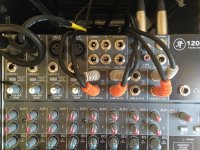
This is the pic he sent me.
mixer.jpg

I can't tell from the pic what the make and model of the mixer are. And I really don't know what I'm looking at here.

Any insights? I'm trying to figure out what cables I need to bring to connect the Zoom H4 to the board to get a clean audio signal.

Help!
 
Okay, I'm shooting a wedding this Saturday. The venue is putting a mic on the officiant and sending audio through a mixing board and out to speakers. The coordinator told me I could pull a feed from the board into my Zoom H4. Good so far.

So I email the 'sound engineer' (provided by the venue) and asked what kind of output he would be able to provide. XLR, 1/4" or phono? Mono or stereo? Line level or not? Etc.

Here's where the phrase "Oh God help me!" comes in.

The 'sound engineer' emails me back and says, "I'm no expert. So here's a pic of our board. Hope this helps."

This is the pic he sent me.

View attachment 87531

I can't tell from the pic what the make and model of the mixer are. And I really don't know what I'm looking at here.

Any insights? I'm trying to figure out what cables I need to bring to connect the Zoom H4 to the board to get a clean audio signal.

Help!

The 'running man' seems to be a Mackie logo... I have an older 1202VLZ... (I don't recall having a running man logo...)

Here's the web page

http://www.mackie.com/products/vlz4-series-compact-mixers/
 
It's a mackie 1202 (if I recall correctly).
You can come out of either the RCA outs which should be -10 or out of the 1/4 "main" outs next to it on 1/4.

With that being said, here is just a bit of unsolicited advice.
What happens when you get there and the guy who admits "im no expert" has a problem with his feed?
What if there is a buzz in it? What if his gain structure is such a disaster you're hearing more hiss than you are voice?

I only say this because if this is a paying job for you it's not the best idea to go into a situation where you dont have a do-over
and not know how to do sound properly. You admit that freely so I don't see a problem with stating that.
If you aren't even sure how to get an output from a very simple board I'm guessing you might not know how to run it either (and everything else in the non-experts hands).

I'm sure you will proceed on your own and hopefully you get lucky. Because if you end up with great sound that's what it is. Luck.
Eventually you're going to run out of that.

I say none of this to be mean or negative. Just saying it to hopefully make the gears in your head turn.
 
The best practise way to connect your Zoom H4 would be to connect one or two 1/4" (6.35 mm) TRS cables between the MAIN OUT on the top right of the mixer and and Zoom's TRS inputs. You should use cables with three contacts (not missing the Ring, which is what R stands for in TRS, Tip, Ring, Sleeve). The reason for this is that it's a balanced signal and you have the best chance of getting low noise. Having said that, it's a line-level signal so you'd probably also have good results using the RCA connection, if you have an RCA to 1/4" cable you trust (you can't use a RCA 10 1/8" (3.5 mm) TRS because the Zoom H4 doesn't have a 1/8" line input).

My biggest piece of advice would be to take headphones, make someone speak into the mic before the event and make sure you're getting a good, undistorted signal with low noise. If you're not, you might need to turn off noisy channels which aren't in use or give up and use some other way of getting sound (you might get better results sticking the H4 in a flower pot near the subjects of the video, even).
 
(Rippie, see Andrew's reply for an example of being helpful and informative without coming across as insulting and condescending.)

Thanks Andrew! That's exactly what I needed to know!

The Zoom H4 connected to the sound board is not the only audio coverage option I have planned. Been burned once on that, and once was enough. And of course I do plan to bring headphones and thoroughly test the setup prior to the ceremony.

In previous situations where I've connected to the house board, the engineer has always been knowledgeable enough to let me know where he wants me to connect and what the specs are. This has worked fine for me in the past, without requiring me to know more about the board than the engineer does. Honestly, this is a first.

Thanks for the info!
 
I'm not sure the main outs are the best option here. It looks like both Aux outs are free, and this can offer you (with some care and attention during setup, and monitoring during recording) a safer bet. As a pre-fade send for a single mic, Aux 1 will give you a clean feed that will be unaffected by anything the house sound operator (let's not call him an engineer at this point) does to the main mix. You can use this to take only the officiant's mic and omit other sound sources.
 
Thanks Alex. Let me detail what the inputs will be.

One will be the wireless mic from the officiant.

One will be a mic on a stand, at which two people will recite poems and one person will sing a solo.

Also, pre-recorded music will be played.

All of this will go through the board and out to the speakers.

I'd like to get all of it on my Zoom H4 recording, if possible.
 
Is mic'ing the officiant yourself with your own wireless an option? As someone that has to deal with "house feeds" at press conferences on a regular basis, they are hit or miss. Most of these set-ups are set-up for the audience to hear what is going on through the house speakers and what comes out of the multi-box half the time is not good(or even useable at times).
 
Sorry David,
I would have to go with Ripple here. Andrew gave you some decent advice but you have no idea and neither does the "sound guy" so you are depending on luck. That is not "condescending" it's a fact. If you get a car and don't know anything about how it works and take a trip across the country you might have a great time, but it would be luck. Same thing here. If a "solution" works it'e because you were lucky enough to have that work for you this time. If as Ripple mentioned the sound out of the console is SH%t not at all unusual, then if YOU don't know how to fix it YOU are screwed. While what Andrew said is fine what if those out puts are not available? Mr. Sound Guy doesn't know anything so... For instance the balanced main outs are already used, so depending on how it's wired it's fairly likely that you plugging into the TRS jacks will kill the XLR and that won't fly.

So you are into the RCA jacks. Probably fine, but Mackie does a weird thing with mutes going to an alternate out so maybe you have an issue, maybe not.

Also does the Zoom take a +4 input?, I'm not sure so maybe. If it does it's not so likely to like a -10 one that you will be sending it if you have to use the RCA's. Unless there is an input setting on the Zoom.

I'm not trying to make you feel bad but "pat" answers in sound tend to be great only for those few that they work for and total disasters for everyone else. So getting a simple answer should actually worry you because it is very rare that the simple answer works.

Now Andrew was not wrong, but he is assuming things that are not nec. true. Ripple, while you may not like the fact he didn't give you a simple answer, is more reflective of real life experience.

I have been doing sound for theatre and film for a number of decades and I have a really large bag of adapters and a tool kit that includes a butane soldering iron that go with me to the "simplest" gigs. If the sound guy is an admitted "no expert" that means you have no idea of the nightmare that may be awaiting you. It could be fine but if it is it's luck because he has already said he doesn't know what he is doing.

So you can plan for Andrews solution but if you are not bringing the hardware incase you can't get anything out of the house board then you have basically failed in YOUR job of planning out the shoot. Because you can not depend on anything from that "sound person". I put it in quotes not to be condesending but because no actualy sound person on earth would send you that photo as an answer to your question.
 
Thanks Alex. Let me detail what the inputs will be.

One will be the wireless mic from the officiant.

One will be a mic on a stand, at which two people will recite poems and one person will sing a solo.

Also, pre-recorded music will be played.

All of this will go through the board and out to the speakers.

I'd like to get all of it on my Zoom H4 recording, if possible.
 
As I said, I'm not putting all my eggs in one basket. I have multiple redundant recording devices. I would like to get this particular setup -- H4 to the sound board -- as clean as possible. But it's not a 'do or die' situation.
 
I'm condescending and insulting because I said you're not a sound guy and you're not experienced enough
if there are problems? Silly me, I thought you pretty much said the same exact thing in your original post.

The sad part here is I specifically told you I wasn't trying to be mean or negative but I wanted you to start thinking about the big picture.
I wanted you to think about all the other things that could go wrong and to prep for them. I wanted you to learn the ENTIRE manual not just
how to get sound out of it so in case you need to fix things you have a better understanding.
This is exactly why I specifically said I hope the gears in your head start turning.

The really sad part is instead of reading what I said and doing any of that, you take it as a direct insult and complain.
How long have you been in this business? You're going to need a slightly thicker skin.

Good luck with your shoot.


(Rippie, see Andrew's reply for an example of being helpful and informative without coming across as insulting and condescending.)

Thanks Andrew! That's exactly what I needed to know!

The Zoom H4 connected to the sound board is not the only audio coverage option I have planned. Been burned once on that, and once was enough. And of course I do plan to bring headphones and thoroughly test the setup prior to the ceremony.

In previous situations where I've connected to the house board, the engineer has always been knowledgeable enough to let me know where he wants me to connect and what the specs are. This has worked fine for me in the past, without requiring me to know more about the board than the engineer does. Honestly, this is a first.

Thanks for the info!
 
Last edited:
People need to ask this question "what would your expectations be if it was your daughter / son being married" would YOU be happy with a video person of your experience handling the shoot?

Can you confidently say YES?
 
As someone that has to deal with "house feeds" at press conferences on a regular basis, they are hit or miss. Most of these set-ups are set-up for the audience to hear what is going on through the house speakers and what comes out of the multi-box half the time is not good(or even useable at times).

This.

Not so skilled live sound mixers don't usually understand proper gain stages. Lots of times you'll look at their meters and they have ZERO lights lighting up. (REALLY low output).
They hear it just fine coming out of their speakers because their power amps are on 10, but try to take a clean signal off a board where every stage is way too low.
By the time we arrive they have already rung out the room or at least figured out how loud they can turn the mics up before feedback which makes it difficult for us to insist they fix it. Why would they want too? They know it's coming out of their speakers great! They don't want to mess with the thing THEY are getting paid for.

In order to insist to make the changes yourself (you touching their board) we have to come across 1000% that we know what we are doing and their house sound will be improved
and not suffer. I literally just ran into this situation 2 weeks ago. Event with 2 massive political figures. Board feed sucked. (line level signal to the mult was coming to me at -60!)

Once again my original post wasn't meant to be snarky. It was meant to explain that knowing how to plug into a mixer is 101 level stuff. It's everything else you need
to be ready for and know how to fix. When the house guy admits he doesn't know what he is doing.. and the camera guy admits kinda the same thing..
I suggest he watches every youtube video he can find about gain structure, how to run/set up live sound..etc.

It could be easily said.."it's just a wedding..it just needs to be good enough".. but at the same time, no 2nd takes, highly important to the people paying for this, clients that
can either be understanding or a nightmare. etc.

Notice I didn't say the obvious thing to hire a sound guy. We know that's not going to happen, but if the OP doesn't want to get burned
he better start reading up!
 
Somehow this turned from a simple question about connecting the H4 to the mixer, to a rather insulting and arrogant "are YOU the person who should be doing this video???" I see this happen a lot here, and it's turning this once great place into a place I rarely want to come to anymore.

I have done this before. I do have redundant sound capturing systems in place. I just had ONE QUESTION. I'm thankful to those who simply answered the question without feeling the need to treat me like someone worthy of scorn.

I'm done.
 
I keep a pair of variable pads in my kit for use with the H4n to match the impedance of the signal feeding it, as the input impedance of the TRS inputs are a little funky.
 
David, I shoot a lot of weddings so I can quite empathise with you :- ) Using venue boards can be so hit and miss what with no staff knowing even where they are let alone how they work, access denied through fear of you wrecking it, access prevented by anti-theft measures etc. I always check if its feasible but I no-longer carry a truck load of different connectors and cables - just RCA phono which in my part of the world covers nearly all venue boards.

This looks like the model:
http://www.mackie.com/home/showimage.html?u=/products/1202vlz3/images/ZOOMED_1202-VLZ3.jpg

And this looks like the user manual:
http://www.mackie.com/products/1202vlz3/pdf/1202VLZ3_OM.pdf

On page 10 it appears to confirm what would have been my first shot - RCA to the L & R Tape Output sockets.

I use a cable with red and white RCA connectors on one end and a 3.5mm male connector on the other end which plugs directly into my H4n.

You may find that the signal is too hot even when you turn the Levels on the H4n right down. I often have to use a Pad cable to reduce this in between the main cable and the H4n. If you have access to some wireless equipment you could plug the cable into a wireless transmitter instead of the H4n, then have the H4n connected to a wireless receiver close to you so that you can double check the Levels once things are underway.

Like you I have backups of backups often including a small H1 on auto-Levels very close to one of the venue speakers.

Pete
 
"you could plug the cable into a wireless transmitter"
Most transmitters are mic level by default so attenuation would be needed. OTOH, many accept line level input operation via a 'custom' wired plug/cable. ( Lectro and Sennheiser for instance)
 
David this has not been at all snarky. If a 15 year old asks which pedal to push to make the car go it's not snarky to suggest he learns how to drive first.

You have lots of backups, but you don't know how to connect to a mixer?

And this isn't anybody saying we never make mistakes, in fact 90% of what you have been advised to do was "learned" the hard way by the folks posting it. We are just advising that you learn the easy way so you don't have to learn the hard way.

If you get everything mixed through the console you will by definition be getting the operators mix. Since this is a live event the speakers are there to support the live sound and play back pre recorded music. The music is ONLY coming from the speakers but the voices are only being supported by the speakers. Depending on the space there may be a very large misbalance between levels. ie The voices will be very low compared to the music and what people hear at the time. If you take a main board feed then that misbalance is baked into the sound and you will have very little chance to correct it.

The wireless jump suggested earlier would require going mono and that could have some very bad affects on the music. Your options would be to just take one track or to sum and depending on the recordings either could sound way off from what folks are expecting to hear.

Setting up your own mics in the house gets around most of these problems. And you may already be doing that.

I would skip the music and just grab the voices off the board since you can always add the music back in.

But to do that you need to use the direct outs from the board. I would use the direct outs to go into your own mixer since you have more than two vocal channels. That will get you the signal after the preamp and before the rest of the mixer so you won't get the operators level moves or EQ etc.

The aux send can do basically the same thing but then there is a knob that the operator might grab aiming for something else and your hosed. If you do go the aux rout you want a prefader aux and I don't remember if those mackies come with one. Mine is the older version and you could change one of the auxes by making a modification to the internals. It was detailed in the manual so some have it done and some don't. If your post fader then you are stuck with whatever level moves the operator does. Also I think the auxes are post EQ and you generally don't want that. The EQ can be very weird because this is a PA setup and they are EQing to support live voices and to fight feedback. It can sound great in the space and horrid through the feed.

Mackie boards all have direct outs on all mic channels so you probably can't get the music that way but then I would advise that you add it later anyway.
 
Last edited:
Back
Top