GH2 Minolta Rokkor lens + Heliopan Vari ND = Washed out colors...

Admir

Well-known member
Just came home from a car event that I shot. Used my trusty HMC150 and my new love GH2.

The HMC colors look fine, sure the image might be a bit more "boring" than the GH2 but hell, it produces fine images, as you can see the red car is red, nothing else...
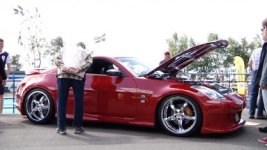
Sequence 01.Still006.jpg


After all the interviews were done, I wanted to shoot some arty footage with my GH2. Brought my 50mm f 1.4 Minolta Rokkor lens together with a heliopan vari ND. Camera was set to smooth -2 all the way. Now we all know the "ferrari red" color, but this is how all the reds turned out:
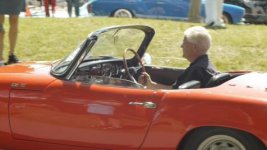
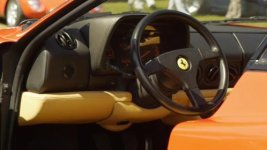
Sequence 01.Still004.jpgSequence 01.Still003t.jpg

Specially the close up on the ferrari, I mean that car was RED, not washed out reddish-green like.... I find it really hard to color correct since everything gets much more red in order to restore the nice color of the car... Not only this, about 70% of all the GH2 material has green reflections all over them, sure I can use it but that's not good. The shooting conditions were pretty rough, 12 o'clock, hard sun at the top of the sky, really harsh highlights... Maybe that's why I got so much ghosting, reflections....?

This guys shirt was also red...

Sequence 01.Still007f.jpg

Ok, rant over. What are you experiences, am I the only one with washed out reds when using the heliopan vari ND and rokkor lenses (don't know if the lens/filter combo is to blame or only the ND filter). Anything I could have done differently in order to preserve the reds with my setup?
 
I have quite a few Rokkor lenses and the color on the later model lenses is very good. However, I would not describe it is "super pop". I suspect that the issue here is simply the sunlight. If there are no clouds, direct sunlight is a bleacher of color. Depending on the sunlight, for sure you need an adequate hood and you might also experiment with a polarizing filter.
Throw the footy into Colorista, and try the pop setting on the secondary mask. Some of the footage looks bleached to me, like the back of the car. So here you may simply be exceeding the dynamic range of the filter. I have had some look with Flowmotion hack underexposing to preserve the highlights, then carefully bringing up the shadow areas in post, at the risk of noise. But you have to underexpose to retain the highlights if you have really bright light.
On my color calibrated monitor, the shirt looks orange. So you must have a WB issue here. Use the WB eydropper on the guy's white pants for starters. Using secondary color correction, you can change the car or the shirt and leave the rest unchanged. You can also use Premiere (download the trial if you need to) to match the colors of the two cams, more or less.
 
GH2 has an obnoxious green cast to it. I'm FAR from tech advanced enough to feel super comfortable giving "solutions", but in post I always knock down the green a few notches (in Vegas I just use the levels and select green to adjust). Just a few ticks removes the green cast, and in so doing you visually seem to get "more" red (it's what's already there of course, but blah blah blah). All that said, this looks awfully orange. I'm sure playing with CC you can get it back pretty close, but shouldn't really have to. I've gone back to shooting in cinema mode, colors seem a little truer in the midrange to my eye, just have to not overexpose on skin tones. I hate the sun. 9 times out of 10, total nightmare for me. Sweet car.

*Edit - it does look like a white balance issue, actually. I've had lots of those, too. Never trusted the idea variable NDs so I never used one, but I think that's supposed to be a good one. I don't think the lenses would throw it off that much, either. Maybe they'd be not very contrasty, but that's about it.
 
Last edited:
You can also use the "leave color" feature to change orange to red. But let's for a moment assume that you have a white balance issue, and that you have too much orange. Basically, not enough blue. Outdoor lot has lots of blue, but it doesn't matter how you got to orange, all you need is to color correct . I took my GH2 outside with a red card to see if any combination of settings would produce such an extreme shift to orange, and if you shoot outside using flash wb or indoor, etc, it makes the colors look weird but not so orange as in your photo, so check the settings in your NLE as well, and check if the image is orange during playback in cam.
 
Thanks for all the great input!

Checked the WB setting, it was set to outdoor / sunligt... I have checked the material in camera, it about the same as in the NLE... Orange.. Removing some of the green helped quite a bit, that will have to do for now. I think this might be the GH2 green cast over the image, combined with the Vari ND that does something greenish to the image in some situations. The glass itself of the filter is green, and when the ghosting appears it's always green... Some people say that the heliopan vari ND is the best variable ND you can get with no change in color and sharpness... But I would say that it does add some green to the color, probably a bit more in harsh sunlight.

All in all, GH2 vs HMC150, I find the GH2 colors much more baked in. The HMC colors feels more natural and separated, and not so pastel looking as the GH2 colors can be. I love my GH2, but I would never dare to sell my trusty HMC.

I have a complete clip of the show, if you want to take a look at it. Note the nasty green flare at 2.50 ...

It shouldn't be too hard to point out the GH2 and HMC clips =P
 
Take the cam outdoors in with something red and snap a few photos. If it is still orange, it's the camera. If it is red, then it is the filter or the NLE interpreting the color. Shoot the same photo with the filter on. If still red, then it is a software issue.
Check that you are shooting sRGB and not Adobe RGB as well, that might affect the reds. My cam shoots red as red, regardless of the lens.
 
I have the Rokkor 50mm 1.4 as well, and it flares BADLY in certain situations. And we're not talking about the artsy lens flare, we're talking about the flare where the whole image looks washed out, similar to what you are posting about. A lens hood helps immensely assuming that the catches the angle of the sun.

Ultimately I think it's a mixture of the vari ND filter and lens flaring. I haven't actually used one (Vari ND), as I just have 3 actual ND filters that I use, but I hear that very often they give the image a green cast and mess with colors. Not sure about the Heliopan, but I think that may be the green cast, and some of the washed out colors because of the lens flare. Also, I don't use smooth because it messes with colors too much for me. I usually use Normal or Vibrant, depending on the amount of post work I want to do. I find Vibrant gives a nice crisp image with good colors if I'm not doing a film project that I plan to play with colors on, and just want to document some event and show it to people without making a big production out of it.
 
Last edited:
Did some testing with the image profiles. I find the vibrant setting at -2 on everything besides noise reduction and sharpness that I have at -1 really nice. The red is much more accurate, and the image has more deep blacks, and looks less washed out.
I like the idea of a flat image profile where you can adjust things more easy. Now, I'm not by any means a pro color grader but some files that I want to apply color correction to breaks down really easy while other files allows much more grading, all shot on a hacked GH2. Maybe it's better to work from the "wrong end", shoot something with rich and nice colors and desaturate the image by lowering the saturation and bringing down each color until you're satisfied.

That might put less strain to the file.
 
Here's a clip with a Red Ferrarri in it. Shot on Vibrant, no nd, Canon 55mm 1.2 at around f5.6. I find colors are more deep if you underexpose a bit. I like vibrant because of the colors and noise is very low. The blacks tend to be crushed a bit, since I crush the blacks in post anyways, this saves me the step.

http://www.youtube.com/watch?v=jDeUmjbOU0s&feature=youtu.be

I've several Rokkors in my collection, and they all tend have veiled flare, even if the light source isn't in frame. A bright sky would do it. But that's what gives the Rokkors a dreamy look.
 
I have the HMC150 and GH2 as well. The GH2 smokes it in just about every category, especially resolution, noise, low light... but there are some times where I definitely prefer the color off the 150, particularly the reds. The GH2 higher bitrate hacks at least allow you to push around the footage in post a bit.
 
Here's a clip with a Red Ferrarri in it. Shot on Vibrant, no nd, Canon 55mm 1.2 at around f5.6. I find colors are more deep if you underexpose a bit. I like vibrant because of the colors and noise is very low. The blacks tend to be crushed a bit, since I crush the blacks in post anyways, this saves me the step.

http://www.youtube.com/watch?v=jDeUmjbOU0s&feature=youtu.be

I've several Rokkors in my collection, and they all tend have veiled flare, even if the light source isn't in frame. A bright sky would do it. But that's what gives the Rokkors a dreamy look.

OK....something's not right here.

This clip ALSO looks pretty darn ORANGE to me. Is that what you saw berylium when you saw the car?
On my monitor just now the Ferrari was just...orange...but the YouTube "progress" bar on the bottom of the video window 1/2 ans inch away was totally RED.
I've ogled plenty of Ferraris...I can't believe the red would be that off in the GH2...
 
Errr... now that you brought it up, it does look rather orangy to me. But I'm pretty sure that's how I saw it (about a week ago).... going by memory. I did check the original mts files, and I'm satisfied the youtube version is close enough that I'm not concerned that youtube messed the color during compression.

Having said that, I don't really know what Ferrari Red looks like, this being the first ferrari I've seen (I'm not too knowledgeable about cars). I kinda like orangy reds... so maybe that's why I never thought it looked bad. Also, there's a lot of reflections going on, from the sky and from the horizon.

The shot was on an over cast day, and I dialed the Gh2 color temp to overcast.

Do you think a Ferrari owner would repaint his car to an orangy red? Or would that be sacrilegous?
 
Hi Admir, I have had the same problem matching the HMC151 and the GH2, then i saw some settings in the AF100 subforum "Matching AF100 footage to the GH2" by Ipowell. I just tried it out of desperation this time with my AC130 and GH2 and somehow i came near to getting the same colors than ever before, i have not tried it with my HMC151.
 
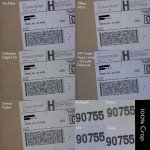
This is a REPOST from the FS700 forum about my recent experience with Heliopan. In short, mine was having a very noticeable Green cast, which probably would be extra bad for the GH2 since it starts with a green cast

Pics are below

I just got a new Heliopan Variable ND Filter from Fotomayer in Germany and right away, I noticed a green cast just by looking through the filter. In fact, it has the same amount of green shift as does my much cheaper Genus ND (Not good).

I took the following photos early in the AM on a cloudy day, used the preset Daylight white balance on my 60D. All photos were within 10 minutes of each other, so the light was consistent. I used a Canon 70-200mm F2.8 IS II set at f4 at shot 200mm focal length. The ISOs varied a slight bit to compensate for proper exposure.

I noticed that out of the 3 Fader setups (Heliopan, Genus and the DIY method), the DIY had the least color shift (slight blue). The Heliopan and Genus both had a very noticeable green color shift. The Heliopan is very sharp though.

My dilema is, many people have raved about the Heliopan and how it has no color shift and is neutral. Could I have got a BAD SAMPLE? From the very long Heliopan thread a while back, seems like the Quality Control on Heliopan is not so good since a number of people reported problems with their samples from missing screws, to the X, to arriving broken.
filter1.jpg
 
That Ferrari I shot was red, just as the mans shirt was red but both turned out quite orange.. I have always noticed a bit of greenish color to the image when using the vari nd but it has never been a problem to color correct until the ferrari came along..

My Rokkor lens gives a more contrasty look than my nikon vintage lenses, so that might be a reason why the vari nd isn't the best combo with my 50mm Rokkor.
 
There certainly is a greenish cast on GH2 footage together with the Heliopan VariND (my setup). But it's really easy to correct in post, as has been suggested earlier. USE RGB color correction, and turn the green towards pink a tad bit, and probably add some blue. You can get any red you want.
 
Back
Top