Minimum RAM for Resolve (MacBook)

Don't know about FCPX, but in Resolve if you run out a vRAM and ended up hitting normal Memory much less a HDD/SSD swap file then it would be game over. I used to have issue with Fusion on a 12GB GPU doing such things, but never with my current 24GB of V-Ram. FWIW, the 4090 can do something like 1TB/sec (1,048,576 MB/s) internally for such work!
 
Don't know about FCPX, but in Resolve if you run out a vRAM and ended up hitting normal Memory much less a HDD/SSD swap file then it would be game over. I used to have issue with Fusion on a 12GB GPU doing such things, but never with my current 24GB of V-Ram. FWIW, the 4090 can do something like 1TB/sec (1,048,576 MB/s) internally for such work!

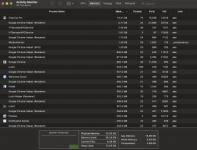
So, I just looked at Activity Monitor after opening my laptop. This is with FCPX and Chrome and a handful of other applications open, but nothing happening at the moment. This actually looks similar to what I remember from when FCPX was crashing. It says it's using about 25GB of memory, and I have a handful of GB of cached files and about a dozen GB of Swap Used. Its memory pressure meter is low. So...I'm not sure why it's using Swap files but it seems it's doing it because it wants to and not because it's under duress. I also remember Thomas Smet saying that the SDD on the new Macs is so fast that Swap Files are more practical than before. I dunno what's going on. Chrome is using a lot of memory for me right now because I have so many tabs open (which was not true when I troubleshooted the crashing last week because I restarted and closed everything). But it looks like I still have physical memory available...

here's the screenshot in full-res: https://drive.google.com/file/d/1KjgkTS_N_Yo0Ct9aM7rPEFlLGYlN3J-7/view?usp=drive_link
 

Attachments

  • photo132231.png
    photo132231.png
    77.2 KB · Views: 0
A swap file means it is swapping pages of memory to disk so if that is happening on large scale there should be some disk activity visible in your activity monitor. But from the timing of the observation, I'd be suspicious that the OS system upgrade didn't go as planned and would be looking at a way to undo it. In Windows, the process is called "system restore." What it does is restore a copy of system files from an earlier time when all was well, restoring all the previous drivers and settings. It does not affect your work files and program files which are not overwritten. If there is a utility like that, short of restoring the complete operating system, programs files and data from a backup, that's what I would be trying. One other Windows utility is chkdsk, it's run from the command line with a choice of parameters after the drive letter that searches for orphaned or cross-linked clusters and tries to reunite them with their parents, correct errors in the root directory, file allocation table (fat) and indexing errors.

Right now I have about a dozen GB in "Swap Used" but very little disk activity. I'm also not editing at the moment although I still have FCPX open from before.

My computer crashed about 3 times in the first week after I upgraded my OS. It maybe crashed one or two times in the few weeks after that... But it hasn't crashed in the last week or two even though I haven't updated the OS further. Not sure what's going on. I think that Apple has also crippled the battery management because my battery drains while the computer is closed now whereas it didn't before the upgrade. (This is possibly only due to having bus-powered drives connected. But it shouldn't be powering them while it's asleep anyway.) I've checked my system settings and don't see anything pertinent to that issue. It makes me wonder if Apple is up to their old tricks of trying to fool their users into thinking that their hardware is degrading and they need to buy a new unit. They've lost numerous lawsuits for similar firmware-related handicapping of iPhones. I've considered reverting to the prior OS but I think I'm going to hold for now, especially since I upgraded when I had no projects on the cooker but now I have several. I'll try to see if there's a way to check my install for errors...
 
I've got Resolve open to an 8K60 project and this page in Edge; 12GB in use, 6 GB cached, 493 MB paged pool and 422 MB non-paged pool, so offhand it seems to me like Sonoma is spending a lot of resources on services, renderers and pooled pages but I would assume that is normal but is more than Windows is spending on its services. You should click on disk, network, CPU and Energy to see what's going on there. My CPU is only at 3%, (nothing happening), disk drives are at 0%, and GPU is 17.5 GB of its dedicated 24 GB, 4.5GB of its 16 GB shared memory (40 GB total vid ram), utilization 1%. It's cool and quiet now with nothing happening, the fans spin up when you start scrubbing or rendering, GPU temp is 35C now, heats up over 45C when it's pushed. I'm not immune from the blue screen of death but it's infrequent. Despite the memory available to 3090 and 4090 GPUs, you can blow through all of it with 8K projects in certain respects, e.g. NR+transitions that blend frames such as cross dissolves, where if your source is 12K BRAW original, you basically now have 2 copies in memory, one for each side of the frames to be blended that combined with temporal+spatial NR is too much, Resolve protests briefly before abruptly exiting without saving, but no Windows blue screen. I get around the problem by making cuts at each end of the transition, and turning off the NR nodes during the transition where NR is not needed anyway.
 
For those interested, I ended up ordering the base MacBook Pro M3 with maxed-out RAM (just 24 GB, but I think that’ll be enough for what I foresee doing, which is a far cry from making six figures on editing jobs in my backyard … if I had a backyard).

I also ordered a yucky little bus-powered Crucial X9 Pro SSD with 4 TB of space for editing. You have to look closely at Apple’s specs, but having done so I believe there would be no speed advantage to the X10 Pro (or comparable Samsung T9) over this X9 Pro (or comparable Samsung T7 Shield) on the MacBook I got (there would be an improvement with the M3 Pro models that have the latest “2x2” USB ports).

I went with the Crucial over the Samsung because it’s considerably smaller and might use less power according to reviews like this one: https://www.anandtech.com/show/1898...76l-3d-nand-delivers-record-ufd-consistency/3

They’re about the same price, which is more than a couple of months ago. These things are apparently likely to get more expensive rather than cheaper in 2024, so I didn’t wait a few weeks in case the price came down again: https://www.guru3d.com/story/trendforce-predicts-nand-flash-memory-price-increase-by-2024/

I appreciate the wider discussion, and please carry on.
 
I think that’ll be enough for what I foresee doing, which is a far cry from making six figures on editing jobs in my backyard … if I had a backyard)..

Don't worry, a backyard isn't necessary. I have a backyard and rarely use it for editing because it is overkill for today's way of working. I actually do my best editing while riding my mountain bike and eating a corn dog at the same time. I refuse to do work in an office. Heck, I even refuse to use a seat in my car and prefer to crouch behind the wheel while driving. Sitting is for pussies. I also use a USB hub with four 32GB thumb drives for storage. I got them free as swag at a trade show. Sure sometimes the hub shakes loose and falls off when I catch some air on my bike, but I just brush it off and plug it in again and reboot. No issues whatsoever. I once finished editing a client's video in less than 10 miles. Granted, some of it was on flat ground, but still I was proud to tell them about my accomplishment. To say the client was impressed would be an understatement. Let's see AI do that!
 
I also ordered a yucky little bus-powered Crucial X9 Pro SSD .

I have a couple Crucial X...somethings somewhere. I never ran tests on them. But they didn't get me any issues while editing and their speed/latency is noticeably faster than any HDDs. The only reason I switched to the Sandisk Extreme Pro was that the transfer speed on the Crucial plummets after the first 50GB or so. If not for that, I'd probably still be using them.
 
Don't worry, a backyard isn't necessary. I have a backyard and rarely use it for editing because it is overkill for today's way of working. I actually do my best editing while riding my mountain bike and eating a corn dog at the same time. I refuse to do work in an office. Heck, I even refuse to use a seat in my car and prefer to crouch behind the wheel while driving. Sitting is for pussies. I also use a USB hub with four 32GB thumb drives for storage. I got them free as swag at a trade show. Sure sometimes the hub shakes loose and falls off when I catch some air on my bike, but I just brush it off and plug it in again and reboot. No issues whatsoever. I once finished editing a client's video in less than 10 miles. Granted, some of it was on flat ground, but still I was proud to tell them about my accomplishment. To say the client was impressed would be an understatement. Let's see AI do that!

Everyone knows that prolonged sitting is harmful. I've seen many office workers using either a standing desk or a desk that can switch between seated and standing. On the health side of things, that's what I try to do -- respond to my physical discomfort and vary my posture.

On the practical side of things, I'm forced to multitask a lot. I don't like editing outside because of screen brightness issues. But if it means that I can take the other 2 kids outside for an hour while my wife nurses the baby, it's a win. I'd love to edit without distractions, and maybe that will happen when the kids are older.

If I were having drive disconnection issues, I'd do something else. But I'm not.

Speed without quality is worthless. But the clients are happy with my quality. And since I'm hired on a day rate, being able to complete assignments in fewer days leads to rate increases. I only brought up speed as an indicator that my unorthodox practices are not slowing me down.

Troll begone!
 
I have a couple Crucial X...somethings somewhere. I never ran tests on them. But they didn't get me any issues while editing and their speed/latency is noticeably faster than any HDDs. The only reason I switched to the Sandisk Extreme Pro was that the transfer speed on the Crucial plummets after the first 50GB or so. If not for that, I'd probably still be using them.

That’s the old X-somethings. These new X9 Pro and X10 Pro models don’t slow down. See the test I linked to for the gory details.

There is also an X9 non-Pro – be careful because that might be a whole different animal. It’s a bit cheaper.

These SSDs are also waterproof, which I considered essential for my plan to edit on the toilet.
 
Why does it need to be waterproof to edit on the toilet?

A urinal works better because you can set your computer at eye level on the ledge and still have both hands free. But in case you're sloppy with your aim, waterproof is recommended by the AATE (American Association of Toilet Editors).

By the way, I just read that Oppenheimer was edited from the back of a horse at full gallop. True story. Only a fool works at a desk in 2024.

...typically, both my hands are free when I'm on the toilet but one of my hands is in use when I'm at a urinal.

Anyway, it's telling that you have to resort to such cartoonish scenarios to critique my style. "You like to edit on the couch? You might as well be editing on horseback!"
 
Back
Top