Minimum RAM for Resolve (MacBook)

Okay. Then I’m pretty safe. Do you know what else drives RAM use in Resolve? Is it more project length or 10-bit sources or what?

I'm not a computer expert, but I don't think that project length matters. More bit-depth and compression. But I think what really matters is the number and complexity of the effects you're using and the number of layers in your composition. I have 32GB of RAM in my M1 Max MBP and I plan on doing at least 64GB in my next upgrade.

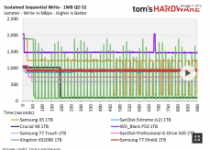
Elsewhere you asked about SSDs. I like to look at TomsHardware for SSD reviews. They test comprehensively. One thing that I've found that is important to me is the sustained write performance. This matters if you're in a hurry and need to transfer hundreds of GBs for editing immediately. If you can afford to wait for a longer transfer and you're just interested in the lower latency of SSDs vs HDDs, then it's probably less important. But as you see on their tests, the T7 Shield does decently well (it's the red line):

image_132223.png


Screenshot 2024-02-13 at 11.43.02â¯AM.png - Click image for larger version  Name:	Screenshot 2024-02-13 at 11.43.02 AM.png Views:	0 Size:	47.9 KB ID:	5709782

You probably need to go to the site to see the graphs clearly: https://www.tomshardware.com/reviews...e-ssd-review/2

The interface port of a drive is also very important (although that speed will be reflected in this chart).
 

Attachments
  • photo132223.png
    photo132223.png
    44.9 KB · Views: 1
Last edited:
Are you seriously using cheap little bus-powered drives as your main editing drives? Yuck.

In post 15, Samuel asked about the T7 Shield. I haven't used it, but those are the reviews.

But yes - I edit from Sandisk Extreme Pro V2's velcroed to my laptop. How else could I edit on the couch, in the kitchen, in the backyard watching the kids, etc etc? I will never be strapped to a desk chair for reasons of both health and practicality. These drives are faster than I need for editing. With greater throughput, I could probably shrink my export times. But it would save me probably just a couple minutes per edit day. You do you.

Screenshot_20240213_121531_Gallery.jpg
 
How else could I edit on the couch, in the kitchen, in the backyard watching the kids, etc etc? I will never be strapped to a desk chair for reasons of both health and practicality. ]

Geez, I have friends who are just hobbyists who take their work more seriously than that. Yes, you do you.
 
Geez, I have friends who are just hobbyists who take their work more seriously than that. Yes, you do you.

In my experience, getting to the work is way more important than how you get to the work. And in my harried existence, this is the best way to do so. Besides, sitting in a chair is terrible for you. Anyway, I made six figures last year from the editing side of my business alone so it's good enough for my present needs. Sure, you can't handle every editing task this way. But the vast majority of my edit time is consumed by shot review, selection, placement.
 
Last edited:
To be fair to ahalpert, as long as the read/write speed of the Drive/Interface combo is comfortable higher than the video's bitrate you should see no impact during the editing process. It may impact the speed of the render but given the following, I doubt that it will be the bottleneck but rather the GPU/CPU in rendering times.

In our BlackMagic Disk Speed Test trial using a USB 3.2 Gen 2 interface (on a MacBook Pro), the Extreme Pro V2 averaged a write speed of 944MBps and a read speed of 878MBps, similar to a slew of other drives limited to that interface.

The other factor would be the speed to copy from the original media, and also the finished file transfer. Again, the bottleneck is unlikely to be the Extreme Pro V2 at these speeds as the cards in camera's are usually slower and you are probably using the same bus for their adapter anyway. The same argument would probably hold true for the finished file transfer.

This drive is really just an USB 3.2 enclosure around a PCI Express 3.0 x4 NVME drive. So the internal HW is fine, and now just gets down to the reliability of the USB interface for unexpected disconnects with those cables flapping around.
 
To be fair to ahalpert, as long as the read/write speed of the Drive/Interface combo is comfortable higher than the video's bitrate you should see no impact during the editing process. It may impact the speed of the render but given the following, I doubt that it will be the bottleneck but rather the GPU/CPU in rendering times.


The other factor would be the speed to copy from the original media, and also the finished file transfer. Again, the bottleneck is unlikely to be the Extreme Pro V2 at these speeds as the cards in camera's are usually slower and you are probably using the same bus for their adapter anyway. The same argument would probably hold true for the finished file transfer.

This drive is really just an USB 3.2 enclosure around a PCI Express 3.0 x4 NVME drive. So the internal HW is fine, and now just gets down to the reliability of the USB interface for unexpected disconnects with those cables flapping around.

I use the Extreme Pro Portable 2TB USB-C and get better speed than quoted above, on my clumsy old workstation PC. Please don't tell it it's not a Mac, it could get its feelings hurt. Shoot 12K60 BRAW to it and edit on the same drive.

Capture2.JPG - Click image for larger version  Name:	Capture2.JPG Views:	0 Size:	80.8 KB ID:	5709812​
 
I'm all PC. Most editing is done on a PC with 2 x 42" OLED's & a 4090. Use a Thinkpad (also has an OLED Screen) when traveling and USB drives for editing and it's little iGPU. All works just fine with UHD 4:2:2 XAVC-I 50fps footage. The downside with the Laptop is one small screen, but that is a compromise I have to live with when away from home.
 
Just for comparison, on my Mac:

SanDisk 2TB Extreme: 767 Write / 744 Read
SanDisk 4TB Extreme Pro: 918 Write / 942 Read
SanDisk 2TB Pro-Blade SSD Mag: 2462 Write / 2751 Read
Internal 4TB SSD: 6749 Write / 5512 Read
 
To be fair to ahalpert, as long as the read/write speed of the Drive/Interface combo is comfortable higher than the video's bitrate you should see no impact during the editing process. It may impact the speed of the render but given the following, I doubt that it will be the bottleneck but rather the GPU/CPU in rendering times.

The other factor would be the speed to copy from the original media, and also the finished file transfer. Again, the bottleneck is unlikely to be the Extreme Pro V2 at these speeds as the cards in camera's are usually slower and you are probably using the same bus for their adapter anyway. The same argument would probably hold true for the finished file transfer.

This drive is really just an USB 3.2 enclosure around a PCI Express 3.0 x4 NVME drive. So the internal HW is fine, and now just gets down to the reliability of the USB interface for unexpected disconnects with those cables flapping around.

I entirely agree. Almost everything I shoot is Sony XAVC S-I from FX3/FS7. (If it's not that, then it's a more compressed codec with a smaller bitrate.) So, worst case is I'm processing 1.2Gbps streams (150MB/s). I could process several such streams simultaneously and have comfortable headroom with the Extreme Pro V2 sustained write/read speeds.

The maximum read speeds of my CF Express Type A cards is 800 MB/s. So, the SSD is not the bottleneck when offloading footage either.

If I had long render times, I'd be more interested in a faster drive situation. But most of my edits are 15 seconds to 2 minutes long. Usually my export is finished by the time I load the website where we post rough cuts (frame.io). So the time savings of reducing my render times would be negligible in absolute terms.

I have a reputation for being the fastest editor on the roster at my main client. Working knowledge of the software is more important. Most important is being able to conceptualize and execute good choices.

I'm not saying that there aren't advantages to using a properly built-out editing workstation. But in this case, drive speed is at the bottom of that list. And having a portable situation is a boon to my productivity.
 
I use the Extreme Pro Portable 2TB USB-C and get better speed than quoted above, on my clumsy old workstation PC. Please don't tell it it's not a Mac, it could get its feelings hurt. Shoot 12K60 BRAW to it and edit on the same drive.

​

This is about what I get. We could get even faster speeds if we had USB 3.2 Gen 2x2 ports on our computers. With that interface, the drive is rated up to 2GB/s transfer speeds (albeit not sustained).
 
Just for comparison, on my Mac:

SanDisk 2TB Extreme: 767 Write / 744 Read
SanDisk 4TB Extreme Pro: 918 Write / 942 Read
SanDisk 2TB Pro-Blade SSD Mag: 2462 Write / 2751 Read
Internal 4TB SSD: 6749 Write / 5512 Read

Most of the time, that excess speed is wasted. But again it really depends on what you're working on
 
I too have CFExpress Type A ( 2 x 1TB) cards.

They are fast enough that you can even work off the card itself. Not saying you shood, but I've done it. Plugged the CFExpress Type A into it's USB-C reader, imported into Resolve, did some scrubbing back and forward without issue, edited up, then rendered out the clip to the fast internal drive for uploading. Keep in mind these CFExpress cards are also PCIE (only 1 lane for Type A at present). Works when you are in a rush and want to get a quick edit out as you save all that time copying files around.

...or if you just want to see what they look like in your NLE
 
I too have CFExpress Type A ( 2 x 1TB) cards.

They are fast enough that you can even work off the card itself. Not saying you shood, but I've done it. Plugged the CFExpress Type A into it's USB-C reader, imported into Resolve, did some scrubbing back and forward without issue, edited up, then rendered out the clip to the fast internal drive for uploading. Keep in mind these CFExpress cards are also PCIE (only 1 lane for Type A at present). Works when you are in a rush and want to get a quick edit out as you save all that time copying files around.

...or if you just want to see what they look like in your NLE

That's how I do it, Damn the torpedos, full speed ahead!
 
It's gonna blow! Your in the red zone (that's never good)!!! :)

Okay, I cheated. My Mom in Heaven would not be proud of me to carry on with a lie. I didn't use an actual SSD to pull those big numbers. I had plenty of ram so I created a virtual disk in memory and loaded a copy of Resolve and some 12K and 8K BRAW media files containing a bunch of cc nodes and nr onto the virtual disk and ran it from there. Aside from starting up quicker and loading the thumbnails faster, it runs and renders at exactly the same speed as from the slower physical SSD drive that puts up write/read numbers worse than the Extreme Pro Portable USB-C drive that Abe and I use. So Abe's point that excess speed is wasted (with Resolve) is spot on 100%. In fact, Resolve is only using about 12GB of ram, doesn't leverage the storage drive that hard; it's really all about the GPU, your 4090 and my 3090. For Apple, I think all the memory is global, GPU and even SSD. So a faster SSD saves some time copying but I use the Extreme Pro to capture BRAW directly from the Ursa 12K, and edit on the same disk I captured on, and if it's important I'll make a backup first. So as long as it's fast enough for that, it meets my needs. I assume the WD Sandisk Pro Blade SSD would work equally well but not faster because the Ursa12K uses a USB 3.2 port that maxes out at 550 MB/S write.
 
. In fact, Resolve is only using about 12GB of ram, doesn't leverage the storage drive that hard; it's really all about the GPU, your 4090 and my 3090. For Apple, I think all the memory is global, GPU and even SSD.

Here's an unrelated question you might be able to help me with. Last week, I was doing an edit in FCPX and for the first time in years my program was crashing and unable to playback or export what I wanted. It was a static shot of an aging rock star seated and speaking to camera. There were three layers forming the base of the composition -- the full shot and then 2 garbage mattes covering up the boom and boom shadow which were in frame.

On top of that nested sequence i applied a series of color wheels filters to treat the background and different parts of the subject differently, followed by the standard Sony LUT. Then I applied 3 skin softening filters tracked to the face (one for the face, one for the neck, and one for the eyes which were covered by red sunglasses).

So far so good. But his pants were so tight that he had camel toe and the client asked me to obscure it. So i darkened the area with a color wheel constrained by a shape mask and a color mask (masked to the color of his pants). The program became unresponsive every time I tried to view this clip.

The crotch-darkening filter was not by itself a problem because i had tried it earlier without all the color correction and skin softening and hadn't had a problem.

So after trying everything I could think of to troubleshoot, i worked around it by exporting the clip without the crotch darkening filter and then applying the filter to the completed composition.

The strange thing to me was that when I went in to Activity Monitor to see what was going on when I tried to play back the clip with all effects (or the clip with all effects but the crotch-darkening filter), the "Memory Pressure" indicator was comfortably green. I think I was using something like 24GB out of 32GB of RAM although it may have said that some Swap Files were also in use.

I couldn't see any other indicators of stress in any other window in Activity Monitor. So I'm wondering if this was just a failure of FCPX to manage my resources (or even a failure of Mac OS Sonoma which I upgraded to last month and instantly undermined my system's stability and led to the first crashes I've ever had on my M1 Max). Or maybe it was an issue with RAM that I wasn't seeing in the monitor. Or maybe it was a GPU issue. What do you think?
 
A swap file means it is swapping pages of memory to disk so if that is happening on large scale there should be some disk activity visible in your activity monitor. But from the timing of the observation, I'd be suspicious that the OS system upgrade didn't go as planned and would be looking at a way to undo it. In Windows, the process is called "system restore." What it does is restore a copy of system files from an earlier time when all was well, restoring all the previous drivers and settings. It does not affect your work files and program files which are not overwritten. If there is a utility like that, short of restoring the complete operating system, programs files and data from a backup, that's what I would be trying. One other Windows utility is chkdsk, it's run from the command line with a choice of parameters after the drive letter that searches for orphaned or cross-linked clusters and tries to reunite them with their parents, correct errors in the root directory, file allocation table (fat) and indexing errors.
 
Last edited:
Back
Top