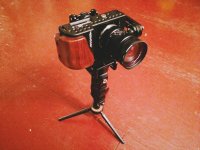
Micro Gimbal for GH4, BMPCC, A7s - $699 USD

It says motor load 1.2kg which I imagine is not the same as the camera weight capacity since the camera platform etc has a weight, too. It says it's rated for up to 1000g camera/lens combos.

Thanks for the clarification. I don't expect to use beyond 850g—GH4 + 7-14mm f4.
 
Interesting. Certainly, having only one screw to set is an improvement! The Yaw adjustment is a definite improvement. I couldn't tell what was going on with the pitch screw, they should have zoomed in on that. The problem with the Nebula is you can only adjust by turning a screw that faces the camera; if the camera is too close to the screw you're "screwed" ;) It seems on the PilotFly that they have two screws for the Pitch motor. One that face inside, which one can use if using a small camera, and one that faces outside, facing out like the camera, which would never be blocked. If that's the case, then yes, this is a vastly improved design IMHO.
 
So there's lots of back and forth on that forum link for the H1 about it being 8bit instead of the originally posted 32bit. I'm kinda new to all this...what is the difference in having a 32bit vs having an 8bit one? What advantages/disadvantages, etc.?
 
So there's lots of back and forth on that forum link for the H1 about it being 8bit instead of the originally posted 32bit. I'm kinda new to all this...what is the difference in having a 32bit vs having an 8bit one? What advantages/disadvantages, etc.?

32bit is no more better than 8bit for Nebula 4000. 32bit is better for low quality or DIY gimbal. Because two sensors better for keep horizonal in motion. Nebula always keep horizonal in motion, so it is no matter of Nebula 4000.
 
Hopefully after the initial supplier maggots fail, suppliers will energe that provide solid products that are well supported. This is a large market with high demand. Suppliers who have contempt for their customers will fail in due time. It isn't possible to overcome the damage they do to themselves with their shoddy business practices. People will quickly see through stunts like planting shills in forums.

Documentation is one thing to keep an eye on. If a manufacturer can't be bothered to provide good documentation, you have a good idea what they think about their customers. Run, don't walk away.
 
Last edited:
My first post on DVXUSER: Nebula 4000 + BMPCC First Test Shots

My first post on DVXUSER: Nebula 4000 + BMPCC First Test Shots

Hi Everyone,

I can't believe I've known about this forum for about a decade, but never joined the discussion. I guess this Nebula 4000 release has reinvigorated my interest in filmmaking. It took me about two weeks of tweaking and practice for many hours a day to go from no experience with 3-axis gimbal stabilizers, to decent understanding of PID tuning, camera balancing, and walking technique. As far as technique goes, I finally determined that I take really big steps when I'm walking normally, and this was causing the up and down, "bobbing" issue. The key is to take smaller steps and keep the knees bent. In the video below I'm applying that knowledge in the first scene, but the other clips were shot earlier and suffer from a good amount of bobbing (smoothed somewhat with warp stablilizer).

I think the Nebula 4000 is definitely a game changer, I'm very happy with it (the guys at Camera Motion Research are great; I highly recommend buying it through them), and I have no regrets being an early adopter, regardless of any competing products that may appear. If anyone is interested in my PID settings or any other technical info, let me know.


link: https://www.youtube.com/edit?o=U&video_id=O6xPQZ3yY38
 
Last edited:
My Nebula is making a High pitched sound and it is lightly shaking. When I turned it on, out of the box, the device was rapidly shaking and now it is making a high pitched sound. It does not respond to the red button presses. If I hit the red button, one, twice or three times, it starts to shake and makes the high pitch noise. I've tried to calibrate it as well.


The camera I have on there is an a6000 with a sigma 30mm art lens and a Tiffin 72mm Variable ND Filter. The nebula was shaking and making the high pitched noise before I put the camera on.

Here is a video: https://drive.google.com/file/d/0BwtVmYRbdrPpQ1VvR3lpdURrWFE/view?usp=sharing
 
Looks to me that it isn't balanced as well as it should be. Also, if you don't tighten all screws they start to come out and then you get that vibration and sound. The IMU may need to be calibrated. Camera is pointing up a bit? That my 2-cents. BALANCE BALANCE BALANCE.
 
Looks to me that it isn't balanced as well as it should be. Also, if you don't tighten all screws they start to come out and then you get that vibration and sound. The IMU may need to be calibrated. Camera is pointing up a bit? That my 2-cents. BALANCE BALANCE BALANCE.


I get it to the point were everything floats but it's the 45 degrees that I can't seem to achieve.
 
My only experience is what I’ve read here . . . and using a non-adjustable, Feiyu FY-G4 3-Axis gimbal with my GoPro.
Of course there is no setup because the thing is made for the GoPro (which is so light it’s nearly ignored in the entire process).

Anyhow . . .

I’m hoping that the next generation Nebula 4000 (or similarly priced competitor) will come up with software that senses the camera on startup (would likely need to be sitting on a stand) and makes the fine adjustments automatically.

That would be cool!

The trick will be to see if (when) that happens if the “do-er” will be able to deliver quality at a reasonable (as opposed to astronomical) price point. Here’s hoping!

I guess an intermediate step toward relieving some of the frustration might be to add a couple of adjustment (worm) screws like some of the lesser expensive Steadicam or glide-cam devices.

P.S. It’s a one trick pony and only handles the GoPro but I sure am satisfied with the FY-G4.
 
My Nebula is making a High pitched sound and it is lightly shaking. When I turned it on, out of the box, the device was rapidly shaking and now it is making a high pitched sound. It does not respond to the red button presses. If I hit the red button, one, twice or three times, it starts to shake and makes the high pitch noise. I've tried to calibrate it as well.


The camera I have on there is an a6000 with a sigma 30mm art lens and a Tiffin 72mm Variable ND Filter. The nebula was shaking and making the high pitched noise before I put the camera on.

Here is a video: https://drive.google.com/file/d/0BwtVmYRbdrPpQ1VvR3lpdURrWFE/view?usp=sharing

I seem to have a real knack for balancing these things, but even when I didn't have perfect balance (with a rig that is pushing the weight limit) I don't remember hearing a high pitched sound like that. Did you order directly from China or did you order from Camera Motion Research? Part of your problem sounds like one of the motors is set to the wrong polarity (the "INV" switch under the motor power section). A wrong setting there usually causes the motor in question to go haywire. These are the steps I would follow, roughly in order, to determine if your Nebula is defective, or otherwise isolate which setting(s) might be causing the problem:

VERY IMPORTANT: do not hit "reset defaults" at the bottom next to "motors on/off!" The only "reset" you would want to do is a restore of the profiles that were set out of the box. The first thing you should do is back up those profiles to disk. Also, set the action for a "long buttton press" to blank in the "Service" section, removing "reset controller." Turn on the alarm/beep for menu/profile button changes so you get feedback that the button presses are actually doing something.

- Number 1: how far from the factory settings have you strayed, and did you save the profiles to disk so you can restore them? You may want to revert back if you've changed too many settings and/or forgotten what you've changed.
- What is the status of the green LED: off, on, blinking slowly, blinking fast, or blinking irregularly? Normally it should be on, or blinking slowly during calibration. See "Status LED" in the PDF manual linked below if it's doing something else.
- Does anything change after a motor calibration ("AUTO" button in motor power section)? it's the "INV" checkbox you're concerned about. Here's the board's reference manual, btw: http://www.basecamelectronics.com/files/v10/SimpleBGC_manual_2_4_eng.pdf. Note that the correct number of poles for each motor is "14," and the setting should be switched back to that value if calibration shows differently.

If motor auto-calibration didn't fix the issue:

- Does the high pitched sound go away when you turn off the motors?
- Does the realtime graph display set to fastest/widest response reveal which motor in particular might be vibrating?
- I believe you can isolate each motor by turning the "motors on/off" switch back on and then dialing the power down to "0" to two motors at a time. You could also dial one motor at a time down to "0" and see if you can isolate it that way. Does the vibration/sound go away?

I'll stop there and see if you make any progress ;)

EDIT: Here's a pic of my (somewhat ridiculous, almost too heavy) current setup - BMPCC, MOVCAM, SLR Magic 12mm T/1.6:
 

Attachments

  • image.jpg
    image.jpg
    113.8 KB · Views: 0
Last edited:
One more thing: you should touch each motor to make sure none of them are getting very hot to the touch. Warm is fine, but very hot is not good at all. For some reason my ROLL axis motor gets very hot at power levels of 140 and up, which seems kind of low to me. Anything above 80C for long periods can permanently damage the magnets (I believe it's 80C, or something like that).
 
I seem to have a real knack for balancing these things, but even when I didn't have perfect balance (with a rig that is pushing the weight limit) I don't remember hearing a high pitched sound like that. Did you order directly from China or did you order from Camera Motion Research?

VERY IMPORTANT: do not hit "reset defaults" at the bottom next to "motors on/off!" The only "reset" you would want to do is a restore of the profiles that were set out of the box. The first thing you should do is back up those profiles to disk. Also, set the action for a "long buttton press" to blank in the "Service" section, removing "reset controller." Turn on the alarm/beep for menu/profile button changes so you get feedback that the button presses are actually doing something.

- Number 1: how far from the factory settings have you strayed, and did you save the profiles to disk so you can restore them? You may want to revert back if you've changed too many settings and/or forgotten what you've changed.
- What is the status of the green LED: off, on, blinking slowly, blinking fast, or blinking irregularly? Normally it should be on, or blinking slowly during calibration. See "Status LED" in the PDF manual linked below if it's doing something else.
- Does anything change after a motor calibration ("AUTO" button in motor power section)? it's the "INV" checkbox you're concerned about. Here's the board's reference manual, btw: http://www.basecamelectronics.com/files/v10/SimpleBGC_manual_2_4_eng.pdf. Note that the correct number of poles for each motor is "14," and the setting should be switched back to that value if calibration shows differently.

If motor auto-calibration didn't fix the issue:

- Does the high pitched sound go away when you turn off the motors?
- Does the realtime graph display set to fastest/widest response reveal which motor in particular might be vibrating?
- I believe you can isolate each motor by turning the "motors on/off" switch back on and then dialing the power down to "0" to two motors at a time. You could also dial one motor at a time down to "0" and see if you can isolate it that way. Does the vibration/sound go away?

I'll stop there and see if you make any progress ;)

EDIT: Here's a pic of my (somewhat ridiculous, almost too heavy) current setup - BMPCC, MOVCAM, SLR Magic 12mm T/1.6:

I bought my Nebula off of Ebay. I originally bought it from Film Power but I canceled it because I didn't here to many great things about them.

I already hit "reset defaults" a couple of days ago but not before I saved my original profile. Note, my original profile makes the Nebula go haywire. It squeals and uncontrollably shakes. I received a second profile from a Nebula user in a Nebula FaceBook group. That profile calmed down the Nebula but it still lightly shakes. I haven't messed with any of the setting past those two profiles. I loaded them and then pressed write. When I push the red button one, two or three times it doesn't respond it just continues shakes.

Whenever I calibrate it will do a sequence if beeps and then shake. The SimpleBGC continues to say that calibration has started. I saw a video of someone calibrating their Nebula and mine definitely didn't operate normally.

While calibrating my Nebula's green leds blink fast and the device starts to shake.

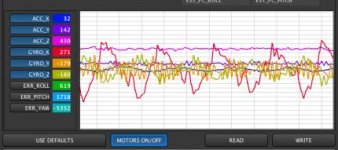
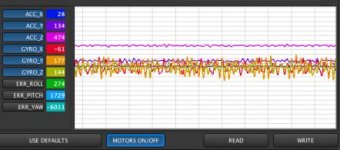
This is the graph with the motors on.
Screen Shot 2015-03-30 at 7.15.47 PM.jpgScreen Shot 2015-03-30 at 7.17.19 PM.jpg

Also they are not heating up.
 
Ah, gotcha. I recommend buying from Camera Motion Research for anyone who wants one of these things but hasn't ordered yet. They test all functions and balance a camera on every unit before shipping them out, and they provide great support.

There are three basic calibrations relevant to your issues: accelerometer, gyroscope, and motor polarity/poles. To avoid the issue with motors shaking during the ACC and GYRO calibration, shut off the motors using the software. Make sure the surface you're using is level and that you've procured two small wood blocks (or anything similar that does not contain magnets) to prop up the camera mounting plate on the pitch axis. If you happen to have an iPhone, go into the compass app and swipe left, revealing a great leveling app. You can initiate both calibrations from within the software since it's unclear whether the menu button is working.

Next, calibrate the motor polarity and number of poles. Stand the unit upright and balanced, powered on, with motors active, then push "AUTO" under "motor configuration" in basic settings. The motors will slowly turn one at a time, counting poles. The important thing will be getting the polarity correct ("INV" checkbox next to each motor). If anything other than 14 poles is detected, enter "14" manually.

After you get through that, you can move on to figuring out if your settings are causing any residual noise and vibrations, or if the unit is faulty. I'm happy to help while all of this is still fresh in my mind after my two week "Nebula tuning" binge.
 
sterlingenuine: I just watched that guy's first video and it reminded me of a couple of things. You said you did a full reset near the beginning, then restored the saved profiles. I don't know for sure, but it's possible you lost the calibration data for the 6-point, "more accurate" calibration Filmpower does before shipping out the units. That high-pitched sound is weird, and definitely not normal. At one point in his video I noticed the battery power indicator in the software was reporting only 4.1V going to the board, instead of the normal range of around 10.8-12.6V. What voltage levels are you seeing?

EDIT: I notice something interesting in his second video: the high-pitched sound stops briefly after he starts the ACC calibration, but the calibration fails and the sound resumes. That might be indicating that the sound is related to the lack of proper ACC calibration data.

Another thing I was reminded of is that you may be taking certain risks by accessing the board using a USB cable rather than over Bluetooth. Filmpower states in their very sparse manual that they "don't support" using a USB connection, but they don't say why. They even placed a sticker over the USB port as if to emphasize the point. I had a brief scare in the middle of updating my firmware from 2.4b6 to 2.4b7 (not sure why mine didn't come with the latest version) where I lost the ability to connect via bluetooth, and I was forced to briefly use USB. I noticed that my USB connection sent power to the board even when the unit was switched off, which could potentially lead to over-voltage or other issues when you power on. I strongly recommend getting a bluetooth card for your computer and not taking any chances with USB. Btw, what caused me to lose bluetooth communication was dropping the baud rate to the next lowest setting from the default. Don't touch the baud rate!
 
Last edited:
Back
Top