Micro Gimbal for GH4, BMPCC, A7s - $699 USD

I cant seem to get my Macbook Pro Retina to see the Nebula 4000 via USB to fine tune with SimpleBGC. Downloaded a USB driver too but tried to install. When I double click to install nothing happens. Strange.

I have it fairly well tuned but the roll balance is giving me issues. I think the motor is to strong. Need to get into the PID.
Use bluetooth.
 
Tried Bluetooth too but won't connect. Hmm....
What password are you putting in? The password key is 1234.

Also, did you do this:

MAC OS users: GUI uses a serial communication, that needs to create a lock file.
To allow it, you should to do the following steps:
1. Start terminal (navigate to /Applications/Utilities and double click on Terminal)
2. Make folder "/var/lock" by command: sudo mkdir /var/lock
3. Change permissions by command: sudo chmod 777 /var/lock
4. Allow to run non-signed applications in System Preferences > Security & Privacy >
General > Allow Applications downloaded from: Anywhere (see http://d.pr/i/9fAm )
 
What password are you putting in? The password key is 1234.

Also, did you do this:

MAC OS users: GUI uses a serial communication, that needs to create a lock file.
To allow it, you should to do the following steps:
1. Start terminal (navigate to /Applications/Utilities and double click on Terminal)
2. Make folder "/var/lock" by command: sudo mkdir /var/lock
3. Change permissions by command: sudo chmod 777 /var/lock
4. Allow to run non-signed applications in System Preferences > Security & Privacy >
General > Allow Applications downloaded from: Anywhere (see http://d.pr/i/9fAm )

Password 1234 and 2222. Just got it to connect with Bluetooth but the app doesn't see it.

I saw that readme file and did the command. It did create the file when I run
mkdir: /var/lock

I get this.
mkdir: /var/lock: File exists.

Then I inputed.

sudo chmod 777 /var/lock

I dont get feedback from terminal. Just another

Erik-Nasos-MacBook-Pro-Retina:~ eriknaso$

I don't use Terminal very often. Thanks for the help.
 
Last edited:
When I hooked up the Nebula on WIN 7 for the 1st time, WIN7 automatically searched, found, and installed a driver. When I now connect the Nebula, it turns on automatically and beeps.

How about trying another USB cable?
 
More comments:

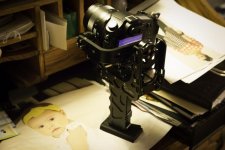
1. With no second pin locking the position of the camera to the tilt bracket, knocks on the lens rotates the camera out of roll balance all the time, so I am trying a tie wrap around the lens looped through the slots on the base.

2. One of the four allen head screws attaching the L shaped roll bracket to the motor is stripped out, and I didn't do anything harsh for this to happen. Hoping it is the screw (they send spares) and not the female thread that is damaged.

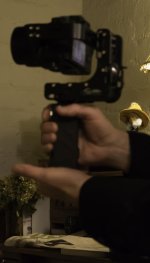
3. Having the Manfrotto quick release adapter slide plate on the bottom of the handle full time makes it easy to set the rig down on my desk in an upright position, and it doesn't feel like it's going to tip over accidentally, with due care. The plate also allows me to rest the rig on the palm of my left hand while shooting, using my right hand on the handle in a very light Merlin-like grip to control movement. Can use two hands for control, when not using the monopod. This I think will help me maintain a constant camera height better.

E38T9415.jpg

E38T9425.jpg
 
Last edited:
It's just a sensor calibration and a gyro calibration. Without the Gh4 you will have to enter the PID settings with software.
That's not necessarily helpful advice. The two calibrations independent of the full software interface could solve the problems he mentioned. Always better to advise the less risky and less complicated possibility first, right? Let's hear back.
 
That's not necessarily helpful advice. The two calibrations independent of the full software interface could solve the problems he mentioned. Always better to advise the less risky and less complicated possibility first, right? Let's hear back.
How is telling people WHAT the in gimbal calibration operations actually do "not necessarily helpful advice"? All the push 4 times calibration does is calibrate the sensor attached to the sled. All the push 5 times calibration does is calibrate the gyros according to the input PID values. You would do that in a ambient temperature change or after long uses.

What you gave was "
not necessarily helpful advice" telling people to use the sensor calibration and gyro calibration in their hopes to get different results. Which they wouldn't. ALL GIMBALS need PID adjustments to tune for specific camera packages and performance expectation. Calibrating the sensor will only tell the gimbal what is level. Calibrating the gyros only lets the board send the proper power to the gyros from the PID values.
 
Hi Guys I am not that computer tech savvy can anyone please point me to the correct JDK file When I try to open the simpleBGC_GUI_2_40 software on my Mac Pro retina it says "To use the “java -jar SimpleBGC_GUI.jar,” command-line tool you need to install a JDK." It seems there are many choices of JDK I have no idea which one/file, thanks.
 
You said you got the bluetooth to read the N4000. Switch the app connection type to /dev/tty.Nebula-DevB and hit connect.

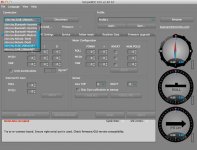
Unfortunately I get the same results. with Bluetooth except no error message. I cant change anything. The key is the under "Board" it doesn't have the version listed and under Firmware it also has a -

All the values are set to 0 and I dont think that is correct. If I change the ROLl values in PID I cant WRITE because it's grayed out.

All the commands on the bottom are greyed out.

USE DEFAULTS
MOTORS ON/OFF
RED
WRITE


This is making me crazy!
 
Last edited:
Hi Guys I am not that computer tech savvy can anyone please point me to the correct JDK file When I try to open the simpleBGC_GUI_2_40 software on my Mac Pro retina it says "To use the “java -jar SimpleBGC_GUI.jar,” command-line tool you need to install a JDK." It seems there are many choices of JDK I have no idea which one/file, thanks.

Double click the .jar file and the GUI opens.

You will need to use terminal to get it to work. Read the read me file in the folder for instructions. It's pretty straight forward. You also need the USB driver. Download VCP (832 KB)
 
Last edited:

This video is helpful but lacked chapter marks so I decided to add them and posted it as a reply on the Youtube video. Now if you need a refresher how to do each adjustment go to Youtube and just click on the time stamp and the video will jump to the point.

Chapter Marks.

3:37 Axis Vertical Balance
6:07 Roll Balance
10:00 Pan Balance
13:32 Switch Modes
16:10 Sensor Calibration
17:57 Android Tuning & Remote
35:31 PC Mac Bluetooth Lnk
40:41 Mounting Monitor And Extend
52:50 Mounting GoPro
 
Last edited:
I loaded program onto my wife's windows laptop and connected it via bluetooth no problem so shan't bother with it on mac now. Have played with some settings including resetting calib.ACC and Calib.Gyro via the program (held a block in between it to stop it moving during calibration) currently it is almost horizontal pitch meter reads 0.22 and blue reads 0.02 so thats reasonable now and the horizon bar on the GH4 is green so am now happy with that. Might be good if we all share a few settings?
With GH4 and 12-35 lens set on 12mm I have put the following settings in to basic PID controller roll 23 pitch 20 yaw 25 and motor configuration roll 255 pitch 185 and yaw 120 seems reasonable only trouble is its dark outside now so can't really check footage until tomorrow. Looking good though!
 
Last edited:
Dustylense: I can only see a thumbnail screenshot, do you have a higher res of that pic as well? I can barely read any number. Thanks.
 
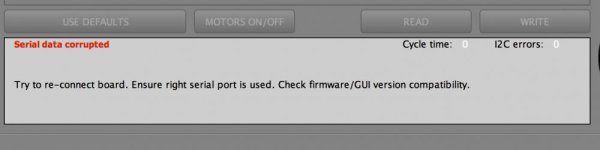
Nebula Error.jpg

I have a good balance with my A7s as of now but I think I could get it even better. It tends to freak out if the roll goes to far. This error bugs me because I cant get the Nebula 4000 to talk to the software at all even on a PC, mac with Bluetooth or USB.
 
Back
Top