Marvel Cine Gamma 7D picture profile

Loic

Active member
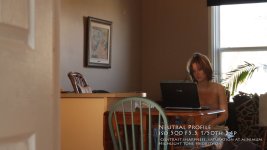
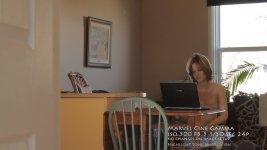
I stumbled upon this picture profile from Marvel and thought I would share my tests. I found it kills the highlights to much but depending on the scene it can be really helpful as a canvas for color correction in post. These images are straight from the camera. No alteration done on them.
 

Attachments

  • House_marvel.jpg
    House_marvel.jpg
    93.2 KB · Views: 0
  • House_neutral.jpg
    House_neutral.jpg
    95.6 KB · Views: 0
  • plants_marvel.jpg
    plants_marvel.jpg
    128.5 KB · Views: 0
  • plants_neutral.jpg
    plants_neutral.jpg
    126.1 KB · Views: 0
I'm not sure I understand your decription "kills the highlights to much." It seems like it preserves the highlights better. You can see more detail in the hi's with this profile. Unless I read you wrong.
 
Look in the image of the girl, the door on the left with a beige highlight. The highlight is there in the neutral picture style but in the Marvel one, it's practicaly gone.

I know that in the plant frame grab Marvel protects the details on the leaves so it helps the highlights.

I guess it's a question of scene's intention. I am still not settled on the issue.
 
I'm a bit new at this, but in the door's case, as I can apparently see less than the neutral setting, I think once contrast is added (or shadow's crushed for example) detail can be revealed.

Is it safe to say the door looks flat but when treated for color details can emerge? I find this happens quite a bit with files I obtain. Things look flatter but once the gamma's pushed a but things start to show up.

I think the concern is less contrast = less clip? Yet things may look flatter and less detail-ey? (scuse the made-up word).
 
Loic, it's exactly as greymog states. This mode is not meant for you to leave untreated. Once you do the necessary post work on this footage you will see that beige color come back. When referring to highlights just look in the window at the whitest areas (outdoors). The neutral picture shows an almost completely white outdoors....while the other actually starts to show some more details showing up in the background. When you see a completely white shot in the picture it means that you lost information that you more than likely can’t get back (same thing for the dark areas). But if you shoot flat as possible you preserve both these areas.

That’s what this mode does…preserves more of the highlights (trying to keep it from blowing out so as to squeeze out more detail in the brightest areas of the picture) while at the same time all the darkest areas, where you couldn’t make out detail before, are raised up (showing more objects and detail in the shadows). The idea behind this is to give you the best latitude. Once you capture as much information as possible…now you can add back as much contrast as YOU want and not what the camera dictated to you.

Basically shooting flat will not look good coming out of the camera but is meant for post production giving you more control over the final image.
 
I think (and I'm only guessing here) that's something that could be fixed by adjusting your gamma's mid tones. That's almost the same look I get when fiddling with the mid tones in my gradient map within Sony Vegas. You should be able to fix that look with a curves adjustment also.
 
I tried this for a few days, it definitely does some voodoo to skin tones. I went back to neutral settings and haven't looked back.
 
plus look at the noise on the wall behind the girl - in addition to fugly skin tones the scene profiles have also added too much noise back in - the real strength of the 7D.
 
I agree. I used it a few times and went back to neutral. Adds noise and makes people look like they are made of plastic. Bad, bad.
 
i too started off with one of the superflat settings but found that the noise in the darker areas to be unacceptable. It's really too bad because the setting gives the range a ton of potential, but the drawbacks far outweigh the benefits.
 
I too tried shooting in a super-flat mode with the intention of adjusting levels in post. When I got to post (FCP), it seemed like my only resource was color correction - 3 way. There was very little to do as far as trying to improve the image.

Am I missing something? What do people mean exactly when they talk about raising the levels in post?

Thanks.
 
I also had some problems in FCP with color correction. I apply the 3-Way color corrector and try to push the gamma levels and maybe I'm crazy, but it seems I can't do much because I start to see "blockiness". It almost seems that the initial compression with the h264 codec makes color correction a bit of a pain, or at least limited as to what I'm used to working with DVCProHD with files from the HVX.

Am I crazy?
 
Back
Top