Can't really tell what is macro blocking and what is Vimeo compression. The video isn't down-loadable.
u can kinda see it in the blacks on the table. I actually notice a huge difference. Way less "blocking" for sure.

Follow along with the video below to see how to install our site as a web app on your home screen.
Note: This feature may not be available in some browsers.
Can't really tell what is macro blocking and what is Vimeo compression. The video isn't down-loadable.

The encoder has been set to a variable bit-rate rather than a constant bit-rate which explains the difference in the data rate.
I've uploaded a file straight out of the 5D @ 68Mb/s- http://www.megaupload.com/?d=U23STMNG

Supposedly Magic Lantern 0.1.6 works with firmware 2.0.8. I copied the ML firmware to the root of my Sandisk Extreme IV (45MB UDMA 16GB), as suggeted in the wiki I turned the auto sensor cleaning off, also using original Canon battery but I can't get ML to work. After I start the upgrade process the camera just locks up, black screen, no reaction. Would love to try the new higher bitrate modes. Any ideas?
As the full bit rate causes a lot of buffer stops I thought I would do a test by reducing the visible information on screen with a black card aperture over the sensors OLPF, whilst the shutter is up. Not for the faint hearted as this could screw your shutter if live view fails.
A kind of Heath Robinson 2:35 Ratio.]
You my friend have stones.

As the full bit rate causes a lot of buffer stops I thought I would do a test by reducing the visible information on screen with a black card aperture over the sensors OLPF, whilst the shutter is up. Not for the faint hearted as this could screw your shutter if live view fails.
A kind of Heath Robinson 2:35 Ratio.
The result is I can record full bit rate (-16) at 25p. For as long as I need, the buffer only ever reach 1 bar even with lots of whip pans and bright light. Card: 8GB 60MB/s UDMA SanDisk.
I had the same problem. I went down to 2.0.4 then back to 2.0.8 and it worked with ML.
Got it to work now, thx!... however I can't seem to find how to change the bitrate. Googling it didn't shed any light on this neither is there any info how to activate the higher bitrates on the wiki, unless it's really hidden away somewhere.
Brilliant!
Do you still get 1920 pixels wide with that black card in place? Another option would be a couple of strips of electrical tape.
Fixed rate would be great, should stop the spikes.I've been testing a Lexar 600x 16Gb UDMA card, my research suggested that this was the fastest card on the Canon DSLRs but unfortunately it's performing about the same as the Sandisk extreme 60MB/s card. I'm still getting about 60-65Mb/s with the -14 setting. The variable bit-rate is really frustrating especially in low light. I think a constant bit-rate would work a lot better.
Yeah tape could get messy, now I'm thinking whiteboard marker.
Another possible option could be to get a pro to remove the OLPF and put a mask underneath it. With the MKIII not too far away I probably wouldn't go that far but it's certainly something I'd be interested in exploring to get more bits out of the MKIII. I letterbox all my work in post anyway.
5th Menu across 'Debug' 3rd Item down 'QScale' press down on the joystick to change and cycle through settings. Default is '-8' Highest bitrate setting is '-16' not '+16'.
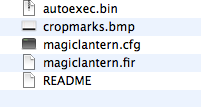
That's the one I downloaded. Put the cfg and fir files in the root, obviously it works but there is no qscale option in any of the menus.. also no entries of anything related to the bitrate in the config file when I open it with a text editor.
