T2i Magic Lantern for 550D in progress!

robotsound: thanks for the very detailed feedback.

Cropmarks are read from the disk, in the order they appear, in this find_cropmarks(). If the current cropmark index was changed, the new cropmark is read from disk only when needed: cropmark_draw(). So you have to sort cropmark_names[]. All of these are in http://bitbucket.org/hudson/magic-lantern/src/tip/zebra.c .

When getting the source code, be sure to select the 550D branch. The source is usually posted at the same time with the builds.
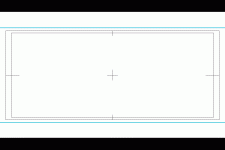
 
Here are some custom cropmarks I made in case anyone is interested.

239.gif

178.bmp - action and title safe grid for the 1:78 aspect ratio
185.bmp - action and title safe grid for the 1:85 aspect ratio, with prominent crop marks at the frame boundaries
239.bmp - action and title safe grid for the 2:39 aspect ratio, with prominent crop marks at the frame boundaries
combo.bmp - action and title safe grid for the 2:39 aspect ratio, with prominent crop marks at the frame boundaries for both 1:85 and 2:39

Enjoy!

View attachment cropmks.zip
 
Cropmarks are read from the disk, in the order they appear, in this find_cropmarks(). If the current cropmark index was changed, the new cropmark is read from disk only when needed: cropmark_draw(). So you have to sort cropmark_names[]. All of these are in http://bitbucket.org/hudson/magic-lantern/src/tip/zebra.c .

Thanks for that information!

Since it's just a simple sorting function, would it be OK if I just prototyped it in Linux and then sent it to you? I'm still a little scared of the whole "your camera might explode" thing :)

Basically, my plan would be to implement a simple (bubble) sorting function that works in place and doesn't need to allocate much memory (save for a couple of integers to use as indexes). I wrote a little toy GameBoy Advance game in ANSI C several years back (also using GCC), and this prototyping strategy served me quite well while I was establishing the initial data model before I got my dev environment set up.

Is this something you would find helpful?
 
robotsound: Well... if you change settings blindly without understanding what's going on, it's dangerous. For a simple sort like this, the risk seems very low (just be careful with the pointers).

DorianVasco: Max bit rate may be affected by magic zoom and other CPU-intensive items from LiveV, and also by card fragmentation. It's good to start each test with a formatted card, and have the same settings (the same magic.cfg).

It would be nice to see how much each feature from LiveV affects bitrate.
 
a1ex: I wrote some sorting functions that should work with Magic Lantern. I sent you a private message with a link to the code.
 
DorianVasco: Max bit rate may be affected by magic zoom and other CPU-intensive items from LiveV, and also by card fragmentation. It's good to start each test with a formatted card, and have the same settings (the same magic.cfg).

It would be nice to see how much each feature from LiveV affects bitrate.
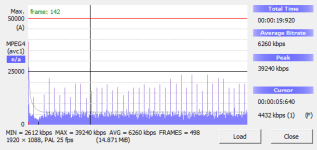
Even with MagicZoom off, bit rate averages here at 42Mb/s (occasionally it touches the 43Mb/s bar).

Dorian, I will check former versions and report.
 
I tested a few builds and it seems that the bit rate issue begins with the 2011Apr29.550d.fw109.little-bits

Can anyone confirm that?
Yes, it seems like 26Apr works. I can record at 50Mb/s (which roughly translates to 45-46Mb-s Avg /-16 Qsc)
 
i'm using the 5may build. in movie mode i noticed that ml displays the speed as 1/31. i have 1920x1080/30 selected in the canon menu. when i go to change the speed with the set and disp buttons, i get 37,34,31, and then it goes to 4000. hitting set again doesn't bring it back around, i have to use disp to go down.

is this normal or have i screwed up one of the settings? when set at 31, is the cam actually recording at 1/30 or at 1/31?
 
JFI : I get out of the box 38Mb/s bit-rate (insted of ~44-45) on the latest firmware (7-5) @ FW Default.

What happened to bit-rates since build 26/4 ? :( (is it just display thing or is it real figures).

My magic zoom is turned on but not active (but even then - so is the one in 26-4 build)

My zebras are not set as RGB and I have turned off GD (again).
 
Last edited:
FW default works the same with or without ML. It is not perfectly constant bitrate, it depends (a bit) on what you are shooting.

If the free space indicator in top right corner is correct, then ML bitrate display (AVG) is accurate.
 
Here's a new feature idea (or at least it's new to me). Have the Spot Meter display its readout in relative stops, as an option in addition to percent and IRE.

Here's how I imagine this would work:

1) In addition to the current percent and IRE spot metering modes, you would have a new mode called "relative" (or something).

2) When in relative mode, it would display how many stops up or down you were from a nominally correct exposure (probably as defined as 18% grey). It would display in 1/3 stop increments.

3) When you went off the charts, perhaps it would just turn into a minus or a plus, indicating there wasn't really an exposure there anymore.

In normal usage, if you had a "correct" exposure and pointed the spot meter at an 18% grey card, it would simply read "0". If you opened up the aperture one stop, it would read "+1". Fractional exposures such as "plus one and a third stops" could be represented as "+1 1/3". Shadow detail one stop below 18% grey would read out as "-1". And so on.

Some of these settings might change depending on the picture style being used, since the spot meter reads the framebuffer as input, which I believe comes after the picture style.

Am I correct to assume that 36% would always be one stop above 18%, or is this an unfounded assumption?

Is this a feature that anyone else would like?

I could do some camera tests using different picture styles and come up with a look-up table to map exposure readings to relative f-stop values if there was any interest from a1ex.

Thanks!
 
Hi, I just did a quick test of the new build 2011May11.550d.fw109.CBR.alex

- Playback mode does not work anymore. After pressing 'play' no buttons work except 'half shutter' which switches back to normal)

+ CBR seems to work. Without audio I am able to record 3x on my class 10 card.

FW Standard:
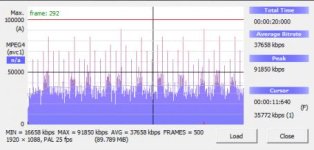
01 fw standard.jpg

CBR 1x:
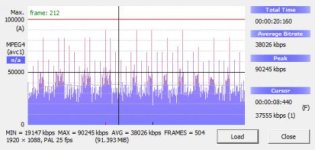
02 cbr 1,0.jpg

CBR 2x:
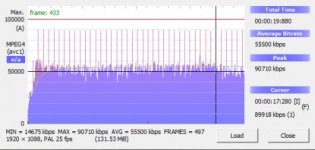
03 cbr 2,0.jpg

CBR 3x:
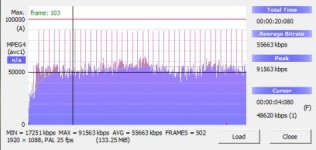
04 cbr 3,0.jpg

CBR 0.1x:
05 cbr 0,1.PNG

Thanks for your work Alex!
 
Back
Top