
Navigation
Install the app
How to install the app on iOS
Follow along with the video below to see how to install our site as a web app on your home screen.
Note: This feature may not be available in some browsers.
More options
You are using an out of date browser. It may not display this or other websites correctly.
You should upgrade or use an alternative browser.
You should upgrade or use an alternative browser.
T2i Magic Lantern for 550D in progress!
- Thread starter ...
- Start date
Not both at the same time (just in the same build).Both 1920x 1080 and audio monitoring.
So here we are on the cutting edge of video making.
With the uncompressed 4:2:2 frames recorded onto a nanoflash, or equivalent, or even tethered in a studio suituation.
There are two leaders as I see it: your Magic Lantern enabled 550d Alex, and the Gh-2.
Both are delivering quality and price previously unobtainable by the little guys.
I'm thinking the 550d wins due to all of your work and its wider field of view.
the gh2 lenses appear to have a 2x magnification. Too much compared to our friend the 550d
Im teetering on the edge here too, waiting to jump in. Gonna invest in what for me is a big outlay.
A smoking fast pc with all the bits to edit & Key 4:2:2, and a DSLR.
Its the type of investment that could be a life changer.
A high end professional setup. Whoa Momma !.
Looking forward to hearing from anyone whos captured the clean Hdmi output in pal hd.
They might even have keyd the footage !
If anyone has done it, they are sure keeping quiet about it on the web,
If they are keeping quiet, I would'nt blame them, they have the advantage.
D-allstar
With the uncompressed 4:2:2 frames recorded onto a nanoflash, or equivalent, or even tethered in a studio suituation.
There are two leaders as I see it: your Magic Lantern enabled 550d Alex, and the Gh-2.
Both are delivering quality and price previously unobtainable by the little guys.
I'm thinking the 550d wins due to all of your work and its wider field of view.
the gh2 lenses appear to have a 2x magnification. Too much compared to our friend the 550d
Im teetering on the edge here too, waiting to jump in. Gonna invest in what for me is a big outlay.
A smoking fast pc with all the bits to edit & Key 4:2:2, and a DSLR.
Its the type of investment that could be a life changer.
A high end professional setup. Whoa Momma !.
Looking forward to hearing from anyone whos captured the clean Hdmi output in pal hd.
They might even have keyd the footage !
If anyone has done it, they are sure keeping quiet about it on the web,
If they are keeping quiet, I would'nt blame them, they have the advantage.
D-allstar
If anyone has a $199 Blackmagic Intensity Pro (PCI Express) or Intensity Shuttle (USB 3.0), it would be interesting to test this. I've seen tests with the Canon HV30 and the Intensity Pro recording 4:2:2 and the difference was marginally better than recording HDV to tape. Where it shines though is in keying and color correction. Wonder if it's the same with the T2i?
the difference was marginally better than recording HDV to tape.
I hope so.
The difference can be seen on fine detail like hair, or light wispy, fabrics and transparent items.
That difference can be between almost convincing and a proper professional illusion result to be proud of.
I've added a section about power saving in the user guide, with some figures based on soren's measurements. Can you check if my computations were right?
Also, config file is saved automatically, and if you enable "turn off display", it will stay off until you disable it from ML menu. This helps a lot with long recordings and overheating.
http://groups.google.com/group/ml-d.../803c679a4c59db09?show_docid=803c679a4c59db09
Also, config file is saved automatically, and if you enable "turn off display", it will stay off until you disable it from ML menu. This helps a lot with long recordings and overheating.
http://groups.google.com/group/ml-d.../803c679a4c59db09?show_docid=803c679a4c59db09
I have an issue with the last two builds of ML on my T2i. I use an external microphone so I set my input to "external stereo," however when I restart my camera, it starts using the internal mic instead. I've checked the ML menu and it still says "external stereo" and I have to change it back and forth in order for it to use the external mic again.

Jarrett P. Morgan
Well-known member
Are you saving your config file?

ChuckS
Veteran
I have a 7D [No magic Lantern] I'm curious has anyone changed the Q-Factor and increased the data rate to 75Mb/s? Or at all? And if so, how big of a difference did it make? And what kind [brand] of memory card are you using?
This is a rather involved thread, sorry if this has been answered, also I read something about 4:2:2 does ML enable 4:2:2 recording? Its late, I'm tired so this might be taken totally out of context, just asking...
This is a rather involved thread, sorry if this has been answered, also I read something about 4:2:2 does ML enable 4:2:2 recording? Its late, I'm tired so this might be taken totally out of context, just asking...
DorianVasco
Member
Hi, it seems that the auto white balance from the ml menue is as accurate as the canon way (take a photo -> set custom wb)
Have a look at the rgb histograms:
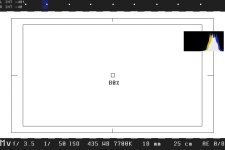
^ml whitebalance
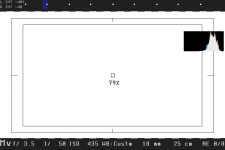
^custom wb
I also thought about a function that would auto adjust set the "contrast" so that the histogram is not only balanced in the middle but also "filled as much as possible" without clipping. I am not sure if I described it well, but in my opinion that would be a way to take as much information as possible out of the image.
Best regards,
Dorian

Have a look at the rgb histograms:
^ml whitebalance
^custom wb
I also thought about a function that would auto adjust set the "contrast" so that the histogram is not only balanced in the middle but also "filled as much as possible" without clipping. I am not sure if I described it well, but in my opinion that would be a way to take as much information as possible out of the image.
Best regards,
Dorian
Hi I am new here but been watching formum for a long time.
I took the plunge this week and have been very impressed with the good work going on, well done Alex and everyone else involved.
Two quick question the bracketing feature does not seem to work on my camera. If i select 5 shots at 2 ev apart or ,any other EV for that matter, i only get 4 shots. likewise if i pick 7 shots i get 5 or 6.
And two, i have a san sik extreme 30mbs card and can only achieve Q scale 11.
And my quick contribution to you all is that you can install and uninstall magic lantern as manytimes as you like without worry, there is no firmware count.
I took the plunge this week and have been very impressed with the good work going on, well done Alex and everyone else involved.
Two quick question the bracketing feature does not seem to work on my camera. If i select 5 shots at 2 ev apart or ,any other EV for that matter, i only get 4 shots. likewise if i pick 7 shots i get 5 or 6.
And two, i have a san sik extreme 30mbs card and can only achieve Q scale 11.
And my quick contribution to you all is that you can install and uninstall magic lantern as manytimes as you like without worry, there is no firmware count.
chrisegg: what build do you use? Also try switching the lens between AF and MF (the shutter release method is different).
QScale says nothing without seeing the exact scene (the bitrate varies a lot). For benchmarks and predictable results, use the CBRe mode.
Dorian: auto contrast can be tricky, as there should be a threshold of how many pixels you like to over/under expose (otherwise you risk that the auto algorithm will like to set the contrast at -4 when it can go higher). Also, in indoor shots, I've got best results with contrast a bit lower than the histogram method would indicate (too high contrast looked unnatural). I believe you can judge better what amount of contrast is required in a shot.
And if the contrast is too low, you can always boost it. But if it's too high, there may be shadow/highlight detail lost.
Auto WB from ML does not adjust green/magenta component. I believe Canon WB adjusts this too. Still, kelvin WB + G/M shift seems to give very good results in lots of tricky cases.
QScale says nothing without seeing the exact scene (the bitrate varies a lot). For benchmarks and predictable results, use the CBRe mode.
Dorian: auto contrast can be tricky, as there should be a threshold of how many pixels you like to over/under expose (otherwise you risk that the auto algorithm will like to set the contrast at -4 when it can go higher). Also, in indoor shots, I've got best results with contrast a bit lower than the histogram method would indicate (too high contrast looked unnatural). I believe you can judge better what amount of contrast is required in a shot.
And if the contrast is too low, you can always boost it. But if it's too high, there may be shadow/highlight detail lost.
Auto WB from ML does not adjust green/magenta component. I believe Canon WB adjusts this too. Still, kelvin WB + G/M shift seems to give very good results in lots of tricky cases.
DorianVasco
Member
Hi Alex, thanks for your quick answer.
youre right, it would be not easy to implement with the threshold values. When I think about it, it indeed seems easier to adjust the contrast with help of my eyes to fit it to each scene. But then it would be nice, if the colour histogram can be active while changing the settings.
Would also be nice to have the 'false colour' toggle with more modes.
e.g. "normal -> false colour -> full histogram -> full waveform"
I tried to adjust the wb with the g/m shift, but it was not possible to set a 'perfect' wb. Well, thats not a problem, and maybe its possible to add the custom wb and the other presets to the ml menue?
Keep up the great work!
With best regards,
Dorian
youre right, it would be not easy to implement with the threshold values. When I think about it, it indeed seems easier to adjust the contrast with help of my eyes to fit it to each scene. But then it would be nice, if the colour histogram can be active while changing the settings.
Would also be nice to have the 'false colour' toggle with more modes.
e.g. "normal -> false colour -> full histogram -> full waveform"
I tried to adjust the wb with the g/m shift, but it was not possible to set a 'perfect' wb. Well, thats not a problem, and maybe its possible to add the custom wb and the other presets to the ml menue?
Keep up the great work!
With best regards,
Dorian

chrisegg: what build do you use? Also try switching the lens between AF and MF (the shutter release method is different).
Hi Alex, thanks for the response
I used the 23rf Feb build and my camera was in manual focus mode and AV on the dial.
Everything else seemed to work fine just could not get the braketing to work .
Ps where can i make a donation?
Good, I'll take a look to see what could be the problem.
The donation link is on the 550D wiki page and in the PDF guides. Thanks!
The donation link is on the 550D wiki page and in the PDF guides. Thanks!
Sorry if this sounds like a dumb question, is there any corolation between q scale and CBR?
Ie. if i change CBR to 70mb/s and then Q scale to -10 for instance is there much point?
Are they linked to provide an improved quality or is it a case of useing either one method or the other?
Hope this makes sense.
Ie. if i change CBR to 70mb/s and then Q scale to -10 for instance is there much point?
Are they linked to provide an improved quality or is it a case of useing either one method or the other?
Hope this makes sense.