Magic Lantern enables 14-bit RAW CinemaDNG on 5D

^ there's something wrong with your player, I watched it at 1080p (or, more precisely, what youtube calls 1080p...)
 
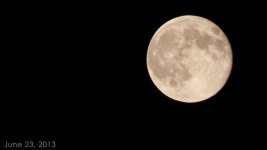
Since it was a supermoon weekend, here's a frame from raw video i shot.
Using 5D2 with nikkor 80-200mm f2.8 at 200mm + 2x teleconverter + MLraw 3x crop = a 1,200mm shot ? :Drogar-BigGrin(DBG)

1063883_531411320249271_1152279442_o.jpg
 
on windows how do you convert the raw 5d files to cinemaDNG?
It seems that eyeframe does not work for me
 
Can the Mark III playback the RAW files in camera? My T2i was unable to do that with RAW video....at least with the last build I installed. I'm considering getting rid of my BMCC MFT mount for the Mark III if it can playback the RAW recorded files. If not, it would be a bit scary to work with shooting RAW and having to wait to view the files. Either that or I'd have to have a laptop ready to convert for review, which would be a pain.
 
They're still working on that, I believe. If there is some playback functionality, it's still not as good as it will probably be.

Just curious: what resolution and fps do you get with the T2i and a fast card?
 
They're still working on that, I believe. If there is some playback functionality, it's still not as good as it will probably be.

Just curious: what resolution and fps do you get with the T2i and a fast card?

Using a SanDisk Extreme Pro 45mbs I can get continuous RAW video at 896x512p @ 16:9 23.976 and I can 960x448p @ 2.20:1 23.976 aspect ratio. I can get 1024x448p for upto 10,000 frames at 2.35:1 23.976. Might be able to squeeze more if they release a variable buffer version and can get more frames at lower frame rates. Not sure if they have the variable buffer for the T2i yet. I can get 1728x992p @ 16:9, no crop at 5.999fps. Great for realistic super speed effects or House on Haunted Hill/Stir of Echoes ghost movements or even The Evil Dead style camera moving rapidly from one pace to another.

I find that even at 896x512p the video is still quite a bit sharper and more detailed than the 1920x1080p H.264.
 
Last edited:
Can the Mark III playback the RAW files in camera? My T2i was unable to do that with RAW video....at least with the last build I installed. I'm considering getting rid of my BMCC MFT mount for the Mark III if it can playback the RAW recorded files. If not, it would be a bit scary to work with shooting RAW and having to wait to view the files. Either that or I'd have to have a laptop ready to convert for review, which would be a pain.

The mkII and mkIII can playback the recorded raw videos in 2 ways.

1. In raw video menu, Playback - plays the last recorded raw clip.

2. In file browser tab - you can select which clip to preview.

Caveat, Footage is in black and white and playback in not in real time.
 
Ok, for those with a 5D2 using NB after jun 16th and are having problems in crop mode, specifically pinkish image with low black levels.

a.d. has made a new fix which you can download here: https://bitbucket.org/a_d_/laboratory/wiki/Home

I tested this repeatedly in several resolutions in crop mode and pink cast is gone.

Take note that this fix will cause some "bad pixel" problems in SOME cameras in raw video mode. Like this one;

http://www.magiclantern.fm/forum/index.php?topic=6426.0

This does not show up when using h264 video.

My camera however don't have bad pixel issues with raw video so I use the fix provided by a.d.
 
Significant improvement with Jun 27 build ML raw video

Significant improvement with Jun 27 build ML raw video

With build dated Jun 27, ML developers have made significant progress allocating memory and increasing significantly the recording duration for RAW video.

On the 5D mkII new higher resolutions are now capable of recording continuously with a 1000x cf card. Performance have also improved on slower cards such as 600X.

Below are test results based on a 1000x lexar. FPS=23.976.

At 1X

Resolution-------Number of frames

1872 x 1054-------1058
1872 x 1012-------4686
1872 x 936 -------continuous
1872 x 850 -------continuous
1856 x 1044-------2378
1856 x 928 -------continuous
1728 x 972 -------continuous
1472 x 1104-------continuous

Crop Mode 3X (5x magnify)

2144 x 1076-------371
2144 x 1072-------370
2144 x 974 -------947
1920 x 1076-------1326
1856 x 1044-------continuous
1728 x 972--------continuous
 
Last edited:
Thanks for the updates Ted. I have stepped away from the ML progress for a week or two due to work so this is a good way to get back up to date.
 
For 5D2 users looking at how the 30P recording has improved with jun 27 "small hacks" build.

Resolutions --# of frames @30P
1872 x 1054 --237
1872 x 1012 --312
1872 x 936 ---460
1872 x 850 ---770
1856 x 1044 --287
1856 x 928 ---489
1728 x 972 ---650
1728 x 864 ---3338
1472 x 1104 --701
1472 x 828 ---continuous
1600 x 900 ---continuous

Crop mode 3x
2144 x 1076 --132
2144 x 1072 --158
2144 x 974 ---213
1920 x 1076 --235
1856 x 1044 --294
1728 x 972 ---476
1600 x 900 ---continuous
1472 x 828 ---continuous

The highest res for continuous recording has indeed increased.
Previous NB it was only at 1472x828 Now its at 1600x900.
 
Last edited:
Back
Top