FS7: Magenta

Wouldn't the magenta cast be removable with all the menu settings as seen below to let you dial in the WB?


Color Temp<A>
1500K to 50000K (
3200K)
Color Temp. Balance<A>–99 to +99 (±0)
R Gain<A>
–99 to +99 (
±0)

B Gain<A>
–99 to +99 (
±0)

Color Temp<B>
1500K to 50000K (
3200K)

Color Temp. Balance<B>–99 to +99 (±0)
R Gain<B>
–99 to +99 (
±0)

B Gain<B>
–99 to +99 (
±0)

Filter White MemoryOn / Off
Shockless WhiteOff / 1 / 2 / 3
White Switch <B>Memory / ATW
ATW Speed
1 / 2 /
3 / 4 / 5

Color Temp<P>
1500K to 50000K (
3200K)

C.Temp BAL <P>–99 to +99 (±0)
R Gain <P>
–99 to +99 (
±0)

B Gain <P>
–99 to +99 (
±0)


I was able to use the White offset settings as a work around. Will post my settings when I'm next in the office with the camera.

I saved a scene file that I'll be happy to share.
 
Do those offsets also affect the auto white balance as well? You want to be able to alter the presets, but not the auto white since that is working just fine.
 
I haven't done a scientific test, but I 100% my FS7, received in late October (one of the first) suffers this magenta issue.

Any chance this is something that is resettable in a service menu? Hidden menus for Sony techs?
 
I haven't done a scientific test, but I 100% my FS7, received in late October (one of the first) suffers this magenta issue.

Any chance this is something that is resettable in a service menu? Hidden menus for Sony techs?

Thanks for checking.

It's looking as if every FS7 is having the same issue.
 
Surprising thing is that it took so long to find it . Im embarrassed myself as I checked immediately but only under tungsten . Actually I'm shocked that this got past Sony am a bit worried about whether its fixable .
Does anyone know if this is or was initially an issue with the F5/55 ?
 
Last edited:
I shot yesterday and didn't see as strong a magenta cast as some here are showing. It was a really overcast day maybe that had something to do with it. I formatted the card for something else forgetting to save the files but will go out and shoot some more today. Its still overcast and 10cm of snow. lots of white.

The other thing I will test because I was shooting in a hypergamma that maybe looking at it back unprocessed in camera the saturation level is lower so the magenta isn't showing as much.
 
I'm battling similar issues with the F55 as well. Tons of Magenta pollution, especially in exterior shadows.

We used F55 for a show when it first came out. Pre-SLOG3, pre-MLUT, etc. Production style was very run'n'gun, so SLOG2 wasn't an option for exposure reasons. HG7 seemed the best solution. I can't remember if Matrix was Off or SMPTE Wide or REC 709...either way...

The footage took a huge shift toward magenta if you manually dialed in WB. It was far from perfect when using 5500k preset, but took a nosedive when going full manual. It seemed that once you went into manual WB, you could only change the warm/cold WB shift, but the camera retained its green/magenta compensation.

For example, let's say you are shooting under commercial fluoros and did a custom balance to a white card. Your reading comes up at 4100k and the camera has compensated for the green spike. If later in the day you're shooting an exterior and dial the camera to 5600k, it would adjust the camera's orange/blue balance, but retain the previous green/magenta setting. You're left with an image that has minus green applied over the whole frame. Not a good look, IMO. It's also been over a year since I've dealt with this, so perhaps it's been fixed in firmware?

We eventually moved back to ENG rigs for the project. Reliable colors on the go, more flexible lens choices, A/B switchable custom WB, etc.

Hopefully Sony can figure that whole thing out. When your content doesn't leave time for your ideal workflow, it's nice to have a reliable contingency plan.
 
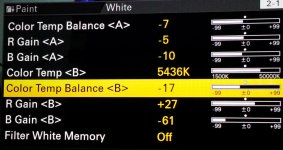
Here's a quick solution for now.

You may have to change your value slightly to taste.

Setting Color Temp Balance to -17 worked well for me. I tested under day light kino and overcast exterior.
Just remember to dial this in whenever you shoot a preset daylight white value and only if your camera has a magenta shift like mine and some of the others out there.

Basically it seems to shift the hue towards green to compensate for the magenta. You can observe this yourself if you dial in too high a negative value.

Just another gotcha to watch out for until we get a firmware fix :)
 

Attachments

  • Colour Temp Balance.jpg
    Colour Temp Balance.jpg
    67 KB · Views: 0
What im wondering is where all those other numbers are getting values like -61 from!

Great to know 'COlour Temp balance' means - Green-Magenta Adjustment

'Temp' relates (in my book) to the kelvin scale which is R->B

It should be called Tint balance.

I spose my chinese is terrible so one cannot expect the English on these cameras to be any good.

S
 
The light source is a Flo (if anything one would have expected high green!),

Is this a Kinoflo Diva by chance?

Divas go way magenta. Lot of people will not use them because of this.

There are many other fluorescents that go magenta as well, especially lower cost units.
 
Is this a Kinoflo Diva by chance?

Divas go way magenta. Lot of people will not use them because of this.

There are many other fluorescents that go magenta as well, especially lower cost units.

Nate in my tests I'm using a 4ft 4bank Kinoflo with a new set of daylight tubes.
The magenta shift is also present in exterior day lit scenarios as shown in some of my tests earlier in the thread.

Did you ever experience anything similar on your F55?

Surinder.
 
Is this a Kinoflo Diva by chance?

Divas go way magenta. Lot of people will not use them because of this.

There are many other fluorescents that go magenta as well, especially lower cost units.

It is a photonbeard highlight with 4 Osram 95CRI bulbs and 2 Kino bulbs.

My 'north light' test matched the low green but due to the evening sun I guessed showing that test could cause confusion as the RB channels did not match.

BTW my studio is completely white

S
 
Quick question... how are you guys adjusting white balance in Custom mode? Are you actually going Menu > Paint > White > A, and then changing the temp from there? I'm not seeing a way to set it up like the FS700, where "PRESET" could just be "Kelvin". So you'd just press the white balance button on the side of the camera, scroll to the value you want, click the wheel in. Done.

Is the only way of manually changing the white balance to dig into the menu or hit the auto-white on a card?
 
Quick question... how are you guys adjusting white balance in Custom mode? Are you actually going Menu > Paint > White > A, and then changing the temp from there? I'm not seeing a way to set it up like the FS700, where "PRESET" could just be "Kelvin". So you'd just press the white balance button on the side of the camera, scroll to the value you want, click the wheel in. Done.

Is the only way of manually changing the white balance to dig into the menu or hit the auto-white on a card?

Josh I believe that's the case. If I press the white balance button on the side of the camera that set it to ATW. I think the only way to dial in the WB is change it in the menus and set it to switch pos A or B. like on the F3. But may be someone more experience can chip in here.
 
I agree that using any flourescent at all is a very dicy way to test white balance . Safer to put a blue gel over a tungsten source but even that had better be a new gel and that's dicey also . If you have another camera ( I have an f3 and an ex1 ) you could use that as a control .
However real daylight outside away from reflective walls is very safe . God didn't put no magenta or green in the sky !

I went into the preset kelvin (P) and that seems to work . I'm kind of mystified by the white balance A & B settings in the menus so far . Haven't played with them much but it seems like a number of those settings don't do what I expect if anything . But I need to test them more .
Im pretty po'd about this kelvin magenta thing . Never seen it in a video camera in 30 years .
 
Last edited:
MAGENTA PROBLEM SOLVED -- KIND OF (this should be a sticky if I'm right)

- I have been spending a rainy afternoon in san Francisco doing incredibly geeky tests with the FS7 and I finally discovered something very valuable about the Magenta question.
If you look at the color temp controls A, B & P each have a setting for Color Temp Balance, then Red Gain and B Gain.
Red Gain and B Gain change with the color temp and are similar to the red & blue pots on a remote paint control.
They will automatically change when you press auto white and you can change the color either by adjusting the Kelvin number or the R & B gains. Kelvin will alter the R & B gains & vice versa so there are 2 ways to do the same thing.
(BTW with the wifi control you can use your laptop as a paintbox here)

However Color Temp Balance is a Green/Magenta control . Minus adds Green and Plus adds Magenta.
Unexpectedly I noticed that when I push auto white I get a Minus number in the Color Temp Balance place!
Around 3200 I tend to get -4 and up around 5600 I get -19 In other words the camera says it is adding green to make the color balance correct and adding much more green around 5600.

If you go to the Preset <P> settings and match the Kelvin and then also match the Color Temp Balance (i.e. -19 at 5600) your Auto White and Preset will match exactly ! BINGO !

So if you want to use presets for daylight 5600 you always add -19 Color Temp Balance. A little more study should reveal a set of green to add for various higher or lower Kelvin temps.

Weird as all Goddamn Hell IMHO, and something that SONY ought to fix. Even if the camera does get more magenta with higher color temp , Sony software should compensate or even hide it. However It is something controllable since you need to go into the menu anyway.

I haven't tried this outdoors yet and its raining tomorrow as well so maybe one of you guys can test it in daylight. Real daylight numbers will probably be different as I'm using tungsten with CTB and LED's to create daylight, but the principle should apply.

Lenny
 
I would tend to believe this to be true as I've pretty successfully used the Color Temp Balance control to match my FS7 to my F5, which has been setup to my liking.

I'll get my cameras out tomorrow and see what I see...but here's what I've done recently - the tighter single is the F5, the other wider shot is the FS7.

I basically hand-copied over the appropriate settings from the F5 to the FS7 where the menus were the same - and they are very similar. I then made the finer adjustments in the Color Temp Balance and Red Gain/B Gain controls using a Cambelles chart or a good, old-fashioned human being.

This is 1080/29.97 XDCAM 422/50 for network broadcast that does get some color correction love in the edit, but we try to get it as close as we can in the field - time dependent. Is it perfect - no. His lips still have a little more magenta in them than I would like - but in reality, they WERE a bit magenta, so it's really close.
 

Attachments

  • 3.jpg
    3.jpg
    27.4 KB · Views: 0
  • 4.jpg
    4.jpg
    26 KB · Views: 0
Does the F5 deal with white balancing differently than the FS7. Does it have the same menus and do you have the same issues with the Preset being too magenta in daylight unless you set a Color Temp offset?
 
Back
Top