FS7: Magenta

morgan_moore

Major Contributor
DVXuser Surinder contacted me with a suggestion that his camera had a mag shift with certain settings - was my camera the same or does he have a bad apple?

Those settings are..
Custom mode, WB_5600, Rec709 gamma. (a ready to deliver format useful for some jobs)

I ran a quick test and have to say that I agree - aka my camera matches his findings, setting the camera using dialed in kelvin is off in the Gre->Mag axis (apparently AWB works fine as does 3200)

The light source is a Flo (if anything one would have expected high green!), tests of window north light matched too but had a R-B shift that correlated with the hour of the test (sunset!).
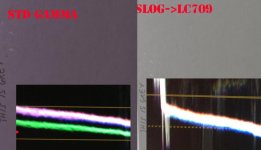
Summary.jpg
 
Last edited:
Good to know thanks for posting. I can't see myself using the rec-709 gamma much but it does good to know how to avoid oddness like that. I bet its something that can be fixed in firmware.


Thanks for starting this thread Sam. Also very grateful to you for taking time out to do these tests today, pretty much straight after my call. You're a Champ :)


I'd be interested to hear from other FS7 owners if they have similar issues and how wide spread this issue actually is?


I noticed the problem with my camera on its first outing. I just couldn't get rid of the magenta cast even after doing several ALL RESETs on set. We lost about an hour of shooting time due to this. The magenta shift was confirmed with the onboard vector scope and a Sony Trimaster EL 17 inch OLED. We also off loaded some test shots to check with the scopes in Premiere Pro CC. So this pretty much confirmed that the cast was embedded in the clip and not due to the FS7's onboard LED viewfinder.
We eventually managed to somewhat remove the shift by using either ATW using a white sheet of paper or by changing the white offset values in camera.


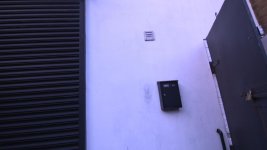
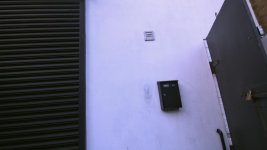
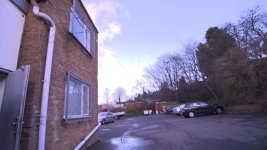
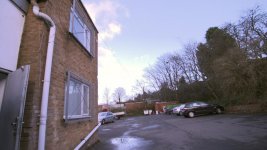
I have attached some stills that may help demonstrate the issue. The camera was set to 5600k using the dial. ND set to clear so as to remove ND colour shifts if any from the equation. I used shutter to get a rough exposure. The FS7 was set to Custom Mode with STD gamma. XAVC I, UHD settings.


I also have some clips that are uploading to Youtube now that were shot while I was talking on the phone to a Sony engineer. I'll either update this post with links or pop them into a new post under this thread.


So far I can conclude that my camera and Sam's have a white balance issue in Custom Mode. On my camera it is in all gamma settings and with daylight sources of all types. Whereas 3200k or tungsten balance is perfect. Sam's test also shows that this issue is not present in Cine EI SLOG3 mode.


Surinder.

5600k ext uncorrected.jpg5600k ext corrected in post.jpg5600k ext2 uncorrected.jpg5600k ext2 corrected in post.jpg
 
I think that this problem only occurs when you use preset WB.
That means the preset WB are just off and useless.
Use your own custom WB and the problem will be solved
immediately.

On the long run the camera should be serviced by Sony...
 
I think that this problem only occurs when you use preset WB.
That means the preset WB are just off and useless.
Use your own custom WB and the problem will be solved
immediately.

My camera has the same problem. But if you do a proper white balance on a white card, problem solved. No big deal. It's only an issue if you want to take shortcut and use preset. I'm sure Sony will sort it out in a firmware update, but in the long run, it's not a big deal. Just use a white card and do it right. it's not the first Sony camera to have WB presets that aren't right.
 
My camera has the same problem. But if you do a proper white balance on a white card, problem solved. No big deal. It's only an issue if you want to take shortcut and use preset. I'm sure Sony will sort it out in a firmware update, but in the long run, it's not a big deal. Just use a white card and do it right. it's not the first Sony camera to have WB presets that aren't right.

That is not so simple. There are situations where using a card may not be practical (telephoto - you are in a shady hide, the lion is not) or one may want certain off colours to 'pollute' the image for example an INT with a lot of daylight and a couple of minor tungsten practicals one may feel that 5500 and yellow lights looks more pleasing than a WB that would cool the scene as the practicals 'polluted' the reading.

Of course we can paint the cameras right but that is just a waste of time, ideally Sony would have got it right and let us concentrate on story.

S
 
That is not so simple. There are situations where using a card may not be practical (telephoto - you are in a shady hide, the lion is not) or one may want certain off colours to 'pollute' the image for example an INT with a lot of daylight and a couple of minor tungsten practicals one may feel that 5500 and yellow lights looks more pleasing than a WB that would cool the scene as the practicals 'polluted' the reading.
Of course we can paint the cameras right but that is just a waste of time, ideally Sony would have got it right and let us concentrate on story. S

I'm not making excuses for Sony, I'm just saying that is the reality of it. So you have two choices: 1) You can shoot magenta video. 2) You can set a manual white balance and move on.

And you can throw out all the hypothetical scenarios that you can dream up, and I will tell you that somehow, somehow, I (and hundreds of high-end broadcast ENG/EFP freelancers) have managed to set manual white balances on 99.99% of everything I have shot in the past 35 years. It's no big deal. And the ironic thing is that your second hypothetical situation is a perfect example of when a preset should NOT be used even if it did work as it is supposed to.
 
I used the phrase 'may look more pleasing' not 'is technically correct' for a reason; the former accounts for a variance of aesthetic sensibility.

S
 
That is not so simple. There are situations where using a card may not be practical (telephoto - you are in a shady hide, the lion is not) or one may want certain off colours to 'pollute' the image for example an INT with a lot of daylight and a couple of minor tungsten practicals one may feel that 5500 and yellow lights looks more pleasing than a WB that would cool the scene as the practicals 'polluted' the reading.

Of course we can paint the cameras right but that is just a waste of time, ideally Sony would have got it right and let us concentrate on story.

S

100% agree with you Sam. There are may other situations when we may not have a perfect white source to balance to or its impractical because of the scene we are shooting. What if there is no white in the scene and it's a day lit situation may be your white paper is 75% white instead of 90%.

For me 5600k is a good start point when shooting daylight interior or exterior of course we have to compensate appropriately if it's somewhat shaded.
Even in studio situations when using daylight fixtures I start of at 5600 then dial up or down for creative effects getting better skin tones ect. Or getting a nice white on a cyc.

If all my other cameras can get it bang on Sony F3, Canon 7d etc so should the FS7.

I really wanted to hear about how widespread this issue is. I have some work arounds now but it would be nice to see this corrected may be by means of a firmware update.

Look forward to hearing more from other users.

Surinder.
 
For example on my last shoot we set for a wide exterior. It was quite a shady day. With nothing really white in the scene. We were Shooting with a Leica 24mm Prime. Camera is 30-40ft away from the talent.

What do you guys suggest? Lift the whole rigged camera tripod monitors closer in white balance on a white card or paper then move the whole rig back to the original spot reframe and shoot? It would be easier if the White balance preset could be fixed. As per my previous post 5600k is a good start point and I trust most of my cameras to be pretty close. Then I just dial it warmer or cooler as an artistic touch. Once dialled in I keep that white balance setting unless the lighting changes drastically.


Surinder.
 
I might just pop outside before suns gone and see what happens on a white card in custom mode with the switch for 5500k. I'll run through some gammas and see if they are any different on mine.
 
I might just pop outside before suns gone and see what happens on a white card in custom mode with the switch for 5500k. I'll run through some gammas and see if they are any different on mine.

It would be great if you could post some stills or some footage. Would love to see the result.
 
Wow, I did all my initial testing under tungsten and whiter balance & preset were very close, but my daylight preset is also terribly magenta. That's horrible. Sure I can use a white card for now , but that's absolutely unnacceptable. I use Presets a lot. I had something like this happen with my F3 when it came back from Sony repair once, but it was nowhere this bad and it was the same on tungsten & daylight. If all of our cameras have this, how the hell it get past Sony engineers.

By the way Gammas shouldn't have any effect on the color.
 
Wouldn't the magenta cast be removable with all the menu settings as seen below to let you dial in the WB?


Color Temp<A>
1500K to 50000K (
3200K)
Color Temp. Balance<A>–99 to +99 (±0)
R Gain<A>
–99 to +99 (
±0)

B Gain<A>
–99 to +99 (
±0)

Color Temp<B>
1500K to 50000K (
3200K)

Color Temp. Balance<B>–99 to +99 (±0)
R Gain<B>
–99 to +99 (
±0)

B Gain<B>
–99 to +99 (
±0)

Filter White MemoryOn / Off
Shockless WhiteOff / 1 / 2 / 3
White Switch <B>Memory / ATW
ATW Speed
1 / 2 /
3 / 4 / 5

Color Temp<P>
1500K to 50000K (
3200K)

C.Temp BAL <P>–99 to +99 (±0)
R Gain <P>
–99 to +99 (
±0)

B Gain <P>
–99 to +99 (
±0)

 
Back
Top