
I was suspecting IR pollution in another thread I started.
Turns out something fishy is being done in the conversion from RAW to JPG (and also to .MOV) both in-camera or as a post process using Canon's Digital Photo Professionnal.
Playing with DCRAW I noticed that, unlike DPP, my problematic deep reds were being rendered as expected:
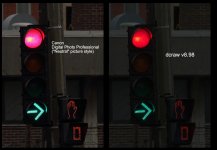
If I was only shooting RAW stills, I'd just use DCRAW and wouldn't look back. However, since we all like to shoot movies, the in-camera conversion has to be "good" since this ain't a Red One and we can't shoot RAW movies yet.
The closest thing I have found to a solution is to make a custom picture style with PSE and tweak the magenta to red. Kinda works, but not really elegant. (Especially if something really magenta is in the scene).
Anybody else noticed this?
-X
Turns out something fishy is being done in the conversion from RAW to JPG (and also to .MOV) both in-camera or as a post process using Canon's Digital Photo Professionnal.
Playing with DCRAW I noticed that, unlike DPP, my problematic deep reds were being rendered as expected:
If I was only shooting RAW stills, I'd just use DCRAW and wouldn't look back. However, since we all like to shoot movies, the in-camera conversion has to be "good" since this ain't a Red One and we can't shoot RAW movies yet.
The closest thing I have found to a solution is to make a custom picture style with PSE and tweak the magenta to red. Kinda works, but not really elegant. (Especially if something really magenta is in the scene).
Anybody else noticed this?
-X
