Looking for bad highlight handling still frames that you cannot stand...

Ok, raw MTS and still frame coming. Very cool of you. I'm all for post solutions wherever possible, because no camera is perfect.

Personally, I would like to see it simply burn to white relatively gracefully like Canon dslr's tend to do. I have FS100 shots where bright very hot backgrounds of tree foliage (in scenes where I am exposing for skin, in the shade) seem to force too much yellow in the rolloff to white too. Not as bad as the AF100, but certainly still an issue.

Here's the link. Others can check it out too, see if they find a fix in Colorista, etc. (goofy slowmo clip of my daughter) https://www.yousendit.com/download/T2djYlJjQ1BvQUlYRHRVag

Having owned an AF100, and currently owning an FS100 and 7D, I know exactly what you mean. I personally think both Sony/Panasonic are dealing with highlights traditionally how they have in their older cameras from what I can tell. It's interesting because they are actually keeping more information when I compare the same exposed scene on the 7D and FS100, but, the way they are doing it is just NOT pleasing. Those complementary colors look horrible. People can accept a white roll-off because they are accustomed to it. It feels natural. But when it peaks to the complementary colors, it looks off and wrong.

If the color sampling wasn't 4:2:0 I think it would be a LOT easier, but, I have to live with that so I am working within that to try and fix up the footage as well at those highlight transitions. That's why it has to be tunable. If you aren't getting those subsampled color issues, then you can dial back the effect to just work on getting rid of the chroma component.

With both the AF100/FS100, what really affects that roll-off is the saturation and knee. If you pull down the saturation, they are more graceful (although not perfect) in those transitions. The knee obviously controls how fast you get into that upper range where the non-magic is occurring :)

Again, thanks for the footage. MUCH appreciated.

I *think* this plugin works in Premiere as well once it is done. It might be a combination of my plug and built in plugs in AE to start with. We'll see. :)
 
I think you've perfectly articulated it, Rick.

Nevermind all the obvious issues where dslr's fall short in video (particularly Canon)--to me, both Pana/Sony forgot one big thing that the dslr's do RIGHT and that's highlights!

I don't know if it was simply more expedient to go with the old "video" style of image processing, which is well established with the camcorder lines. (gammas and picture profiles, respectively)
What I don't understand is why they (Sony/Panny) don't seem to be able to match the pleasing highlight handling that even a GH2 is quite capable of.

Is it a problem with an inferior A/D conversion from the sensor? Do even the cheapest of DSLR's simply have more headroom natively from the sensor to deal with this issue? I've always wondered about this because there are times where I still prefer the image from a DSLR over these cameras that blow them away in almost every other dept.

It's awesome that you're focused on this issue and might be able find a workable solution.

Well, at least it's possible to get 4:2:2 from the cameras. Let me see if I can find some 4:2:2 clips with similar issues. It would be interesting to see how much the extra chroma sampling may or may not help. It seems like 8 bit is a big hindrance too.
 
I think you've perfectly articulated it, Rick.

Nevermind all the obvious issues where dslr's fall short in video (particularly Canon)--to me, both Pana/Sony forgot one big thing that the dslr's do RIGHT and that's highlights!

I don't know if it was simply more expedient to go with the old "video" style of image processing, which is well established with the camcorder lines. (gammas and picture profiles, respectively)
What I don't understand is why they (Sony/Panny) don't seem to be able to match the pleasing highlight handling that even a GH2 is quite capable of.

Is it a problem with an inferior A/D conversion from the sensor? Do even the cheapest of DSLR's simply have more headroom natively from the sensor to deal with this issue? I've always wondered about this because there are times where I still prefer the image from a DSLR over these cameras that blow them away in almost every other dept.

It's awesome that you're focused on this issue and might be able find a workable solution.

Well, at least it's possible to get 4:2:2 from the cameras. Let me see if I can find some 4:2:2 clips with similar issues. It would be interesting to see how much the extra chroma sampling may or may not help. It seems like 8 bit is a big hindrance too.

I don't think it is a problem with inferior A/D at all myself. I think it's a problem with two different schools of thought. At Panasonic and Sony, I think the stills divisions need to get more involved with the video division. I think the FS/AF designers wanted to give you as much detail as they could in the highlights, even if that meant ugly detail. With the 7D, the detail rolls off MUCH faster, but, that sacrifice is made to go to white sooner, which looks more pleasing.

There are certainly other tools that can do what I am doing as well it sounds like, it's all a trade-off. The problem is, when ONE or TWO channels saturate, what do you do with those other channels? That's the issue.

With the 7D, no channel is at 255 on it's own, whereas, on the FS100, it does. Again, it's trying to be smarter.

I think with the 3DLUT that the FS100 is using, they can try and be smarter on the lookup with what to do, but, given what they are trying to accomplish, it still looks bad. Especially if the knee or saturation is cranked up.

I'm also trying to find a balance of if we want to keep a bit of that chromatic information in the highlights, what is the best way to desaturate it and how to blend between the two.
 
What I don't understand is why they (Sony/Panny) don't seem to be able to match the pleasing highlight handling that even a GH2 is quite capable of.

I am sure this is a simple software 'error' created at the design stage

By error I mean a set of parameters input by the designers

Why does this happen..

Its the stupid pressure put on them to produce so called dynamic range

Where does this pressure come from

Losers (reviewers) who stick cameras on scopes rather than having any concept of an image with true fidelity

Bascially 'scope culture' drives these moronic missapropriations of the sensor data

'Hey it doesnt blow at X stops above black - what awesome dynamic range'

No it doesnt blow - but it goes purple - or oragne or cyan

Most scope tests are done in black and white for a start

And there are certain 'experts' on this board who drive the moronic desire for DR at cost to any other elemnt of image quality

While I applaud the OPs efforts to cure this in post I think putting pressure on those desinging the cameras is the way forward

Any watcher of the zacuto tests looking with thier eyes can blatantly see that these 'plastic' top end colours are of no value to anyone of any visual sence

Dear sony and panny - Let em blow please !

S
 
Well, maybe Canon will bless a lower end version of the C300 to have the same basic image. THAT is the highlight handling I long for. (Mobius)

It seems that the 'stills' guys might've accidentally contributed more to that camera than the video division.
 
I am sure this is a simple software 'error' created at the design stage

By error I mean a set of parameters input by the designers

Why does this happen..

Its the stupid pressure put on them to produce so called dynamic range

Where does this pressure come from

Losers (reviewers) who stick cameras on scopes rather than having any concept of an image with true fidelity

Bascially 'scope culture' drives these moronic missapropriations of the sensor data

'Hey it doesnt blow at X stops above black - what awesome dynamic range'

No it doesnt blow - but it goes purple - or oragne or cyan

Most scope tests are done in black and white for a start

And there are certain 'experts' on this board who drive the moronic desire for DR at cost to any other elemnt of image quality

While I applaud the OPs efforts to cure this in post I think putting pressure on those desinging the cameras is the way forward

Any watcher of the zacuto tests looking with thier eyes can blatantly see that these 'plastic' top end colours are of no value to anyone of any visual sence

Dear sony and panny - Let em blow please !

S

It is quite possible that the engineers/programmers who worked on these cameras prefer what is happening to the highlights, I for one can't say what their motivation is because I've never talked to their R&D departments. In fact, I think they are handling the highlights the same as they have in the video departments because that's how their older cameras I've looked at tend to process the highlights as well. That would suggest they are NOT trying to change the algorithms to get more DR, instead, they are trying to give you the same image you are used to getting on their cameras. For good or bad. They are keeping consistent.

I certainly have no pathway to talk with R&D or software development at Panasonic or Sony, and I don't believe complaining about it here is really going to make a difference. I've talked to multiple people at Panasonic a year ago directly and never seen a change come from any of those discussions. I'd rather spend my time coming up with a solution that exists, then a hope that this issue gets noticed. Even if Sony or Panasonic fixed it, given their track record, we'd see it on the next cameras and not these. In other words, I have no way to apply pressure :)
 
I cant see that an engineer would like the highlights

Engineers like linear and smooth curves they want output to be a simple function of input

I guess eningeers are pushed by the marketing guys

If I am not wrong the FS100 came back as production models having an alledged couple more stops of DR than the pre-prod models (at what cost to colour fidelity?)

We have seen the same in both the MP race and high ISO races - marketing driven specs - not engineer driven specs

IMO quite simply the cameras have a knee baked into the profile that could be baked out in a couple of clicks

A profile is baked on - no doubt in my mind

As an early digiback owner I have seen direct readouts from chips - flat flat flat

As for a pathway to R+D - well I will give it a go - I have some e-mail adresses

Sorry if I drive this OT - I wish you well in producing something that can improve what we have :)

edit

Let us not forget that the FS100 chip is the same chip that produces F3 SLog - proof that the core data is good??

S
 
Last edited:
I cant see that an engineer would like the highlights

Engineers like linear and smooth curves they want output to be a simple function of input

I guess eningeers are pushed by the marketing guys

If I am not wrong the FS100 came back as production models having an alledged couple more stops of DR than the pre-prod models (at what cost to colour fidelity?)

We have seen the same in both the MP race and high ISO races - marketing driven specs - not engineer driven specs

IMO quite simply the cameras have a knee baked into the profile that could be baked out in a couple of clicks

A profile is baked on - no doubt in my mind

As an early digiback owner I have seen direct readouts from chips - flat flat flat

As for a pathway to R+D - well I will give it a go - I have some e-mail adresses

Sorry if I drive this OT - I wish you well in producing something that can improve what we have :)

edit

Let us not forget that the FS100 chip is the same chip that produces F3 SLog - proof that the core data is good??

S

Being that I am an engineer, I can tell you that they probably don't even know what the highlights look like. The CMOS engineering is probably split into analog and digital, and then a team is probably bringing that all together at the top. The analog guys are probably worrying about noise, isolation, and dynamic range of each pixel, but in terms of the pixels together, they probably don't even see that part of it. In fact, as you've pointed out, they more than likely see it flat and examine the noise/range that way, never looking at the final processed image. Many times, the different aspects are broken up.

Marketing pushes the engineers as to what they want, engineers push back at what is possible in the timeframe. It's all a give/take.

I never saw anyone claim the DR of the production/pre-preproduction was that different myself, and I did look at A LOT of information before I bought, but, I would say the noise cleaning algorithms Sony use on the F3/FS100 are more to the extended DR than highlight handling.

Engineer driven specs doesn't mean it's going to be any better from an artistic standpoint. And that's the thing people want. So it has to be a balance.

The knee is not baked into the FS100, it's changeable, and it directly affects the HL response as well. I think the FS100/AF100 suffer from engineering being consistent with other video cameras, whereas, we want consistency with HL rolloff on film cameras. I also think it's an easy change in camera personally.

People are starting to use FLAT more with LOG. The problem is, using FLAT on 8-bit means you give up mid tone detail to have a flat HL and shadow area. Given most people are going to crush the shadows and the HL, the S curve of the response is to give you more detail in the midtones since you are going to throw away detail in the shadow/HL area anyways in post. It's there to help get MORE detail, not less.

The trick is, on 8-bit, is to tune the camera so your HL and shadow areas are crushed AS CLOSE to what you are going to do in post. That is how you get THE BEST out of the footage. The closer you get them, the better the final image will be in terms of how much you leave for the midtones to use. It's that 10-bit of the SLOG that I feel is the BIGGEST plus.

With Canon, it sounds like the camera and video departments got together and made a camera. With at least Panasonic, this didn't happen they said. The video department made the AF100 without input from the stills side (or at least minimally). Given the controls on the AF100 and FS100, which are EXACTLY like a video camera and NOT like a stills camera, THIS is what I see was the problem in why the HL handling ended up as it did, like a video camera.
 
id liek to see how the new colorimetry in the hpx250 like others have said improved on the 'hihglight' handling.
 
If I may: (click to enlarge)

00026001.mxf.Still001.jpg
00026001_redone.jpg
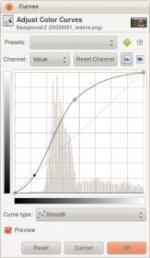
curves2.jpg

Basically the original footage is overexposed. The camera led you to, because its built-in curves are wrong.

The parts that were already white in your original image are irrecoverable. The only way to make the transition to them smoother is to raise the brightness of the areas around. But this makes much of the rest of the image brighter. I could have made it even smoother, but by then her face would be shining like an angel.

Look at this film image (click to enlarge) and study the highlights. The highlights in the hair do not even go to full white. They still retain the orangish color from the lamp.

film.jpg

To get the same effect in video, you have to match the highlights. They cannot be any brighter than they are in this final image. The rest of the image --- like his face --- will look very dark. But if you apply the same curve I did to the last image, then in the end it will look like this.
 
Last edited:
You've hit my feeling on the highlights as well. If they'd blow out like we want, they'd blow out sooner and we'd probably adjust the image accordingly.

However, I am not fixing the highlights like you have. I've written code for analyzing the highlights at the top end and work with R, G and B independently. I am trying to get a better result than that by being smart about undoing what the curves are doing, then redoing something better.

Let me post this frame in a few mins with where I am at:
 
Yeah, I realize it was a bit overexposed. I didn't use any exposure tools other than the LCD, which I'm sure was the mistake.

I'm not entirely sure, but I think I had turned the picture profiles off to try and get a relatively flat image, but again, trusting the LCD was not so smart.
 
Yeah, I realize it was a bit overexposed. I didn't use any exposure tools other than the LCD, which I'm sure was the mistake.

Can you PM me that frame combatentropy used, uncompressed. The AVI won't work for some reason (although your MTS does just fine). I want to take that same frame through what I have and post where I am at.
 
PM sent. It's a CineForm AVI, so you might need to download the free codec trial, which gives you a free decoder after the trial period anyway.

Just used that because it was a really big mxf file, and it was a quick way to slice out a clip and maintain original quality with a reasonable file size.

The codec works on the Mac too.
 
PM sent. It's a CineForm AVI, so you might need to download the free codec trial, which gives you a free decoder after the trial period anyway.

Just used that because it was a really big mxf file, and it was a quick way to slice out a clip and maintain original quality with a reasonable file size.

The codec works on the Mac too.

Ahh! Okay, good to know.

So again, this is VERY preliminary. This is just a screen grab as I have just realized my code doesn't render yet, just preview in AE. It pulls out the yellow in the hair that is clipped, and by doing so, pulls out that detail as well. I hand tuned it a bit, and that is the part I am studying more.

Screen shot 2011-11-22 at 4.02.16 PM.jpg

Not sure how much you can tell from what I did, but you should see a SERIOUS reduction in the yellow. Also, what you can't see is in the top left of the frame, it got rid of the cyan as well.
 
I'm encouraged where this is going.

The worst example I have seen (not mine, fortunately I have dodged the bullet) is on an intersticial that is currently running on TCM, its one of these standup interview/profiles with a viewer describing their childhood movie viewing experiences. Its a location setup on the shaded side of a big bridge, almost everything on the other side of the bridge is cooked-out to yellow. It looks like they knew it was going to do that and didn't care or tried to go with it like it was an intentional 'look' and then some poor soul had to try and grade it into looking like something.

The only problem I have run into so far is in backlit situations where I'm trying to hold camera side detail without losing the rim. I also had some psychedelic results shooting at dawn on a farm with a lot of ground mist/fog, I only had the camera for a week or so at that point and was experimenting, I managed to get it to band furiously and clip to yellow at the same time if I was pointed at the sun through the fog. I'll try and pull a frame from that one.
 
Definitely get me a frame of that!!!!

I've been working on both ends of the problem. The clip above is more subtle to the casual viewer (but for me I don't want it in there either) and then the issues like you describe. I can't stand those complementary color blow outs. What I am experimenting with is getting them to desaturate instead of just go away (so you save some detail but it's really light gray instead of just pulling it all out).

That's where I am trying to make the magic happen, haha :)
 
Still working on it....will have more details soon.  Who here uses after effects?

I do.

Here is a frame grab from that backlit/fog situation. Sandhill cranes on approach, picked them up about 90 degrees frame left where I set my iris and then tracked them into the backlit fog, no time for an aperture ramp (of course) since I was completely wrapped-up in trying to pull focus.

crane_framegrab_01 copy.jpg
 

Attachments

  • crane_framegrab_01 copy.jpg
    crane_framegrab_01 copy.jpg
    14.5 KB · Views: 0
I do.

Here is a frame grab from that backlit/fog situation. Sandhill cranes on approach, picked them up about 90 degrees frame left where I set my iris and then tracked them into the backlit fog, no time for an aperture ramp (of course) since I was completely wrapped-up in trying to pull focus.

View attachment 44112

WOW that's horrid. :) Can you send me an uncompressed frame grab of that. (It compresses it in here). THAT I want to take a look at.

One feeling I am getting is that given what the LCD is showing, people are over exposing the image more than they would on a camera with a nicer roll-off because, at least with the 7D, the rolloff is happening a tiny bit earlier so this scene would have A LOT more white in it (which is what I am going to do to it with the code).
 
Back
Top