Looking for bad highlight handling still frames that you cannot stand...

Rick Burnett

Section Moderator
So, I am working on a tool for correcting the horrible looking highlights being experienced on some cameras. While I have access to my FS100, I didn't save any bad video from my AF100 I had. In addition, if you've ever experienced an issue on another camera that is $5k+ I'd be interesting in getting a still frame from you.

The important part is I'd like it original size, PNG, which will retain the exact frame information as best as possible (so no JPG). Also, just looking for 1920x1080.

Additionally, indicate whether you want me to post samples of before and after on here, or, if I am just to use the frame grabs offline.

Right now, this is in the exploratory phase. I'm not sure what I am going to do with the code. I am considering contacting a 3rd party to turn into a plugin for a few different editing platforms, provided the output is acceptable.

Finally, for a few of you, if you'd like to participate, I will send you a copy of the development utility to try on your own footage. It will be severely limited on inputs/outputs, options, as it's designed as a starting point. More details will follow.

Given I am happy with the highlights handling of the 7D, that is what I am modeling the HL fixing to work like.

In any case, hope to see some great examples!
 
All these complaints about the highlight handling in certain cameras and no one has any samples? :) I know you're out there! I only want to get the frames before ANY grading because I need to analyze the pixel values to see what the camera is doing.

Mainly a few AF100 frames as I sold my AF100 and always exposed to protect that issue. Some other FS100 would be good as well.
 
I've contacted you VIA pm with some of my older AF100 footage.

Looking to contribute to the project for sure.

Get with me, Thanks.
 
Thanks for the samples, I can definitely see the issues in the highlights. It will be probably sometime next week I start posting some sample crops of just some of the areas with issues. You gave me JPG so I am a little worried about what the JPG compression is doing with the scene, but I'll try them anyways to see what happens. Ideally, I think PNG would be unaltered.
 
Hey Rick, I shot a documentary on my AF100 and I'm sure I can find some instances in my footage with nasty blown highlights, I'll take a look this afternoon. Or I could take the dog and AF100 to the park this afternoon and send you an SD card if you're looking for a particular type of highlight on different gammas/color matrices of the camera.
 
Colorista has a feature that can extrapolate lost values from blown out regions. Is your code similar to that process? It would seem you'd have to guess based on color values around the blown out regions like they apparently do. That would work great for symmetric regions that are blown out like noses and foreheads. How does your code handle big things like a full blown out window where there isn't any portion of it that has information in it?

Maybe you could let people shoot a lower-exposure clean plate of the same scene (assuming we're locked off on a tripod) and you can then find the blown out pixels in the one scene and replace them with a blend from the clean plate? Poor-man's HDR video concept I guess.

Good luck with the technology.
 
This tool is not for recovering information in highlights, it's for adjusting the rolloff so it's more pleasant. In both the AF100 and FS100 you get this band of a complementary color in the highlight that looks HORRIBLE. People would rather that rolloff go straight into white like Canon does without the intermediate band. I've been shooting things with a 7D and an FS100 to study the difference.

As soon as I get a few samples done, and the algorithm tuned, I'll post up some crops in those areas or opinions.

DCTBRadJohnson, I am looking for where you REALLY see the bands in the blowout. I don't have any with the yellow or magenta yet, just cyan. Look for the UGLIEST thing you can find :)
 
This is cool. But I wonder how will this work if the footage is not in some sort of native (raw) file?

I'm assuming it's some kind of diffusion that's specifically targeted to clipped highlights - if that's the case, it wouldn't matter what kind of file you applied it to.

Very interested to see your results Rick.
 
This is cool. But I wonder how will this work if the footage is not in some sort of native (raw) file?

It should work okay. The concern is how much damage whatever different compression does to the gradients around the blown highlights. But, in talking with some other users who do video processing as well, there are some luminance threshold based gaussian blur methods that might even fix that.

Today I am switching gears and moving out of Max/MSP/Jitter as a development environment and into Xcode with the After Effects SDK. This will allow me to ignore the file handling and focus on the algorithm almost completely.
 
Spent a few hours tonight working on this with my code in AfterEffects and some of the built in effects. The first big issue is that the color sampling of the internal codec (4:2:0) is causing a lot of issues with the highlight. That boundary where you get the color contamination between two colors is VERY unpleasant.

Also, at least with comparing to 7D footage, the 7D blows out sooner to a white gradient than the FS100 does. The FS100 is really trying to save more detail, and it does, but it just looks bad. Not always, mind you, I've found spots where I like what it did, but, if I fix any highlights I have to fix them all.

My sample images are extreme that I have that I made, so I cannot judge them well as to what the net result is. For those sending me stills, they will help the most.

How many of you have AE? Once I get a procedure down, I can send the plugin for you to play with as well. It's VERY rough and does not work completely. I've got at least a few weeks more work on it as I parameterize it so I can tune it even more to see what the values should be.

Stay tuned! :)

And if someone has a nasty blown out sunset, that would be PERFECT to work on too.
 
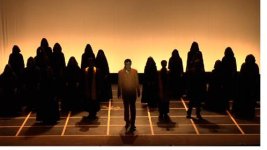
Something like this (From my HVX)... the bluish/greenish cast to the bottom of the backdrop?
 

Attachments

  • Magic Flute Sunday HVX 2.jpg
    Magic Flute Sunday HVX 2.jpg
    18 KB · Views: 0
Something like this (From my HVX)... the bluish/greenish cast to the bottom of the backdrop?

Do you have a copy of this uncompressed that I can study? I want to look at the RGB values in that backdrop. This might be a different problem since it never goes to white, and what I am working on isn't going to fix that. (although it might, since what I am making you can adjust parameters, so maybe it can be tuned to adjust those curves at the highlight end)

Basically, I am studying when the highlight goes to white and what it does to get there.
 
Here's one from the AF: AF100HighlightDelightGrab.jpg

I think the munch down to a small jpeg actually took out quite a bit of the yellow in the highlight burnout. Will send you an uncompressed frame. PM me with an email addy.

Hope your utility can help.
 
You bet Rick, will send a full clip too if it helps. The sun wasn't actually shining intensely at the time either. Caught a nice moment before the late morning overcast clouds burned off at Disneyland with my kids. (yeah, shot inside the park with the AF. Was a lot of fun)

Will PM you a couple of links from yousendit

A clip will be perfect as well! Since my plugin is in AE I can do stills or clips, was just making it easier for people to get me something.

Let me ask you as well, what would you like to see happen in those highlights? Personally, compared to the 7D performance on highlights, I think the rolloff should be to white and not through the yellow.

I think one problem is, when seen in camera, I don't really notice how bad the HL looks. If it looked similar to the 7D, I would have brought the image down a bit in camera and exposed under a bit. The corrections on these might blow them out some more (still studying that) which while looks more pleasing, is more blown out. (if that makes sense).

Thinking out loud, but let's see what I can do with your clip regardless. I'll get some screen grabs up in a few days of just that area as I modify it to get your feelings. Once something acceptable is achieved, I'll send you back a video to look at and see what you think.
 
Back
Top