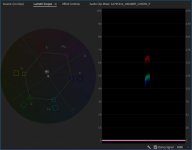
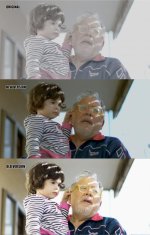
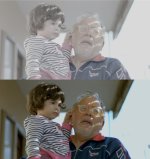
C200: Little test in available natural light -

Danilo Del Tufo

Well-known member
Hello there!
I've made a little test with EOS C200 and RAWlight! Hope to see some impressions about color correction that I've made, thanks!

 
Low light looks slightly magenta, bright light looks green + overexposed. Using a calibrated monitor is helpful. Scopes even more so: https://larryjordan.com/articles/color-correction-make-people-look-normal/comment-page-1/ . Helpful to crop just a skin tone patch to check scopes in detail. What are you using to edit? With 12-bit raw you can pull down highlights and recover quite a bit of detail in skin tones (also true for compressed 10+ bit log encoded footage (raw tools tend to offer more highlight control)).

For final validation, viewing footage on a variety of uncalibrated devices is very helpful (other computers: PC, Mac (different gammas), phone, tablet, HDTV etc.).
 
What are you using to edit? With 12-bit raw you can pull down highlights and recover quite a bit of detail in skin tones (also true for compressed 10+ bit log encoded footage (raw tools tend to offer more highlight control)).
Thanks for advice, I've edited the clips into Adobe Premiere CC 2018, with last update for RAWlight. So I've edited the RAWlight footage natively. I think it's a good sample from the camera, also considering the problems that you've noticed, I will try to improve my skills, this is my first attempt for RAWlight and natural lighting, next months I will buy some lights, actually I'm just experimenting the process of use the camera in a decent way, this my second camera, previously I had an old camera Panasonic Hpx170, so it's a bit stepping curve to understand how the C200 works well. Thanks again for advices and suggestions! Cheers! :-)
 
Thanks for advice, I've edited the clips into Adobe Premiere CC 2018, with last update for RAWlight. So I've edited the RAWlight footage natively. I think it's a good sample from the camera, also considering the problems that you've noticed, I will try to improve my skills, this is my first attempt for RAWlight and natural lighting, next months I will buy some lights, actually I'm just experimenting the process of use the camera in a decent way, this my second camera, previously I had an old camera Panasonic Hpx170, so it's a bit stepping curve to understand how the C200 works well. Thanks again for advices and suggestions! Cheers! :-)

You're welcome. Perhaps try re-grading the exact same footage using the scopes and pulling down the highlights and sharing the results? Other C200 users can learn as you learn.
 
Instead of re-grading the clip, I've made a new test more oriented to evaluate the skin tones, let me know if it's good enough :

 
Danilo,

These aren’t what I’d call good skin tones, and we know the camera is capable of better.

I wonder, is your computer monitor calibrated? If you open up your videos on an iPhone or iPad and compare them to your computer monitor, do they look similar?

In your first video, the older man (your father?) looks orange, and in your second video, everyone looks lifeless. Your scary music is kind of fitting ;) Also, is that music from the Simpsons?? I feel like I know it.

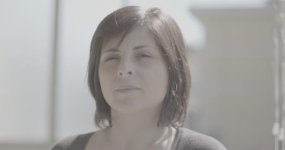
Lastly, it may be the balcony where you’re filming causing some strange color shifts. The shot of the older man inside did look better. If the walls are yellow / orange on the balcony, maybe they’re throwing a color cast on everything?

Anyway, I’m sure you can dial in better skin tones with some adjustments!
 
Looking better- did you use the scopes to dial in the skin tones? E.g. crop a section of skin so nothing else is visible in the frame, then look at the vectorscope and skin tone line. On the C300 II, I find skin tones look best just to the right of the skin tone line, all on the "magenta (right, clockwise) side of the line, with just the left edge of pixels touching the line (can be slightly into the green side, depends on the shot).

To increase the challenge to get skin looking as good as possible, try increasing saturation while grading, as much as possible before it starts to look weird. Dial in the color so it looks good, then you can pull saturation for the final look as desired. My favorite film stock is Kodak EXR 100T 5248. Super saturated rich colors, many of my favorite films and perhaps some of yours too were shot with this film: https://shotonwhat.com/film-negative-stock/eastman-exr-100t-52487248 .

For exposure, the C300 II looks pretty good to me at around 60 IRE for skin tones (light complexions). I'd expect the C200 to be similar. There are no rules, so you can go higher or lower depending on the look you want. Keep in mind that the sensor and camera color science will behave differently based on exposure. A huge reason ARRI/Alexa are so popular is that those cameras can under/over-expose and relatively easily be graded back to "normal" (eye of the beholder) without too much trouble. Thus, "exposure invariant color": no major shifts in color / WB with exposure. For example, if I use Canon Log 2 and over expose by 1 - 2 stops, when I bring it down in post, the mid-to highlights end up magenta, and the shadows end up green. Thus to fix color we can't simply set the WB: must use color wheels and/or secondary and/or masked corrections: a lot more work.

Regarding environment/reflected color- it acts like mixed lighting. So you can just set WB where color is good enough, or you can go in and do more complex color work. A calibrated monitor is helpful, as is periodically looking away and/or taking breaks: the eye accommodates to color imbalances.

Perhaps add some lighting (with 95+ CRI/TLCI light(s), or just tungsten bulbs + China balls) and/or reflectors to get more light on the faces relative to the environment.

See if you can get looks like these with the C200: https://www.hurlbutvisuals.com/blog...posing-your-canon-cinema-eos-camera-platform/
 
I think you are over exposing so much you can't recover it.

Probably, I’ve set the lens aperture to maximum, I will try next time to close the aperture of the lens.

Danilo, These aren’t what I’d call good skin tones, and we know the camera is capable of better.

I’m just learning the camera settings, my previous camera was a Panasonic HPX170

I wonder, is your computer monitor calibrated? If you open up your videos on an iPhone or iPad and compare them to your computer monitor, do they look similar?

I’m using an iMac Pro to watch the clips. I’ve watched also the clips in another monitor, but it’s an old Samsung Tv monitor, and the colors seem there very washed out, on iMac they look better.

In your first video, the older man (your father?) looks orange, and in your second video, everyone looks lifeless. Your scary music is kind of fitting ;) Also, is that music from the Simpsons?? I feel like I know it.
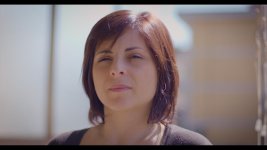
Yes, it’s my father, did you see some resemblance with my dvxuser’s profile picture? :-D.
His skin tone looks very orange to me too, it was very overexposed. You remember correctly, the music is from the Simpson, special Halloween Episode.

Lastly, it may be the balcony where you’re filming causing some strange color shifts. The shot of the older man inside did look better. If the walls are yellow / orange on the balcony, maybe they’re throwing a color cast on everything?

Anyway, I’m sure you can dial in better skin tones with some adjustments!

The wall is yellow, and the balcony on the right side almost the same color. I’m trying to make better color, but I find very difficult. Well…I’ve thought to include in this post, two PNG images from the clip, and hope someone will try to color correct them, maybe also you, so I can see how to tweak better the colors looking at yours adjustments.

Looking better- did you use the scopes to dial in the skin tones? E.g. crop a section of skin so nothing else is visible in the frame, then look at the vectorscope and skin tone line.

Thanks, I think after my first attempt, the second one in RAWlight looks promising. I’m not skilled with vectorscope.

Too technical for him, He just needs to understand the waveform better and understand how far he can push it.
I’m lacking to be technical for sure, despite I’ve studied a lot technical problems of cameras in general, I’ve not followed any camera course. After my little experience with HPX170 that I was using with automatic settings, I’ve got no experience with more complex camera like C200.

Here there are two PNG images taken from Premiere, please try to color correct them and give more advise. Constructive criticism is welcome. Thanks again! :-)

First image, no color correction: https://ibb.co/deGYpx (I've reduced the image in FULL HD in Photoshop)

No color correction.jpg

Second image, no color correction:https://ibb.co/eKkb9x (I've reduced the image in FULL HD in Photoshop)

No Color Correction1.jpg
 
Last edited:
I dunno if I've understand correctly your information (I'm not native English speaker), but What I can do to make better?

Perhaps find scope tutorials in Italian? Or use google translate? Learn to use the scopes- it will help make color work easier: https://translate.googleusercontent...700201&usg=ALkJrhiJ1CHIar7l4kdPs_en3kkCJJeDAw

There's a lot of yellow in that example: wasn't 'easy' to correct- is that reflected light, or the camera? (highlights in the sky are pretty much white). How are you editing / processing the RAW data?
 
Perhaps find scope tutorials in Italian? Or use google translate? Learn to use the scopes- it will help make color work easier: https://translate.googleusercontent...700201&usg=ALkJrhiJ1CHIar7l4kdPs_en3kkCJJeDAw

There's a lot of yellow in that example: wasn't 'easy' to correct- is that reflected light, or the camera? (highlights in the sky are pretty much white). How are you editing / processing the RAW data?
Thanks for clarification, are you referring about Waveform Monitor in C200? Once I've selected it, but I find very hard to analyze it. Do you think the image is not recoverable using just color correction because is overexposed? I think I must try to close the aperture of the lens, I've read that 800 ISO is advised to have much information about colors, but maybe using 6 ND filter without adjusting the lens aperture caused this mess. Also viewing the Waveform Monitor and avoiding to clip at 100 for white, the image will be fine? I'm just using the LCD monitor of C200 and the image looks bright bur not so overexposed, so I will try to underexpose the next time. I'm using Premiere Pro CC 2018 to edit in RAWlight, the last update that enables RAWlight in Premiere.
 
I dunno if I've understand correctly your information (I'm not native English speaker), but What I can do to make better?

Practice, practice, practice. There is no simple answer. You really need to shoot a lot, watch tutorial, take advices and practice, practice, practice.
Learn how to use a waveform. You really can't judge your exposure only by looking at the lcd, especially when shooting outdoors.
 
Practice, practice, practice. There is no simple answer. You really need to shoot a lot, watch tutorial, take advices and practice, practice, practice.
Learn how to use a waveform. You really can't judge your exposure only by looking at the lcd, especially when shooting outdoors.
Thanks, I will take your advices for future projects, I think I will make other tests before I'd be satisfied. Actually I must still resolve the Cfast card problem, not always recognized by the camera, the original dealer is at NAB, so when he will come back, I will try to buy Sandisk instead of Angelbird (512GB). Hope to make more tests soon, in June or September I've planned to shot a short movie, so I will use those months between to learn more from the camera. Have you tried to color correct the PNG images that I've posted before? It's pretty interesting to learn from you! :-)
 
C200 - Color Correction in Adobe Premiere CC 2018 - Rawlight. Does this picture have a "correct” exposure, what do you think about it?

prova copia copia.jpg

TEST:

 
Last edited:
There's no right or wrong answer to many of your problems or questions. It's all relative. Using a waveform can be helpful, but I've often graded outside recommended waveform norms to achieve a specific look I'm going for. I've seen feature films and TV shows where the grading choices seemed abysmal, worked on by professionals who supposedly have a superior grasp on these concepts. It's all made worse by the fact that everyone's monitor and TV looks a little different. You've got "warm, cool, game, and custom" presets that all inevitably get monkeyed with. One good piece of advice from the thread above was to see how your image looks on a high quality mobile device (iPhone, etc). This is a relatively decent litmus test. Also, obtain a monitor with an sRGB or Adobe RGB preset option. They'll be way cheaper than broadcast quality monitors for everyday editing, and I've found that sRGB specifically matches the look and feel of many mobile devices, and my product ends up matching well on most TVs and projectors. That said, I've been to festivals where the programmers jacked up the brightness, colors, and aspect ratios of my featuered product to an unfortunate extreme, and I've been to others where it was projected even better than the way it looked on my home monitor. Good luck!
 
New LUT by a friend of mine. Better skin tones from my previous attempt - Canon C200 - codec Rawlight - lens canon 50mm 1.4 - ISO 800 - ND 6

Nuova Lut copia copia.jpg

Previous one :

noemie gabriele.jpg
 
Last edited:
After various attempts, I've found a LUT for C300 that works with C200 without give me bad skin tones:

comparazione.jpg

comprazioneweb.jpg
 
Last edited:
Back
Top