
Navigation
Install the app
How to install the app on iOS
Follow along with the video below to see how to install our site as a web app on your home screen.
Note: This feature may not be available in some browsers.
More options
You are using an out of date browser. It may not display this or other websites correctly.
You should upgrade or use an alternative browser.
You should upgrade or use an alternative browser.
Lightworks to go open source
- Thread starter TrueIndigo
- Start date


It's the 29th now indeed:
http://www.editshare.com/email/lightworks-nov10-online.html
http://www.editshare.com/email/lightworks-nov10-online.html
Hello again, from the Lightworks Development Team
It has been an exceptionally busy few months as we move toward the first public release of Lightworks Open Source.
Since the landmark Lightworks Open Source announcement (April 2010), we’ve had over 1700 developers and 20,000 editors sign up for the program. With many new features close to finalization, we have embarked on a comprehensive beta testing program, putting Lightworks through its paces and the feedback we have received so far has been excellent. Lightworks for FREE ... just in time for the holidays!
It is with great pleasure that we take the first step in the roll out of Lightworks Open Source and deliver the free download to you! On November 29th, the free download will be available exclusively to those who have registered. An email will be sent to you with detailed download instructions.

Lightworks developers have been working day and night to develop a variety of enhancements for the new NLE.
Application Features
Capture and Playback
Editing
- Edit While Capture, Firewire, SD (analogue and digital), HD-SDI with optional I/O cards
- Full-screen, real-time SD, HD, and 2K preview playback on desktop display, Dual HD-SDI and DVI for Stereoscopic playback
Effects
- Resolution, format and codec independent editing
- Edit at 23.976, true 24, 25, 29.97, 30, 50, or 60
- Advanced multicam editing with unlimited sources
Tools
- Real-time effects in SD, HD and 2K
- Field or frame based varispeeds*
- Keyframe graphs
- Effects layers with node-based layering tool
- Multiple real time primary and secondary color correctors
Film
- Multitrack audio mixer with full bus routing and multiple mixes
- Customization templates for Avid and FCP shortcuts
- Voiceover tool for adding narration directly to edit
- Shot sync - sync two sources for playback comparison
- Customizable BITC timecode and film footage overlays
3rd-Party Support
- Support for 35mm 3-perf, 35mm 4-perf, and 16mm-20 and mixed film formats
- View feet and frames in edit
- View keycode and ink number
- 24-fps EDL import, export and conversion to and from 29.97 fps
- Import ALE, FLX, and CSV files
- Cut list, change list, optical list, pull list, dupe list
Collaboration
- Inscriber Titlemotion, Boris FX, Combustion, After Effects, Premiere Plug-ins, Sapphire, Digital Fusion
- Support for any application that can exchange AVI, MXF and QuickTime files
I/O Support
- Advanced Shared Projects with real-time review*
- QuickTime, MXF, AVI, DPX, DV, DV50, DV100, H.264, Uncompressed, OMF, AAF
- Avid DNxHD*, Apple ProRes*, RED*, AVC-Intra*, AVCHD*, XDCAM HD*, XDCAM EX*
- Stereoscopic support for independent Left and Right files*
- Telecine 29.97i to 24p pull down removal
- 30fps and 25fps import to 24fps project
New Features
*Options available through the Lightworks Store
- New and intuitive user interface
- Basic wizard for user orientation
- Avid and FCP keyboard shortcut preferences
- Integrated help with indexed Lightworks User Guide
- New style ‘bins’
- On screen console controls
- Full screen video on single or secondary displays
- Advanced EditShare Project Sharing*
- Native support for Apple ProRes, Avid DNxHD and AVC-Intra*
- Native support for RED R3D files and RED Rocket cards*
- 10bit and 16bit DPX support
- H.264 and AVCHD support for DSLR cameras
- Stereoscopic import and editorial support*
- Stereoscopic output through SDI and DVI (dual stream, side by side, anaglyph)**
- Native 2K resolution support
- Output through DVI in different resolutions up to 2K
- New project browser
- Windows 7 support (32bit and 64bit)
**SDI Output requires optional I/O hardware
Platform Support
We are still receiving questions regarding OS support for Lightworks. Currently, Lightworks runs on Windows 7 32-bit and 64-bit, and Windows XP 32-bit. We are looking to port it to Linux and OSX, but this won’t happen until late 2011.
Minimum Specifications
These are the minimum recommended specifications for running Lightworks optimally:
- A PC computer with Intel Core Duo, Intel Xeon, or AMD processor
- 2 GB of RAM (3GB recommended)
- A PCI Express graphics card with 256MB memory or higher
- A display with 1024 x 768 resolution or higher (1440 x 900 or higher recommended)
- Windows XP Professional SP2 or Windows 7 (32 bit or 64bit)
- QuickTime 7.6.6 or later
- 100 MB of disk space required to install Lightworks
- Dedicated media hard drive (7200rpm or higher)
Lightworks user profile
As promised, each newsletter we are going to profile a Lightworks user.
This time, we are profiling Chris Gill, editor of Centurion and 28 Days Later.
Click here for the full profileWe want to hear from you!
We’re looking forward to your feedback and welcome any comments or suggestions on where we can improve. Please contact us on lightworks@editshare.co.uk.
I've read a review from a guy who got the beta version to test it.
3 things are missing in the free version
1. "Team funcions" (IMO only interesting for larger studios with dedicated server infrastructure) .
2. 3D editing
3. He had to transcode MPEG2 and AVCHD files in order to load them. So some codecs are not included in the free version - something I can completely live with.
Other than that he states all kind of basic features and effects (video and audio) needed are there except for titles which comes via plugin.
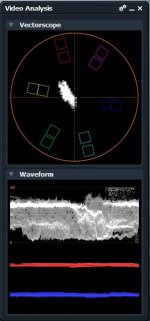
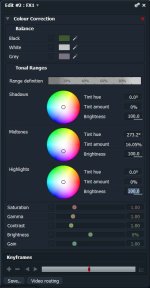
Color correction tool looks great, you can even define the range of highlights/midtones/shadows.
3 things are missing in the free version
1. "Team funcions" (IMO only interesting for larger studios with dedicated server infrastructure) .
2. 3D editing
3. He had to transcode MPEG2 and AVCHD files in order to load them. So some codecs are not included in the free version - something I can completely live with.
Other than that he states all kind of basic features and effects (video and audio) needed are there except for titles which comes via plugin.
Color correction tool looks great, you can even define the range of highlights/midtones/shadows.
Last edited:

PerroneFord
Deals in Lead
Any mention on what he transcoded TO for editing? I'd never use AVCHD anyway, but mepg2 might put a crimp in my fast workflow from my EX1.

Al MacLeod
Well-known member
Free lightworks may prove to be a classic case of "if it sounds too good to be true, it probably is".
I was looking forward to editing video of various flavors of mpeg without having to transcode,
and to be able to edit on a laptop on a network and hand off to a more capable desktop for rendering.
We will find out on the 29th!
I was looking forward to editing video of various flavors of mpeg without having to transcode,
and to be able to edit on a laptop on a network and hand off to a more capable desktop for rendering.
We will find out on the 29th!
PerroneFord
Deals in Lead
Well, with the licensing fees tied to Mpeg, I can CERTAINLY understand why they wouldn't be included. I'm not too worried about it. In most cases I don't want to cut Mpeg2 anyway. I would like to be able to cut ProRes and DNxHD without issue. Jpeg2000 would be a bonus. And we'll see about Lagarith and other .AVI based codecs.
I wasn't too excited about this release, but as the date is drawing nearer, I am very intrigued. If it works as advertised, it could be a great bridge between Avid and FCP which would be GREAT for me.
I wasn't too excited about this release, but as the date is drawing nearer, I am very intrigued. If it works as advertised, it could be a great bridge between Avid and FCP which would be GREAT for me.
Any mention on what he transcoded TO for editing? I'd never use AVCHD anyway, but mepg2 might put a crimp in my fast workflow from my EX1.
Only mentioned that he transcoded to Matrox and Mainconcept codecs.
Al,
you can always get the codecs if you need them, Lightworks can work with them, they're just not included because, well, Lightworks is completely free and these codecs are not. I don't think it's fair to regard this as a disservice of a free software, especially such a professional and quality one like this.
Jpeg2000 would be a bonus.
The guy said even image sequences from exotic effects programs can be loaded, imported as single movie sequence.
If it works as advertised, it could be a great bridge between Avid and FCP which would be GREAT for me.
At least he said the short cuts from AVID are included as preset

Al MacLeod
Well-known member
I picked up a GoPro camera and found the h.264 variant it uses required some new tools for me to edit in Premiere cs3. I tried DNxHD and it worked...huge files, but it worked.
I read the white paper PerroneFord posted a link for and was intrigued.
PerroneFord, do you use DNxHD for compatability or to give the native camera files you shoot less compress-decompress damage as you edit? Every thing you shoot gets transcoded?
I read the white paper PerroneFord posted a link for and was intrigued.
PerroneFord, do you use DNxHD for compatability or to give the native camera files you shoot less compress-decompress damage as you edit? Every thing you shoot gets transcoded?
PerroneFord
Deals in Lead
I use DNxHD for the following reasons:
1. It is readable and writeable on both Mac and PC
2. It is able to get around the color shift problem I see with other codecs in the Quicktime container
3. It holds up well during editing and grading
4. I use Avid, and it's the native codec for Avid
5. It supports an alpha channel whereas many other codecs do not.
6. It's free.
As for your question about transcoding everything.. no I don't. If I am whipping out something quick that needs a few cuts and a render, and maybe a white balance, I don't transcode it. But Avid doesn't do AVCHD and even if it did, I wouldn't put it on the timeline. So I transcode all AVCHD to something else.
1. It is readable and writeable on both Mac and PC
2. It is able to get around the color shift problem I see with other codecs in the Quicktime container
3. It holds up well during editing and grading
4. I use Avid, and it's the native codec for Avid
5. It supports an alpha channel whereas many other codecs do not.
6. It's free.
As for your question about transcoding everything.. no I don't. If I am whipping out something quick that needs a few cuts and a render, and maybe a white balance, I don't transcode it. But Avid doesn't do AVCHD and even if it did, I wouldn't put it on the timeline. So I transcode all AVCHD to something else.
PerroneFord
Deals in Lead
Heard nothing. My money is on a January release.
You can download beta version here after registrating
http://www.lightworksbeta.com/
The store isn't available yet.
There's a forum giving a solution for some Windows 7 64bit installing problems.
Hmm, I'm having a little trouble here with 64bit windows, I can install and start it but have the feeling it's not working as it should...
http://www.lightworksbeta.com/
The store isn't available yet.
There's a forum giving a solution for some Windows 7 64bit installing problems.
Hmm, I'm having a little trouble here with 64bit windows, I can install and start it but have the feeling it's not working as it should...
Last edited:

Al MacLeod
Well-known member
Boy, this software release dropped off the map quick! Is anybody persevering with Light Works?
Progress?
Progress?
I have loaded the Beta version on my laptop and played with it a bit. It is a very rich and complex program designed to allow multiple people to work on a project at the same time. There is a bit of a learning curve involved for sure.
Like it so far, but the included codecs for footage import are very limited. I expect when the release version and the store for various codecs and plug-ins are online it will get more attention.
I like the ability to preview clips before importing to the project. I like the way clips can be organized into bins and racks. I like that you can have multiple "rooms" each representing a unique definable screen layout for the tools you want to have at hand for a particular task.
Haven't had much time to play with it so I am still very much a beginner with this work flow, but I can see how it would be advantageous for large complex projects where people are simultaneously working on different aspects: ingest and dailies, rough cut, sound, FX, offline and online can all be going on at the same time from a shared master project file.
Like it so far, but the included codecs for footage import are very limited. I expect when the release version and the store for various codecs and plug-ins are online it will get more attention.
I like the ability to preview clips before importing to the project. I like the way clips can be organized into bins and racks. I like that you can have multiple "rooms" each representing a unique definable screen layout for the tools you want to have at hand for a particular task.
Haven't had much time to play with it so I am still very much a beginner with this work flow, but I can see how it would be advantageous for large complex projects where people are simultaneously working on different aspects: ingest and dailies, rough cut, sound, FX, offline and online can all be going on at the same time from a shared master project file.