GH4 Leeming LUT One – the best LUT for the Panasonic GH4

Hi Paul

Will v323 work on a Panasonic GX8, which has a different sensor to the GH4?

Thanks
Chris
Hi Chris :)

I haven't had any footage from the GX8 to test with yet, but if you have a colorchecker chart and want to send me some test footage to verify, I'll be happy to confirm it for you.

Cheers,

Paul :)
 
Hi Chris :)

I haven't had any footage from the GX8 to test with yet, but if you have a colorchecker chart and want to send me some test footage to verify, I'll be happy to confirm it for you.

Cheers,

Paul :)

Hi Paul

Yes I do have an x-rite colour checker (not the new video one) so I'll have a look at the requirements that you stipulate on your web site and send some footage over to you.

Cheers
Chris
 
Rokinon Cine 85mm, f2, Speedbooster
Cine-D (-2 saturation) + Leeming LUT v323 + light grade

basket_1080.jpg


Paul,
Here's a good example of what I was talking about. This image would have pegged the red channel if saturation had been left at 0, causing the greens to go yellow. By nudging it down to -2 in camera I was able to save that information and leave some room to push in post.
 
Rokinon Cine 85mm, f2, Speedbooster
Cine-D (-2 saturation) + Leeming LUT v323 + light grade

Paul,
Here's a good example of what I was talking about. This image would have pegged the red channel if saturation had been left at 0, causing the greens to go yellow. By nudging it down to -2 in camera I was able to save that information and leave some room to push in post.
I've had a busy couple of days but I'll investigate over the weekend. There's a flower patch by my house that has super-red flowers right now, so I'll see where they blow out colour wise on the Saturation scale :)

And lovely image again!

Cheers,

Paul :)
 
Hi Paul,

I’m a GH4 owner and have always liked the images from it using the Natural Profile however I also find that the shadow areas fall off very quickly into black. I also have a Panasonic DVX200 with Panasonic’s “Like GH4” scene file installed, I’m delighted that my 2-GH4’s and my DVX200 now match, note the following test. https://vimeo.com/167443202

On the other hand I cant help but wonder if there might be an even better way to match these cameras, one that would solve my concern about the shadow areas. Perhaps a Lemming LUT for both cameras, do you think you might be interested in creating a new one for the DVX200?

Phil Vardalos
 
Hi Paul,

I’m a GH4 owner and have always liked the images from it using the Natural Profile however I also find that the shadow areas fall off very quickly into black. I also have a Panasonic DVX200 with Panasonic’s “Like GH4” scene file installed, I’m delighted that my 2-GH4’s and my DVX200 now match, note the following test. https://vimeo.com/167443202

On the other hand I cant help but wonder if there might be an even better way to match these cameras, one that would solve my concern about the shadow areas. Perhaps a Lemming LUT for both cameras, do you think you might be interested in creating a new one for the DVX200?

Phil Vardalos
I've been interested in making a DVX200 LUT for a while, but so far no one has sent me footage to build one with. If you want to help make a corresponding LUT, send me a message and I'll give you further instructions on what I need :)

Cheers,

Paul :)
 
I've been interested in making a DVX200 LUT for a while, but so far no one has sent me footage to build one with. If you want to help make a corresponding LUT, send me a message and I'll give you further instructions on what I need :)

Cheers,
Paul :)

I'll be tied up for a few days but I will get back to you soon.

Thanks,
Phil
 
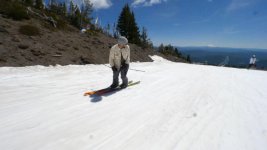
Hey, looking to create a natural looking image on snow. The V2 looks wayyy blue and the V3 makes the sky turn greenish. Right now, the original Leeming LUT looks the best to me. Any opinions on this? Thanks for any help!

No LUT
V1 no LUT.jpg
V1
V1.jpg
V2
V2.jpg
V3
V3.jpg

Thank you!
 
Hey, looking to create a natural looking image on snow. The V2 looks wayyy blue and the V3 makes the sky turn greenish. Right now, the original Leeming LUT looks the best to me. Any opinions on this? Thanks for any help!

Thank you!
The trick with snow is, it reflects the sky first and foremost, so white balancing from it directly is going to skew results a bit (if that's how you balanced).

v1 of the LUT tends to have the most purple skies, so when comparing v3 to it, v3 will seem green by comparison. v2 had a bit of a blue cast to it, so it tends to look cooler in temperature.

I'd say if you move the existing colour balance a hair towards magenta on the green/magenta (tint) line with v323 LUT applied, you will probably find the sky and the snow neutralise nicely.

Hope this helps!

Cheers,

Paul :)
 
The biggest problem with the original image is gross underexposure, with the histogram snow values less than 170. Auto-exposing snow/bright sand needs +1.5-2 EV comp to bring the bright values anywhere near their visual level. Here's the image with the white point greatly pulled in in Levels, but well below clipping.

Peter

V1 no LUT +66 white level.jpg
 
Last edited:
You have to underexpose snow a little in order to retain detail in the whites. I always bump the whites back up in post.

The biggest problem with the original image is gross underexposure, with the histogram snow values less than 170. Auto-exposing snow/bright sand needs +1.5-2 EV comp to bring the bright values anywhere near their visual level. Here's the image with the white point greatly pulled in in Levels, but well below clipping.

Peter

View attachment 114274
 
You have to underexpose snow a little in order to retain detail in the whites. I always bump the whites back up in post.

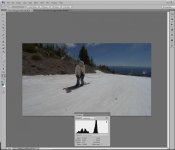
Not the case, as bright snow/bright sky are exposed to neutral gray value. If you have a histogram in your VF you'll see that the brightest values are very far from the clipping point, giving you dirty gray snow. Below the original capture with histogram displayed in PS.

Read any comprehensive exposure guide and you'll see that very bright scenes require over-exp. of +1 or more EV for a realistic take without obliterating details. And very dark scenes, under-exp. to render shadows properly instead of a neutral gray. Counter-intuitive, but unless you put the camera in snow/beach mode the scene is greatly underexposed. A live histogram and highlight "blinkies" are invaluable.

Pete

Capture.jpg
 
Last edited:
Thanks for the info Pete. I set my zebras to 100% and then expose just under the appearance of zebras. Shouldn't this basically have my whites at just below clipping? I always thought so but clearly I may be wrong about that...
 
Thanks for the info Pete. I set my zebras to 100% and then expose just under the appearance of zebras. Shouldn't this basically have my whites at just below clipping? I always thought so but clearly I may be wrong about that...

You're correct. I'm not following what Peter is saying at all. Overexpose a very bright scene? Underexpose a dark scene??

ETTR is simple, and is designed for giving maximum dynamic range with digital sensors (camera type doesn't matter). In post you pull down exposure to suit the scene, retaining the cleanest shadows and all the highlights.

Other methods risk blowing highlights, or giving a lot more shadow noise and less dynamic range.

Cheers,

Paul :)
 
Thanks Paul I thought I was going crazy haha! ��
You're correct. I'm not following what Peter is saying at all. Overexpose a very bright scene? Underexpose a dark scene??

ETTR is simple, and is designed for giving maximum dynamic range with digital sensors (camera type doesn't matter). In post you pull down exposure to suit the scene, retaining the cleanest shadows and all the highlights.

Other methods risk blowing highlights, or giving a lot more shadow noise and less dynamic range.

Cheers,

Paul :)
 
You're correct. I'm not following what Peter is saying at all. Overexpose a very bright scene? Underexpose a dark scene??

ETTR is simple, and is designed for giving maximum dynamic range with digital sensors (camera type doesn't matter). In post you pull down exposure to suit the scene, retaining the cleanest shadows and all the highlights.

Other methods risk blowing highlights, or giving a lot more shadow noise and less dynamic range.

Cheers,

Paul :)

Paul, let me just quote my first and second responses. First - "The biggest problem with the original image is gross underexposure, with the histogram snow values less than 170. Auto-exposing snow/bright sand needs +1.5-2 EV comp to bring the bright values anywhere near their visual level." This is straight ETTR, and it seems strange NPM's blinkies at 100% didn't bring him anywhere near the clipping point.

Second post - "Read any comprehensive exposure guide and you'll see that very bright scenes require over-exp. of +1 or more EV for a realistic take without obliterating details. And very dark scenes, under-exp. to render shadows properly instead of a neutral gray." I meant, and clearly should have said, "positive Exp. comp." in place of "over-exp" and "neg. EC" for "under-exp". Sorry for this brain-cog slip!

So for a realistic OOC rendering of the camera's auto-exp middle gray target for all scenes, ETTR for overly bright scenes with an eye on the histogram and blinkies; and for an overly dark scene, ETTL to avoid blah shadows.

Peter
 
Paul, let me just quote my first and second responses. First - "The biggest problem with the original image is gross underexposure, with the histogram snow values less than 170. Auto-exposing snow/bright sand needs +1.5-2 EV comp to bring the bright values anywhere near their visual level." This is straight ETTR, and it seems strange NPM's blinkies at 100% didn't bring him anywhere near the clipping point.

Second post - "Read any comprehensive exposure guide and you'll see that very bright scenes require over-exp. of +1 or more EV for a realistic take without obliterating details. And very dark scenes, under-exp. to render shadows properly instead of a neutral gray." I meant, and clearly should have said, "positive Exp. comp." in place of "over-exp" and "neg. EC" for "under-exp". Sorry for this brain-cog slip!

So for a realistic OOC rendering of the camera's auto-exp middle gray target for all scenes, ETTR for overly bright scenes with an eye on the histogram and blinkies; and for an overly dark scene, ETTL to avoid blah shadows.

Peter
Call me dumb but I still don't follow. You always want to ETTR a scene, no matter whether it's dark or light, to maximise sensor dynamic range and minimise shadow noise. It's very easy to pull down a naturally dark but brightly exposed scene to restore its natural darkness, in order to minimise shadow noise. Same with a bright scene. ETTR so that nothing is blown, then pull down the shadows in post (increasing the contrast) and adjust the mids to balance the image.

In both cases, ETTR is still the operative word. ETTL would cause more shadow noise.

Anyway, I don't want to get bogged down in this. I wrote an article on how to ETTR on my website, so that people can clearly understand how it works and why it's the only way to shoot for maximum dynamic range. I hope it makes sense to you and that we are just arguing semantics, not technique.

Cheers,

Paul :)
 
Back
Top