
Navigation
Install the app
How to install the app on iOS
Follow along with the video below to see how to install our site as a web app on your home screen.
Note: This feature may not be available in some browsers.
More options
You are using an out of date browser. It may not display this or other websites correctly.
You should upgrade or use an alternative browser.
You should upgrade or use an alternative browser.
GH4 Leeming LUT One – the best LUT for the Panasonic GH4
- Thread starter visceralpsyche
- Start date

visceralpsyche
Well-known member
Thanks for sharing Stephen!
I'm really happy with how those images look - the LUT really gets rid of the orange sunburnt skin tone look of the uncorrected Cinelike D, which is exactly why I created it in the first place.
It's funny, but having shot with Red cameras for years, these images feel very much like Red images Woohoo!
Cheers,
Paul
I'm really happy with how those images look - the LUT really gets rid of the orange sunburnt skin tone look of the uncorrected Cinelike D, which is exactly why I created it in the first place.
It's funny, but having shot with Red cameras for years, these images feel very much like Red images
Woohoo!Cheers,
Paul
Paul (or others). I shot a test project this weekend with the settings. I am also test editing on Resolve 12. I figured out how to specifiy the Leeming LUT on the clip. In the past I have used the VisionColor IMPULZ LUTS which I own. Does anyone know what would be the closest camera platform to select after the Leeming settings and LUT (709, Gh4 Cine-D, RED, etc)
Adam
Adam

Alvise Tedesco
Well-known member
Bought.
Thanks Paul, Dusty, etc..
Thanks Paul, Dusty, etc..

James Carpenter
Well-known member
Purchased, thanks for all the hard work Paul et al.
Will be shooting footage in St. Thomas USVI and will post some up when I get back.
Will be shooting footage in St. Thomas USVI and will post some up when I get back.
visceralpsyche
Well-known member
Aside from the manual which helps you set up the camera properly and use ETTR principles to shoot your footage, the main thing is to apply the LUT in your favourite software, then grade to taste. This can be as simple as a slight curve at the shadow end, to give a nice amount of contrast, or it can be full blown grading with power windows, Looks applied etc.is there a tutorial video on how to get this to look right?
Here's what I usually do as a first point in Premiere Pro, as an example:
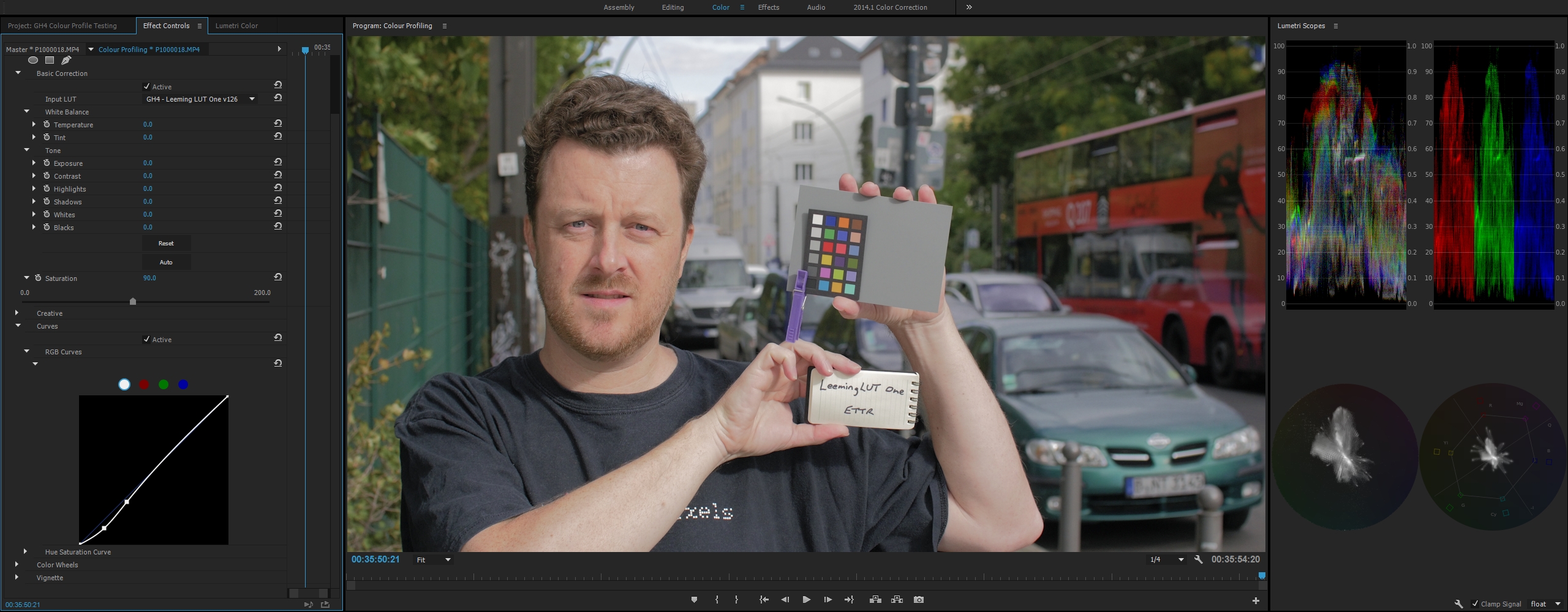
Just the LUT applied, plus a small S-curve and saturation tweak.
HTH!
Thanks,
Paul

Lindquist
Veteran
oh ok! I thought this LUT was like others ive used were I just apply it and I see a somewhat big difference between CineD Flat and the NoamKroll Lut ect. So basically with your lut your saying you can apply it then adjust what ever you want without ruining the picture ? so if I didnt have this lut I would not be able to grade these videos as nicely?
thanks
thanks
visceralpsyche
Well-known member
It's more about using my LUT to give you a proper, colour correct Rec709 working space from Cinelike D, preserving the maximum dynamic range of the camera while giving you correct and easy to grade colours.oh ok! I thought this LUT was like others ive used were I just apply it and I see a somewhat big difference between CineD Flat and the NoamKroll Lut ect. So basically with your lut your saying you can apply it then adjust what ever you want without ruining the picture ? so if I didnt have this lut I would not be able to grade these videos as nicely?
thanks
So the workflow is:
1. Shoot for maximum dynamic range and colour information using my recommended settings (ETTR is really critical here for maximum image quality).
2. Apply Leeming LUT One to correct the Cinelike D colours and levels, to give you an accurate Rec709 baseline (the colour CORRECTION part of the process).
3. Adjust your image as desired to give you a creative look, be it through pre-adjusted Looks people have created, or manually via the usual methods (the colour GRADING part of the process).
HTH
Cheers,
Paul
visceralpsyche
Well-known member
That's weird, it's been sent. If you still haven't received it, send me an email with an alternate email address such as Gmail and I'll resend itI bought the LUT but never received any information on how I actually get it. No download link, no instructions at all, no auto responder. Nothing in my spam box. Does anyone know how you actually get the LUT?
Cheers,
Paul
visceralpsyche
Well-known member
Sent you a PMHi Paul. I did email you as well, twice. Once to your PayPal address and once to the contact address on your website. I run my own mail server and there is nothing in the mail logs. Are you sure you sent it to the address on my order?
The manual explains about how to use the zebras (with picture explanations), but basically, just use zebra 1 at 105% and Expose To The Right for maximum quality
Don't underexpose - ETTR and then bring down exposure in post, for much cleaner blacks and better control of your latitude.
HTH, and thanks!
Paul
Paul, regarding your zebra recommendations, are you saying there is information captured in the super-whites at 103 and 104 IRE? Is the real clipping point of Cinelike D profile 105%?
Thanks
visceralpsyche
Well-known member
It appears so. I don't know if I'd call them superwhites, as much as the zebras are a little conservative. Either way, even at 105%, when I just have it scintillating, I usually find that the scintillating parts are still within 100% in post production.Paul, regarding your zebra recommendations, are you saying there is information captured in the super-whites at 103 and 104 IRE? Is the real clipping point of Cinelike D profile 105%?
Thanks
Cheers,
Paul
visceralpsyche
Well-known member
Ken Wright, if you are reading this, please PM me, as your LUT order bounced to the email address you provided. Thanks!
visceralpsyche
Well-known member
Iban Corominas did a good comparison review of the LUT in Spanish here:
http://www.60fotogramas.com/gh4-mejor-configuracion-en-v-log-y-una-alternativa-el-leeming-lut/
My only takeaway from that review is that the hard clip at roughly 90% is possibly due to the camera being set to 16-235 instead of 0-255 per the manual. Otherwise it's a weird clip (there's a strong light source in frame that is the object being clipped) that shouldn't happen in either the uncorrected Cineiike D or the corrected version.
Cheers from Greece, where I'm currently attending a film festival with my short film, "An American Piano".
Paul
http://www.60fotogramas.com/gh4-mejor-configuracion-en-v-log-y-una-alternativa-el-leeming-lut/
My only takeaway from that review is that the hard clip at roughly 90% is possibly due to the camera being set to 16-235 instead of 0-255 per the manual. Otherwise it's a weird clip (there's a strong light source in frame that is the object being clipped) that shouldn't happen in either the uncorrected Cineiike D or the corrected version.
Cheers from Greece, where I'm currently attending a film festival with my short film, "An American Piano".
Paul
Frantikthegod
Active member
20min music video shot internally with Cine-D.
Corrected with Leeming LUT ONE.
Graded in FCPX w/ Colorfinale.
Metabones Speedbooster XL // Sigma 18-35mm f.1.8.
https://vimeo.com/lcpfilmsnetwork/gordo-smokebreak • password: gordosmokebreak
Corrected with Leeming LUT ONE.
Graded in FCPX w/ Colorfinale.
Metabones Speedbooster XL // Sigma 18-35mm f.1.8.
https://vimeo.com/lcpfilmsnetwork/gordo-smokebreak • password: gordosmokebreak