
Navigation
Install the app
How to install the app on iOS
Follow along with the video below to see how to install our site as a web app on your home screen.
Note: This feature may not be available in some browsers.
More options
You are using an out of date browser. It may not display this or other websites correctly.
You should upgrade or use an alternative browser.
You should upgrade or use an alternative browser.
GH4 Leeming LUT One – the best LUT for the Panasonic GH4
- Thread starter visceralpsyche
- Start date

joe12south
Veteran
I shot a new set-up, manually exposed for overcast daylight (the best, flattest light I know of.) I'll be sharing some more findings later after I have time to really work with it, but I happened to notice something that disproves an earlier statement I made, so I want to correct it right away. In the right circumstances, V-LOG L does in fact hold onto a tiny bit more highlight detail:
V-LOG L
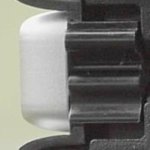
Cine-D (no shadow/highlight adjustment)
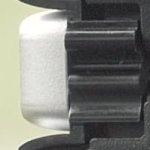
The difference is subtle, you may not even be able to see it on a mediocre monitor, but it's definitely there. What I can't say for sure, but I expect is true, is that if I lowered the highlight curve -1 with Cine-D, that highlight could be brought back, but it would do so at the expense of some color accuracy.
V-LOG L
Cine-D (no shadow/highlight adjustment)
The difference is subtle, you may not even be able to see it on a mediocre monitor, but it's definitely there. What I can't say for sure, but I expect is true, is that if I lowered the highlight curve -1 with Cine-D, that highlight could be brought back, but it would do so at the expense of some color accuracy.
joe12south
Veteran
New images based on Leeming One version 109 beta:
VLOG-L/709
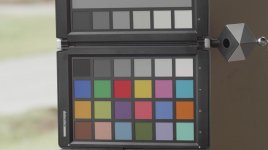
CINED/Leeming One 109
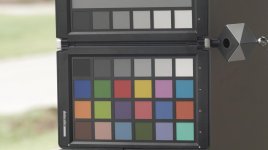
The exposure has been normalized between the two, but that is the only post work that was done.
Here's what I see:
1. Overall saturation of the Leeming LUT is a little low. (About 10-15% depending on the tool used to make the adjustment.) If corrected, green saturation becomes a little too high. This sort of adjustment should be very doable in a LUT.
2. Neither profile perfectly renders every hue. The majority of them are rendered equally well (within what I would consider the margin of error.) Leeming One renders G6 best – which is a tough one to get right without polluting F3 – but Panasonic's VLOG to 709 LUT is still hitting more colors more accurately than Leeming One.
3. The color that concerns me most is G1. It's close enough to the hue of skin tones that I would dearly love to see it more accurately represented. In my opinion, it's noticeably off. A three degree shift in hue will bring it in line, but Paul's LUT would have to be able to isolate the range of effect pretty tightly because otherwise it pollutes other colors that are already correct.
Here are links to full resolution PNG's:
http://www.josephmoore.name/leeming/chart_vlog.png
http://www.josephmoore.name/leeming/chart_cined.png
http://www.josephmoore.name/leeming/chart_leeming.png
VLOG-L/709
CINED/Leeming One 109
The exposure has been normalized between the two, but that is the only post work that was done.
Here's what I see:
1. Overall saturation of the Leeming LUT is a little low. (About 10-15% depending on the tool used to make the adjustment.) If corrected, green saturation becomes a little too high. This sort of adjustment should be very doable in a LUT.
2. Neither profile perfectly renders every hue. The majority of them are rendered equally well (within what I would consider the margin of error.) Leeming One renders G6 best – which is a tough one to get right without polluting F3 – but Panasonic's VLOG to 709 LUT is still hitting more colors more accurately than Leeming One.
3. The color that concerns me most is G1. It's close enough to the hue of skin tones that I would dearly love to see it more accurately represented. In my opinion, it's noticeably off. A three degree shift in hue will bring it in line, but Paul's LUT would have to be able to isolate the range of effect pretty tightly because otherwise it pollutes other colors that are already correct.
Here are links to full resolution PNG's:
http://www.josephmoore.name/leeming/chart_vlog.png
http://www.josephmoore.name/leeming/chart_cined.png
http://www.josephmoore.name/leeming/chart_leeming.png
MichaelTiemann
Active member
Good catch. I also notice that the darkest shadows in the V-LOG L image are ever so slightly darker than the Cine-D DLOG LUT provides. To my eye (or because of my monitor?) the DLOG image has a slightly yellow cast across the white plastic and more texturing whereas the VLOG L white plastic looks more neutral and less textured. I don't know which is more accurate to the scene.
I shot a new set-up, manually exposed for overcast daylight (the best, flattest light I know of.) I'll be sharing some more findings later after I have time to really work with it, but I happened to notice something that disproves an earlier statement I made, so I want to correct it right away. In the right circumstances, V-LOG L does in fact hold onto a tiny bit more highlight detail:
V-LOG L
View attachment 105820
Cine-D (no shadow/highlight adjustment)
View attachment 105821
The difference is subtle, you may not even be able to see it on a mediocre monitor, but it's definitely there. What I can't say for sure, but I expect is true, is that if I lowered the highlight curve -1 with Cine-D, that highlight could be brought back, but it would do so at the expense of some color accuracy.
joe12south
Veteran
The difference you are noting is from low contrast detail that is lost in the V-LOG L dynamic range compression. The sharpness setting is the same between the two shots, but the extra captured contrast in the Cine-D image allows more detail to survive the image processing pipeline. Most likely the (already subtle) difference would be less pronounced with an external recorder.Good catch. I also notice that the darkest shadows in the V-LOG L image are ever so slightly darker than the Cine-D DLOG LUT provides. To my eye (or because of my monitor?) the DLOG image has a slightly yellow cast across the white plastic and more texturing whereas the VLOG L white plastic looks more neutral and less textured. I don't know which is more accurate to the scene.
BTW, that's a fake silver plastic piece with a strong specular highlight, if that helps your perception.
joe12south
Veteran
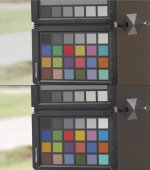
I've been teaching myself how to use 3D LUT Creator. Very powerful. Sadly the demo won't let me save the LUT, but as you can see, it's possible to get the color very accurate...I dare say even more accurate than Panasonic's VLOG>709 LUT.

TheTrickster
Well-known member
Paul, will we receive an updated version of your LUT?
I would/wish hope so too

Personal taste...bah...adjust for personal taste after correcting the image. I'm looking for the most *accurate* LUT as a starting point. Tests to come...
That's true. But Paul Leeming accepted suggestions about the look of the image... that should not be for discussion - if original LUT makes good chart readings, then it's good - after that, we apply personal mode/taste.
Although I like dustylense's interpretation of greens (more yellow, textured) I would like to know if it becomes closer to chart values or not.
I've been teaching myself how to use 3D LUT Creator. Very powerful. Sadly the demo won't let me save the LUT, but as you can see, it's possible to get the color very accurate...I dare say even more accurate than Panasonic's VLOG>709 LUT.
It would be very nice to have a LUT creator that could do what Profile Prism does for printers - an automated process based on captured value vs. real/chart values which doesn't rely on subjective perceptions.
BTW, have you tried to use your color corrections tools and them use LUT Buddy (Red Giant, free software) to create the LUT? Or that doesn't make any sense? (sorry, my technical skills are limited :undecided )
joe12south
Veteran
HP Dreamcolor for 1080P monitoring, Dell UP2414Q for 4K. Both hardware calibrated. BUT, and this is a big but...I'm not basing any of my conclusions on what I see from either monitor. I'm mainly looking at scopes.@joe12south - can I ask what you use for a reference monitor? Thanks
joe12south
Veteran
It would be very nice to have a LUT creator that could do what Profile Prism does for printers - an automated process based on captured value vs. real/chart values which doesn't rely on subjective perceptions.
BTW, have you tried to use your color corrections tools and them use LUT Buddy (Red Giant, free software) to create the LUT? Or that doesn't make any sense? (sorry, my technical skills are limited :undecided )
1. It's very difficult to profile a camera in the same way because of lighting differences. One only needs to look at how poorly the chart matching feature in resolve works to see why.
2. Creating the actual cube file is as easy as pushing a button...making very small, very discrete adjustments to localized color problems is the challenge. The tools you'll find in your NLE or even something like Resolve aren't really designed for such work. 3D LUT Creator has some very unique tools that make this work far more realistic. Things that are almost impossible any other way. I'll probably bite the bullet and buy it.
joe12south
Veteran
I don't want to speak for Paul, but my guess is that 105 is the current "release" version. Once he's happy with the adjustments, he'll release a new version. He's trying to make the discrete color corrections I'm pointing out without damaging the overall response, which is already very good.I would/wish hope so too
joe12south
Veteran
That's true. But Paul Leeming accepted suggestions about the look of the image... that should not be for discussion - if original LUT makes good chart readings, then it's good - after that, we apply personal mode/taste.
Although I like dustylense's interpretation of greens (more yellow, textured) I would like to know if it becomes closer to chart values or not.
- I can't speak for Paul as to his goals for his LUT...only my goals for his LUT. Overall the goal is to make it as accurate as possible...except where it is hiding some of the sins of the sensor (it is sacrificing shadow saturation in order to yield a more pleasing rendition of noise.) I personally find this an acceptable tradeoff, and think Paul has done a really nice job balancing the two needs.
- As of the last version I tested, 112 beta, (which is one version behind what Paul has provided me) green brightness is good, green hue is good, but green saturation was a tad high compared to global saturation. (To put it another way, when global saturation was adjusted to be correct, green was a little high.)
that's the usual way "camera calibration" is done. it's nothing uncommon. well, it's more often used in the context of raw photo processing, but the same tools work for video stills too. if you are using a free operating system, you get used to it, because hardware manufactures often do not support your platform. so you have to do it yourself.It would be very nice to have a LUT creator that could do what Profile Prism does for printers - an automated process based on captured value vs. real/chart values which doesn't rely on subjective perceptions.
i'm always amazed, how it can be done without all this available tools and objectified measuring?
all this stupid discoussions about camera xys wonderful skin tone rendition etc...
have a look at argyll cms (http://www.argyllcms.com/doc/ArgyllDoc.html) or DCamProf (http://www.ludd.ltu.se/~torger/dcamprof.html) and you get an idea about this other way of color science for free.
Last edited:
joe12south
Veteran
I'm traveling, and so can't test as thoroughly as I have been, but I would consider the version Paul sent last night, 114, to be production worthy. I don't know if it is possible to get it even closer, but we're in the realm of steeply diminishing returns relative to the amount of effort.
I have no idea where Paul plans to take this, but I personally have an interest to see if it is possible to get that extra little bit of highlight detail out of Cine-D that is available in V-LOG L. My theory is that a -1 Highlight curve may capture it, and then the LUT can be adjusted to correct for the color errors that are introduced. This is just a theory, I have no proof that this is the case. But if did prove out, I can think of no reason I would want to shoot V-LOG L internally.
I have no idea where Paul plans to take this, but I personally have an interest to see if it is possible to get that extra little bit of highlight detail out of Cine-D that is available in V-LOG L. My theory is that a -1 Highlight curve may capture it, and then the LUT can be adjusted to correct for the color errors that are introduced. This is just a theory, I have no proof that this is the case. But if did prove out, I can think of no reason I would want to shoot V-LOG L internally.
joe12south
Veteran
At the point you have to compile the software under an emulator to even get started, you just ruled out the vast majority of cinematographers. ;-) Even an über nerd such as myself (been in software development and visual imaging for more than 20 years) looks at those tools and cringes.that's the usual way "camera calibration" is done. it's nothing uncommon. well, it's more often used in the context of raw photo processing, but the same tools work for video stills too. if you are using a free operating system, you get used to it, because hardware manufactures often do not support your platform. so you have to do it yourself.
i'm always amazed, how it can be done without all this available tools and objectified measuring?
all this stupid discoussions about camera xys wonderful skin tone rendition etc...
have a look at argyll cms (http://www.argyllcms.com/doc/ArgyllDoc.html) or DCamProf (http://www.ludd.ltu.se/~torger/dcamprof.html) and you get an idea about this other way of color science for free.
Seriously, though, you may be surprised to know how often a simple glance at a vectorscope reveals a deviance that was not obvious from more automated "profiling." Still, I empathize with the spirit of the suggestion. Almost all 3rd party LUT creation surrounds subjective "looks", and almost nobody...the manufacturers included...seems interested in creating accurate input LUT's.

visceralpsyche
Well-known member
Thanks Joe, for all your testing and scrutiny. And thanks also to Dusty, for his initial round of thorough testing too! You guys are rock stars
As Joe just mentioned, version 114 is essentially perfect in terms of colour response, without breaking anything image wise. I'm going to take final look at the green saturation and maybe tweak it down a touch, and make sure the initial luma curve makes the most sense across the widest variety of test situations, then push out version 115 as the release version.
Keep an eye on your inboxes today!
To be clear, all customers get any and all updates to Leeming LUT One free of charge
Cheers!
Paul
As Joe just mentioned, version 114 is essentially perfect in terms of colour response, without breaking anything image wise. I'm going to take final look at the green saturation and maybe tweak it down a touch, and make sure the initial luma curve makes the most sense across the widest variety of test situations, then push out version 115 as the release version.
Keep an eye on your inboxes today!
To be clear, all customers get any and all updates to Leeming LUT One free of charge
Cheers!
Paul
joe12south
Veteran
I'd send Paul a case of beer, but he can get better beer in Berlin.

dustylense
Veteran
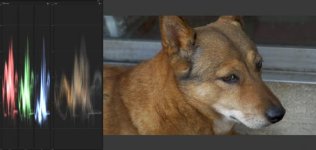
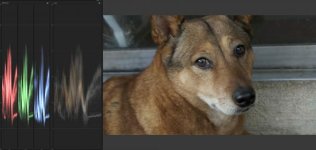
Well, somethings gone sideways.
My dog is golden yellow.
CineD Stock:
Vlog with Luke LUT:
Leeming V109b
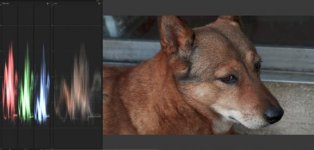
If we're talking about getting a LUT to be an accurate interpretation, it would need in fact be accurate.
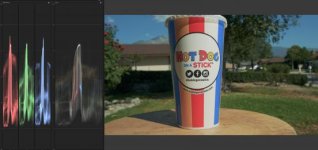
Which goes back to my Hotdog on a stick cup with yellow and reds. Again, imagine you are shooting for Hotdog on a stick and the client sees this on a monitor.
CineD stock:
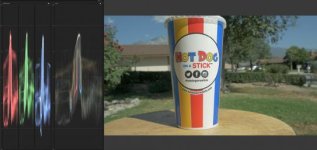
Luke Vlog LUT:
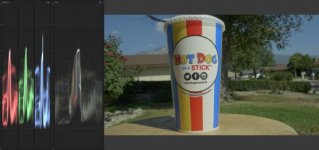
Leeming Lut109b:
My dog is golden yellow.
CineD Stock:
Vlog with Luke LUT:
Leeming V109b
If we're talking about getting a LUT to be an accurate interpretation, it would need in fact be accurate.
Which goes back to my Hotdog on a stick cup with yellow and reds. Again, imagine you are shooting for Hotdog on a stick and the client sees this on a monitor.
CineD stock:
Luke Vlog LUT:
Leeming Lut109b:
Last edited: