Other: LC709A vs Color Space Transform vs Magenta Killer base + mkii knee vs Curves

starcentral

Veteran
Did a test to compare a few de-logging methods. Included the base Magenta Killer 3D LUT which features a small skin booster and additionally combined a "mkii knee".

Definitely think CST is huge improvement over LC709A.


https://youtu.be/U9e9x5cIf2w

"mkii knee"
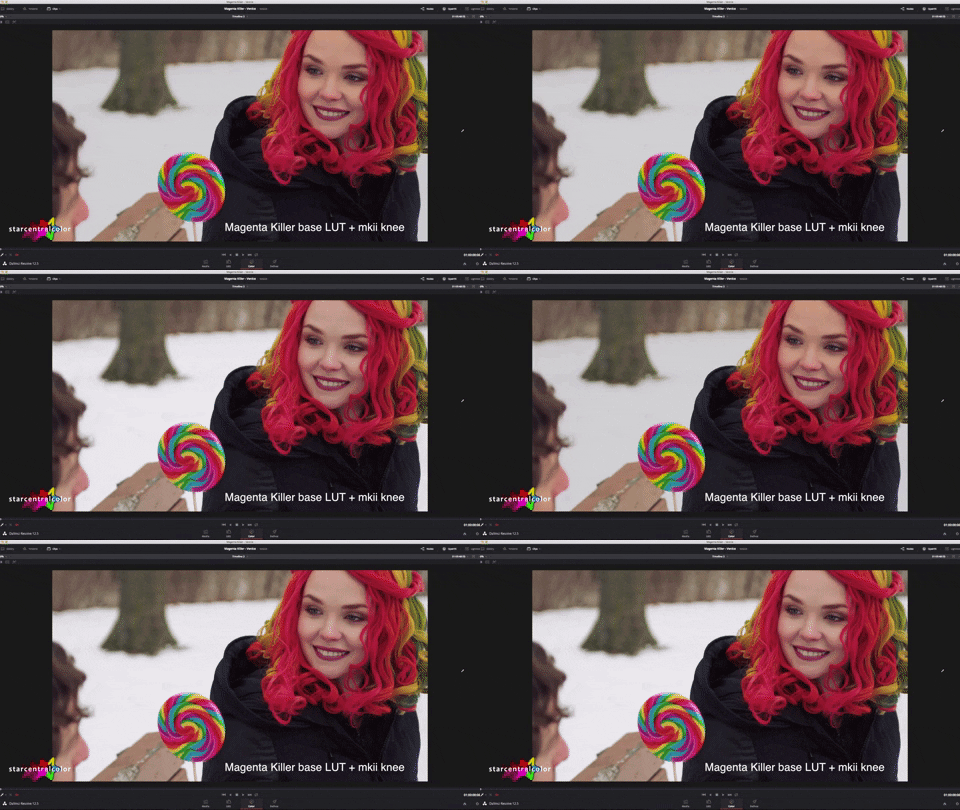
giphy.gif


More testing/experimenting
https://vimeo.com/266202661
 
Last edited:
Has anyone else noticed a difference in the amount of magenta between F5's and F55's? I did a two camera shoot a few days ago with a friend. I was shooting with my 55 and he was using his 5. We were shooting and recording in s-log 2 and outputting the standard rec709 LUT for monitoring. The one thing that kept jumping out to me, even when both images were up simultaneously on the same monitor, the 5 had a magenta cast to the whole image and the 55 looked fine. Now, we were shooting log, so it will all be color corrected and graded in post, but I feel if we had shot burned-in looks, the 55 could have run as-is, but the 5 would have still needed color correction.
 
As I recall from back when the cameras were introduced -- I was told that they used two different Dye Sets for the R-G-B filtration of the Bayer sensors. Color science is a combination of the way the colors are filtered on their way to the sensor, plus the way they are interpreted in the de-Bayering process. The two cameras never looked exactly alike to my eyes, and I always preferred the F55 color. Presumably the F55 was using the same dye colors as the F65, while the F5's dye colors were shared with the FS7?
 
ha ha I was wondering why this is 5:23 or how much work you did with this :D

Do these LUTs work with the FS7 too? And is the version with MKII knee included in you package?
 
Has anyone else noticed a difference in the amount of magenta between F5's and F55's? I did a two camera shoot a few days ago with a friend. I was shooting with my 55 and he was using his 5. We were shooting and recording in s-log 2 and outputting the standard rec709 LUT for monitoring. The one thing that kept jumping out to me, even when both images were up simultaneously on the same monitor, the 5 had a magenta cast to the whole image and the 55 looked fine. Now, we were shooting log, so it will all be color corrected and graded in post, but I feel if we had shot burned-in looks, the 55 could have run as-is, but the 5 would have still needed color correction.

It's indeed strange. I did one two cam shoot with F55's and one was much more Magenta than the other. Same Canon cine lenses, but ND filters were different brand so might have been cause but was unable to go back and find out.

On another two cam shoot I used FS7 with my F55, same CP.2 glass and they matched flawlessly.

@Clermond - mkii knee is not part of the Super Magenta Killer LUT pack, purely experimental.
 
Is what your calling a MkII knee just a highlight roll-off you created in Resolve? Does the MkII refer to anything - I can't imagine it has to do with the FS7 MkII right?

You've convinced me to download it .
 
It's indeed strange. I did one two cam shoot with F55's and one was much more Magenta than the other. Same Canon cine lenses, but ND filters were different brand so might have been cause but was unable to go back and find out.

On another two cam shoot I used FS7 with my F55, same CP.2 glass and they matched flawlessly.

@Clermond - mkii knee is not part of the Super Magenta Killer LUT pack, purely experimental.

It's funny you mention ND. He said he uses external ND a lot because he doesn't like the internal ND. On the first interview that it was really noticeable, I was using the internal on my 55 and he was using external(Schneider, I believe). On the subsequent ones, we were completely in the sun and I was using the internal plus an additional 2-3 stops of external(Schneider).
 
The f5 actually has a matrix setting .. F55 Like.. although Ive never tested it .. had an fs7 look quite different from f5.. I think it was partly to do with lenses.. but nothing that cant be tweaked very easily in post..
 
Is what your calling a MkII knee just a highlight roll-off you created in Resolve? Does the MkII refer to anything - I can't imagine it has to do with the FS7 MkII right?

You've convinced me to download it .


Hey Lenny, there are four variations of 3D LUTs in the super magenta killer pack (see http://www.dvxuser.com/V6/showthread.php?344222-Super-Magenta-Killer-3D-LUT-Pack) but you can get the one I used in this demo video simply by downloading this small collection of exposure compensation LUTs

http://www.hingsberg.com/2018/02/exposure-compensated-3d-luts/ No charge :beer:


What I call mkii knee is highlight wrangling and special sauce in DaVinci Resolve yes, its just added as node to the base super magenta killer 3D LUT.
 
Last edited:
I would agree that some matte box filters can create color bias. I have some Tiffen and Schneider ones that cause that issue. As regards LUTs I've downloaded Dennis's Magenta killer pack but haven't had time to do any serious try outs with them yet. Always keen to try others creations. In the meantime I've been using one that I created that fits the bill re the Magenta bias for most of my jobs both as VF LUT if required and also on the timeline.

The LUT and some stills with before and after LUT treatment can be downloaded here if anyone wants to try it out. Any suggestions on how one might improve the LUT always welcome. The only tweaks done to the images other than the application of the LUT were some small L,G,G adjustments for contrast reasons. I think I also did a white balance on the girl and Macbeth chart and the Kitchen shot.

https://www.sendspace.com/pro/dl/cyid7a

SL3C + CY_SL3C_Amiralook709_-MG_Corp2-800.jpgSL3C_Corp2-800.jpg

Chris Young
 
Chris thanks for uploading some sample images, it's always fun to play around with other people's images.

The super magenta killer LUTs are really useless unless you have magenta bias in your footage, so I wouldn't advise using them unless you have a magenta tint in your footage, otherwise it will just make the footage bias towards green which is just as ugly as magenta.

It shouldn't be a secret that to bump magenta out from your footage you just need a small skew towards green, and if you have a green bias you bump towards magenta. You can use tint dials for this, or in DaVinci gain or offset wheel and in Premiere, or Colorista the mid gain wheel should work.


I've updated the first post with another test from the weekend on my experimental "look" inspired by the "FS5 mkii", would love to hear some feedback

https://vimeo.com/266202661
 
Back
Top