G
Guest
Guest
Was thinking about contrast and the appearance of "sharpness", so I took a screen shot from some Komodo footage on YouTube, one that had a little bit of a hard edge look to it, but otherwise good lighting on a person with generally good skin.
I don't know that is worth trying to fix the lighting in post, but this is less about the grade and more about how contrast and light film grain can improve the smoothness of skin. These are from the same screen shot, one had a little contrast added, and the other had the midtone contrast altered towards smooth. However both maintain similar exposure and have similar black points, I hope. All adjustments were made with contrast curves, saturation/hue, and film grain, there was nothing else used. No power windows, and no blur or noise reduction or anything like that. .
Top image is a little more similar to the original image. The lower one is the one I effected:
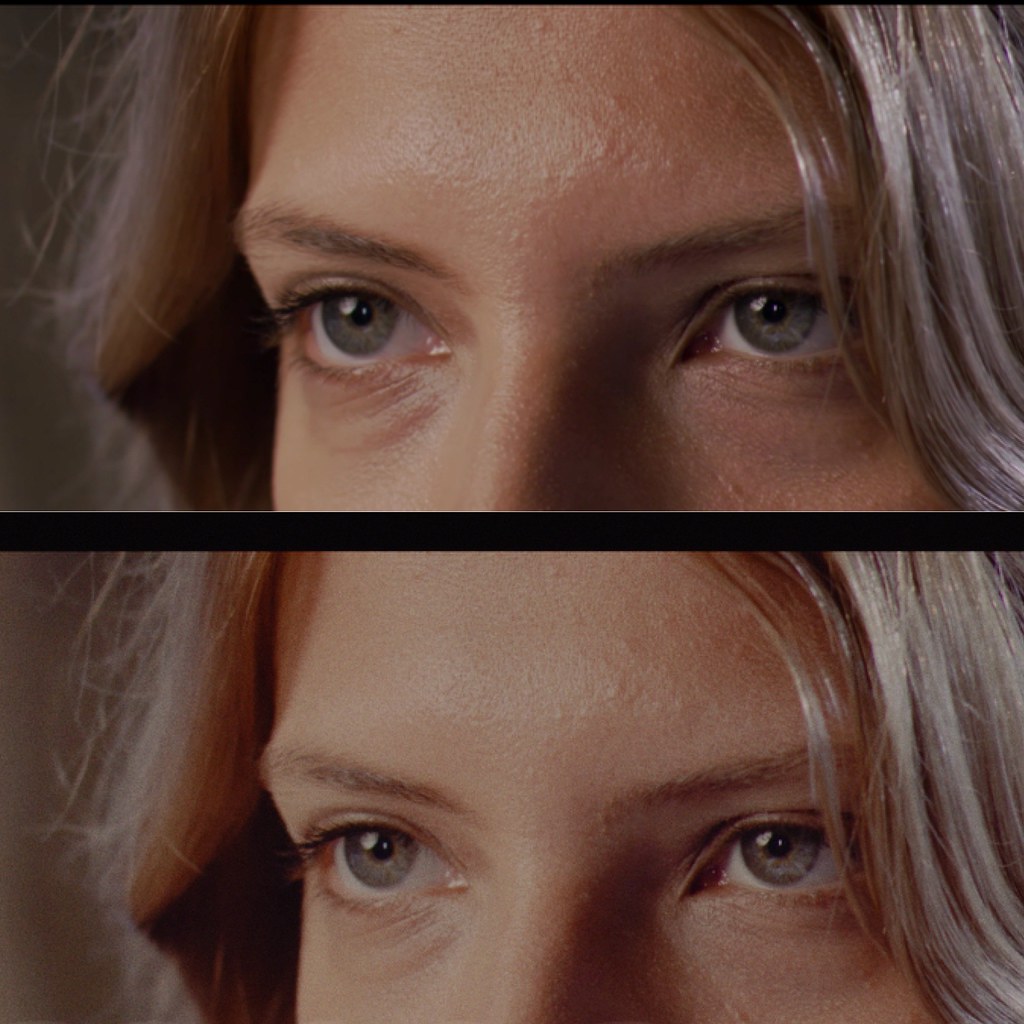
Only problem, is to get the midtones like that, the camera has to have a bit more DR, otherwise going to clipping is awkward. Or have to dig into the shadows and possibly chroma noise, which also kind of changes the exposure. But ETTL can help, just doesn't always provide the best exposure.
Lower DR cameras always have somewhat compromised or "video" midtones, or ugly highlights. Shoot within the DR of the camera and all is good. A lower DR camera with a soft highlight roll off is stealing contrast from somewhere.
Anyway, this was just a technical exercise, and isn't so much about what looks better. Just how midtone contrast effects "sharpness" and looking too revealing. These were screenshot from a 1080p YouTube video.
EDIT - just want to reiterate, this is not a grading tutorial, but simply showing how the blunt use of contrast and noise can smooth out roughness, sharpness, ...or... add sharpness and roughness, and texture. There are many more specialized tools for grading that can be utilized to get good results, and my example image above is not to showcase grading technique specific to Davinci Resolve or any other program. It is purely an exercise to highlight the effect of contrast on the appearance of texture and sharpness.
I don't know that is worth trying to fix the lighting in post, but this is less about the grade and more about how contrast and light film grain can improve the smoothness of skin. These are from the same screen shot, one had a little contrast added, and the other had the midtone contrast altered towards smooth. However both maintain similar exposure and have similar black points, I hope. All adjustments were made with contrast curves, saturation/hue, and film grain, there was nothing else used. No power windows, and no blur or noise reduction or anything like that. .
Top image is a little more similar to the original image. The lower one is the one I effected:
Only problem, is to get the midtones like that, the camera has to have a bit more DR, otherwise going to clipping is awkward. Or have to dig into the shadows and possibly chroma noise, which also kind of changes the exposure. But ETTL can help, just doesn't always provide the best exposure.
Lower DR cameras always have somewhat compromised or "video" midtones, or ugly highlights. Shoot within the DR of the camera and all is good. A lower DR camera with a soft highlight roll off is stealing contrast from somewhere.
Anyway, this was just a technical exercise, and isn't so much about what looks better. Just how midtone contrast effects "sharpness" and looking too revealing. These were screenshot from a 1080p YouTube video.
EDIT - just want to reiterate, this is not a grading tutorial, but simply showing how the blunt use of contrast and noise can smooth out roughness, sharpness, ...or... add sharpness and roughness, and texture. There are many more specialized tools for grading that can be utilized to get good results, and my example image above is not to showcase grading technique specific to Davinci Resolve or any other program. It is purely an exercise to highlight the effect of contrast on the appearance of texture and sharpness.
Last edited: