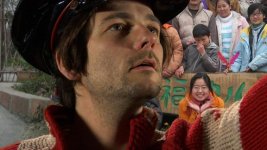
Key test in 1080/25p

Anders Holck

Well-known member
As I'm still waiting for my P2 cards, I have not been able to do any fancy testing with the Hvx-200e :-(

But today I had the pleasure to do a small quick test, capturing tethered to my Powerbook.

Basically it's just a simple key test to test out possible looks for an upcoming production. We didn't have time to light the key properly, so it's color temp and chroma level is not that good, but it was ok for the purpose.
I made the key using the simple Chromakey effect in FCP, and it seems to work ok, although I'm pretty sure Keylight or primatte would fare better, especially on the hairy stuff. Actually I had to jeopardize the overall sharp key because the hair on the right was unable to key, due to the FCP keyer.


Here is a small preview, both of the original and the final:
Key%20org_s.jpg

Key%20final_s.jpg


And links to full res images, recompressed in jpeg:
Original
Final
(For some reason photoshop seems to add a lot of artifacts to the dark areas when saving a jpg)

Also a 720p downconversion, using a high quality algorithm:
Final


I'm pretty impressed by the result as the key wasn't really lit well. And noise wasn't an issue even thought the key was a bit underexposed. Also I added a bit of noise, hi-light glow and shadow glow to the b/w frame to give it a bit of historic feel.
 
Last edited:
Good to know you are up and running with the Pal version.
What's your first impression about picture quality? It seems pretty good and sharp.
How did you focused?

PieroD
 
Holy Eisenstein!

Looks like a peasant out of a film on the Russian revolution.

The Hvx seems to close to perfect for greenscreen.
 
Are these stills from the hvx or some still camera?
The quality looks "too good to be true", compared to the sony z1u...
 
imgentertainment@mac said:
what kind of software did you use for keying?

Just the basic "Chroma Keyer" in FCP 5.
I also first used the "Chroma smoother 4:2:2" to get smooth horisontal colortransitions, as Apple's DVCPRO codecs present you with the RAW pixel doubled 4:2:2 data.

imgentertainment@mac said:
Looks like you lost a little on the hair or did you just smoth the edge just to get rid of it.

Yes unfortunately the keyer in FCP is really not advanced enough. Hair, smoke and shadows cannot be keyed good enough for "prime time" work. The key was indeed very good, except the hair which was acting up, so I dialed up the edge softness a bit.
Also as I stated the key background was really not lit that great as it was pretty desaturated, and the apple keyer didn't like that

Are these stills from the hvx or some still camera?
The quality looks "too good to be true", compared to the sony z1u...

No, it's the HVx-200e :)
Im pretty impressed as well. If we get get the job, I'll make the real "professionally" lit images in the next 14 days. It will be very exiting to see how a good exposed greenscreen works out.

What's your first impression about picture quality? It seems pretty good and sharp.
How did you focused?

I'm very pleased with the quality. My first impression was that the camera was pretty heavy :) Actually I think ill invest in the Cavas mattebox with the shoulder support.
I find that I can focus medium to tele sots perfectly just using the LCD when the lens is wide open, It's really not nessesairy to use the focus assist (I allways double checked with the "Focus assist" but I found I was allways right on target)
At smaller apartures and wide shots the "Focus assist" is very handy, but then again as the dof is not that shallow at theese settings I found that I could hit the focus just using the on screen distance scale.

The lens is VERY good, and the focus ring feels 100% like a mechanical one.

For these recordings I used a 800x600 true resolution (2400x600 pixels) daylight LCD. It's the Tiffen Ultrabrite monitor. Very sharp, with HD component in and with all the controls you expect from a video monitor: contrast, brightness, saturation, sharpness, gamma, hue.

Could you please post an uncompressed still of the greenscreen plate in PNG or TIFF format please?
My hostiing is pretty bad and I'm not allowed to host anything but jpeg's
I can send tiff's or raw DVCPRO HD frames if anyone wants to host them.
 
Last edited:
adam powell said:
woha that looks good...how do you get that silvery black and white...Ive been trying for ages...

well my effect stack in FCP was something like this:

Color corrector (I use the hue wheel as a b/w filter to alter the contrast)
Desaturate
Joe's color glow (set to white-glow the upper highlights)
Joes' color glow (set to black-glow the shadows)
3-way color corrector (to tweak the contrasts)
Joe's levels noise (just a subtle layer of grain)
G Vignette (Just a little bit of darkening in the corners)
 
Here's a quick key i did using Keylight.
This is the best key I have ever acheived. Man the 4:2:2 does make a huge difference. It's so much better than the usual 4:2:0 HDV i work with.
This is fairley compressed but the detail in the hair is fantastic.
 

Attachments

  • Shake-Key.jpg
    Shake-Key.jpg
    37.9 KB · Views: 0
Great job on the key, Keylight really shines at keying hair as opposed to the "consumer" keyer in FCP.

Funny that in your shot the spill suppressor of Keylight also takes the grenish tient out of the eyes and makes them brown...

Can't wait to shoot some more stuff with this camera.
 
Yeah it did a good job.
Someone who actually knew what they where doing would do much better. That was just the on click approach.
I can't believe how good it keys.
Simply amazing!
 
Back
Top