Just got my C100 nice...

olof

DVXuser Sponsor
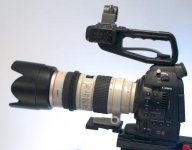
So I picked up my C100 yesterday at my favorite dealer, Access A V in Concord NH. I will be doing a demo of real use of this cam there on the 7th of Dec.

Nice feel was my first impression. Very compact and solid feel.

I also have a FS700 so it will be very interesting to compare these cams

I will be making a handle re-locator and shoulder/15mm system for this cam in the next few days. I also have a NanoFlash and a Nija I will be testing and making mounts for. I will be playing around with an EVF rig as well.

But my first impression is that this is such a light small camera that it really is able to be used lean and be very discreet. And with added rig it will be very capable. The price is certainly right. And I have lots of Canon L's and they work perfectly w/o an adapter. The one-shot AF works very well and the iris adjustments feel very natural, this is a Canon after all so they got it right.

My initial look at the PP's and pic quality are quite impressive. I will post video here soon. I will have it hooked up to my scopes and do some tests later this week. And if the WX cooperates here in NE I will shoot some of these dull early winter scenes we now have here in the north.

First impression is very positive, too bad about the lack of slomo, the 700 has me spoiled, but this is 1 1/2K $ less than the 700. And the ergos has the 700 beat.
 
Last edited:
Thanks for the preview and congrats.
How do you like the EVF? I would imagine you'd be spoiled after the FS700's EVF.
 
These are the first few shots with the C100. They are completely raw no CC. You can download the 1920 version.


https://vimeo.com/54304912

The PP was the EOS Standard. I just wanted to see how it did.

The very first shot was wide dynamic range setting.

Looks very nice and noise free at first glans. Shot at ISO 850. With the 70-200 f2.8 L IS v1. I do notice some stair casing, it is in the original video as well. I will try to adjust PP to eliminate this.

C100-1.jpg
 
Just watched this. Looks like you have your NLE set up to see this as interlaced footage.

I will check that in a bit. It was FCPX auto shared to vimeo, I did not really look at the settings, it was shot 1080 30P, it is very possible it was output as SPF and maybe FCPX treats that as 60i.

I was just rushing some footage out. It is cold here.
 
Olaf, Try setting up a timeline without letting FCPX pick the settings for you. Do it manually.

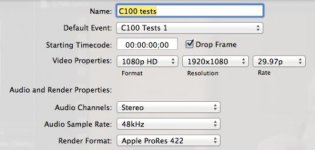
Here are the settings, they are correct i believe. And it looks fine in FCPX and on my HDSDI monitor:

Settings.jpg

Project is 29.97p
 
You have to set the field dominance of the clip to progressive. I had same problem too, setting the project to P is not enough.

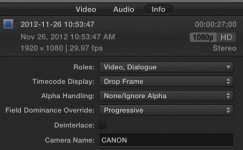
Video Inspector > Info > Settings View > Field Dominance Override > Progressive

There is also a Deinterlace option there, so that might need to be set as well. I haven't had enough time to figure out the best settings. But simply loading C100 footage into a progressive project does not seem to work automatically (unless you shot in 24P of course!).
 
Last edited:
I see in the specs for the 100 that it records 1080 PF30 not 30P like the FS700.

I guess I may have to go into AE to convert footage for Vimeo to 30P before uploading from C100 footage. I just got lazy with the 30P from my Sony cams.

Is there a way to set field order in FCPX, I can't find it in the project settings. Is it available in the individual clip properties, that would be a pain, hmm I will check.
 
I had same problem too, setting the project to P is not enough.

Hi Matt,

Can it be that you tried the global way (to set up the project as progressive) AFTER you had already played with field dominance on your clip?

Your field dominance settings stick, and fcpx remembers these across projects.

Progressive project AND progressive field dominance on top of that gets messed up, but that is not what I meant in my tip. I meant progressive project setup, and then just pull the native mts files into that. The files should have NO field dominance set.

That looks good on my system.

To me, it seems simpler to just remember to create the project as progressive, and then everything is normal. If you need to change the field dominance on every single clip you drag into the storyline... well....
 
Try setting up a project manually as progressive when you create it. It's a non issue—just choose custom and change 1080i to 1080p.

That makes the project progressive and the files you drag into it adheres to that. FCPX then makes the 2:2 pulldown automatically.

See mine and Matt's discussion for more info. We have different experiences, so it would be cool if you tried it. I don't have the camera but have tested with native mts files that I downloaded.
 
I set it up manually as 25P (I always set manually), after ingesting the files and outputting, the interlace issues were noticed, so I went and checked and the project was set to 25i so I changed it again to 25P. I then had to manually set the files to Progressive. So expected behaviour is:

1. If I set project to 25P and ingest PF25 clips this should work automagically and stay as 25P.

2. If the project is automatic or not 25P and changed after creation then the clips need to be set to Progressive.

???? I'll give it a go on another project in the next couple of days. I'm not sure why the project reset to 25i but I did have a crash at one point so who knows.
 
OK this has been a side trip.

Setting project manually still shows clips as 1080i, I tried this on a new project. And I assume they will show this problem.

If I go and reset each clip in the Inspector, then they turn to progressive. I will do this and re-upload to Vimeo tomorrow. I never had this problem before with Sony or Pany progressive clips or 5DmkII/7D clips either. I don't know why Canon uses PF30 (from their product sheet) on this cam, it would be nice if FCPX could universally change this on all the clips instead of doing each one.

This is where I had to reset:

Screen Shot 2012-11-26 at 4.19.08 PM.jpg
 
Last edited:
Setting project manually still shows clips as 1080i, I tried this on a new project. And I assume they will show this problem.

I'd say that it's fine even if the clip settings show 1080i, as long as your project is hard set to 1080p. This combo should still export fine.

Try with a short clip!

But make sure it's a clip where you haven't messed around with field dominance. Set it to whatever is the default when you import into fcpx ("not set"?).
 
I'd say that it's fine even if the clip settings show 1080i, as long as your project is hard set to 1080p. This combo should still export fine.

Try with a short clip!

But make sure it's a clip where you haven't messed around with field dominance. Set it to whatever is the default when you import into fcpx ("not set"?).

That is exactly how I did the original project, and I have before dozens of times with footage from Sony's that are 30p. Now Canon with the 100 is using what they refer to as PF30. It is different than what the C300 does. I will play around more tomorrow.

The bottom line is the footage looks good on an HDSDI eval monitor, but there is something going wrong on export, from FCPX anyway. An easy fix is probably to bring into AE and re-interprit the footage there. I have had to this in the past when there were problems with PSF files. The original video file looks fine in QT player as well. It is just something FCPX is doing. The only footage I have ever had this problem with in FCPX is the C100. I have had similar problems in M100 a few years ago.

I will post here when I solve this.
 
I just found this when researching this problem. It appears Canon is using prosumer version of PSF.

"Rafael,

I spent what may have been too much time last night researching this, but here's what I came up with:

Writer Allan Tépper has a series of articles on just this issue and it's essentially new info as of the last month or so.
--

In part 1 here,
http://provideocoalition.com/index.php/atepper/story/psf8217s_missing_workf...

...he defines two new terms, benign PsF and malignant PsF. It appears that most of the Canon prosumer video camcorders like my Vixia HF S100 create the "malignant" type PsF file. In a nutshell, the camera creates a progressive file, but mis-tags it so that even the most recent versions of PP 5.5 and FCP X mistake it as an interlaced file. Here's more from Allan on this:
http://provideocoalition.com/index.php/atepper/story/empsf8217s_missing_wor...
http://provideocoalition.com/index.php/atepper/story/psf8217s_missing_workf...

It's explained that this file must be modified slightly so that the editing program can correctly identify the file as progressive. Otherwise, FCP X will try to de-interlace a file that doesn't need to be de-interlaced and will ultimately result in unwanted artifacts and lack of sharpness.

At this point, there appears to be two solutions:
http://www.rassoc.com/gregr/weblog/2011/12/02/editing-canon-30p-pf30-footag...

Solution 1 for Canon PF30 - Malignant PsF- Simply import into FCPX twice:
-Use Import From Camera to import your footage into Event 1.
-Then, use Import Files, and import the files in Final Cut Events / Event1 / Original Media – and put them into a new Event 2.

Solution 2 for Canon PF30 - Malignant PsF- Use ClipWrap to pre-wrap the .MTS files and FCP X will recognize them as Progressive.
http://provideocoalition.com/index.php/atepper/story/psf8217s_missing_workf...
http://www.divergentmedia.com/blog/fullpost/announcing_clipwrap_244_update
--

I will likely go with the ClipWrap solution as the free solution is just too many hoops for me to jump through to get work done. Once I've gotten the PF30 file correctly tagged as progressive, I will set up my new Project as 1280x720 HD, 29.97p and get to editing.

Thanks,
Dave"

So I will play around some more with this tomorrow and report my findings here.

I already have Clipwrap. I use it when someone gives me just mts files, instead of the whole card structure, this happens frequently unfortunately. It can turn those into .movs.

So it sounds like Clipwrap to rescue again.
 
Last edited:
Back
Top