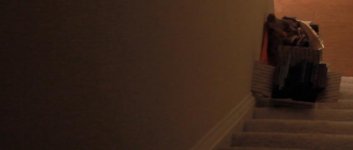
Is this level of shadow noise normal with Flaat?

JoeThePro

Well-known member
Shot info:
60D
F2.0
1/47 (wtf ML, where is 1/48 default?)
ISO 800
CBR 1.5x
Sigma 30mm 1.4

These images are from a clip I shot after installing the newest magic lantern and the Flaat_10p picture style. The noise on the darker parts of the wall near the camera was surprising to me, it looks pretty bad. I guess after contrast is added back in post the shadows will drop down a bit and the noise will be less apparent, but I just wasnt expecting this. Is this just due to the way Flaat responds to shadows?
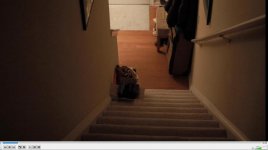
VidTest1.jpg

VidTest2.jpg
 
After further reading it seems that this noise is mostly just a by-product of underexposure. I guess Ill need to do some noise reduction.
 
When I created these, my two main aims were:
* easier to grade than Marvels Cine
* once graded, less noise in the midtones than CineStyle
I think I succeeded on both counts. But yes, the price of cleaner final midtones may have been noisier shadows: it's not usually THAT bad, but I have to admit that Flaat can generate some additional noise in the shadows, especially with the more aggressive options (Flaat_12).

In any case: my main "selling point" originally was the DR expansion and control, but with use, I've come to love Flaat mainly for the skin tones.
 
Ok, thank you. I just wanted to make sure i wasnt expecting too much out of my camera in general. Im pretty new to shooting video, so Im still surprised by just how much light these cameras need to get clean footage. Flaat is a great style, I do like it better than Cinestyle. I just need to practice more!
 
Use flaat10 and shoot at iso 1250 then use a curves to darken back up in post. I've found this often give less noise as the Canon's do a poor job with under exposed area's of a scene. The higher iso will produce slightly more noise, but after darken it up the brighter area's stay clean and the darker area's smooth out a bunch.

That's been my experience. It's not just a Flaat ps thing, but more about how to expose to the right on your histogram with the Canon APS-C cams.

I know it's unintuitive to go to a higher iso, but try it to see if it helps. I've had better results at iso 2500 than 800 on dark scenes before. Crazy, but it works sometimes.

Cheers,
Pete
 
Good to know! Thanks. Now if only I could get sharper shots out of my Sign 30mm... I think this lens is better for photography than video! Its not too bad past 2.8, but still not SHARP.
 
on a 60D, I would usually shoot with sharpness=2 (except when you suspect moire will appear somewhere in your image, then sharpness=0 and add it in post) (in any case, this won't make for soft lenses or filters)
 
on a 60D, I would usually shoot with sharpness=2 (except when you suspect moire will appear somewhere in your image, then sharpness=0 and add it in post) (in any case, this won't make for soft lenses or filters)

Do you think the 60D in general produces softer images than most DSLRs? Im also having issues with reds being over saturated and bleedy, and other colors feeling very drab. Is this due to a mixture of the 8 bit codec and the 4:2:0 colorspace? Man, this is more difficult than I expected!
 
Use flaat10 and shoot at iso 1250 then use a curves to darken back up in post.

You can also darken in the camera - for example, you can get ISO 800 from ISO 1600 corrected digitally by -1EV, or from 3200 corrected by -2EV. You will lose highlights, but in this situation you don't have any, so it should be fine.

And yes, higher ISO reduces noise. Underexposure increases noise, so that's what you should avoid.
 
hello again a1ex, long time no see! :)

@JoeThePro: reds are usually the first to get color clipping; if you're getting that, reduce saturation
 
hello again a1ex, long time no see! :)

@JoeThePro: reds are usually the first to get color clipping; if you're getting that, reduce saturation

How can I get even color saturation? Would I need to use a filter? I can't remember the names, but I've seen some color temperature sensitive filters which are supposed to help with that.
 
You could try to get "even color saturation" with a very detailed picture style. The problem is that pushing colors with the picture style creates noise. So you're not that far off if you do it in post.

So, my advice is to lower the saturation parameter until you get no color clipping; this will reduce saturation also in colors that are far from clipping; if you want, you can try to restore that in post.

Flaat has relatively saturated skin tones, I think it's part of why they don't look "dead", unlike the Neutral skin tones. But if this is causing you trouble in the reds etc, you can go for Prolost flat (Neutral with minimum contrast and saturation -2).
 
You could try to get "even color saturation" with a very detailed picture style. The problem is that pushing colors with the picture style creates noise. So you're not that far off if you do it in post.

So, my advice is to lower the saturation parameter until you get no color clipping; this will reduce saturation also in colors that are far from clipping; if you want, you can try to restore that in post.

Flaat has relatively saturated skin tones, I think it's part of why they don't look "dead", unlike the Neutral skin tones. But if this is causing you trouble in the reds etc, you can go for Prolost flat (Neutral with minimum contrast and saturation -2).

Thank you for the explanations, Samuel. I am using the recommended camera settings for Flaat, and the SOC result has no over-saturation in the colors. Its when I add saturation back in post that I run into issues. I think I need to find a good free tool that allows control over individual color saturation. I just started using Lightworks, so Im not sure if that will allow this type of processing. Ill keep working with it to find a happy medium.
 
I had one picture style where even though the curve was not extreme, the amount of color adjustments I did eventually added noise. I had something like 40+ adjustments.

Also, when I did a black and white test, by desaturating the colors in PSE, rather than using monochrome, it induced noise. Something about custom picture styles.
 
Since I have started using Neat Video Noise Reduction, noise just plain doesnt matter any more. That program is absolute wizardry. It makes completely trashed shots at least usable, and mildly to moderately noisy shots nearly pristine. Its sharpening tool is also wonderfully customizable. Ive come to realize that its just how these cameras work, they need TONS of light to keep the noise down, especially the Canon APS-C. Im a happy camper with my 60D now, to say the least.
 
Back
Top