
Navigation
Install the app
How to install the app on iOS
Follow along with the video below to see how to install our site as a web app on your home screen.
Note: This feature may not be available in some browsers.
More options
You are using an out of date browser. It may not display this or other websites correctly.
You should upgrade or use an alternative browser.
You should upgrade or use an alternative browser.
C100: Is C100 AVCHD fully support by FCPx 10.1 release?
- Thread starter Curnsie
- Start date



MattDavis
Well-known member
Canon's got a bit of 'prior form' in its rather odd interpretation of PSF. Alain's article is well worth a read whilst prepping to install 10.1:
http://provideocoalition.com/ateppe...ow_em_part_1_benign_psf_versus_malignant_psf/
IIRC, the same was also true in its XLH1 HDV camera way back. But FCPX does seem to get its electronic undergarments in a twist, more so than others.
http://provideocoalition.com/ateppe...ow_em_part_1_benign_psf_versus_malignant_psf/
IIRC, the same was also true in its XLH1 HDV camera way back. But FCPX does seem to get its electronic undergarments in a twist, more so than others.
Paul Frederick
Active member
For me and my workflow, its a non issue as I use Clipwrap. It takes the raw card and converts it any number of ways (rewrap only, turn it into ProRes etc..). It correctly interprets the clips on conversion and makes them progressive. It's also super fast! I'd rather do it externally anyway then let FCPX do it. Its easier to get all your clips into bins in the finder level then just import those folders into FCPX. At least, that all worked with FCP 10.0.9. Now with the new one and their libraries, I'm not so sure this will work the same way to organize clips and bins. Havent had a chance to check it out too much yet.
not successful with clip wrap
not successful with clip wrap
i was not successful with clip-wrapping c100 files. rewrapping (to fcpx) made final cut "see" the files as progressive, but they still are treated as interlaced. a native c100-fcpx-workflow would have been a dream...
not successful with clip wrap
For me and my workflow, its a non issue as I use Clipwrap. It takes the raw card and converts it any number of ways (rewrap only, turn it into ProRes etc..). It correctly interprets the clips on conversion and makes them progressive. It's also super fast! I'd rather do it externally anyway then let FCPX do it. Its easier to get all your clips into bins in the finder level then just import those folders into FCPX. At least, that all worked with FCP 10.0.9. Now with the new one and their libraries, I'm not so sure this will work the same way to organize clips and bins. Havent had a chance to check it out too much yet.
i was not successful with clip-wrapping c100 files. rewrapping (to fcpx) made final cut "see" the files as progressive, but they still are treated as interlaced. a native c100-fcpx-workflow would have been a dream...
what settings?
what settings?
mine were described as "progressiv", but when i looked at the footage zoomed at 200% i could see it "treated" the video as interlaced. i have to recheck. what version of clip wrap did you use? and what settings (rewrap, to what)? thanks for the help, roman.
what settings?
i am now working with fcp 10.1. i use "clip wrap",and it puts the clips into a "mov" container,and all is well. in the info window of fcp x they are described as "progressiv"
mine were described as "progressiv", but when i looked at the footage zoomed at 200% i could see it "treated" the video as interlaced. i have to recheck. what version of clip wrap did you use? and what settings (rewrap, to what)? thanks for the help, roman.

Curnsie
Well-known member
Here's a screenshot from a current project showing the problems FCPx is having with AVCHD. At 100% the red lights in the background clearly show interlacing in FCPx and exports this way, whether transcoded to ProRes or not within FCPx. Strangely outside in the OSx finder the interlacing is non existent in the AVCHD file!
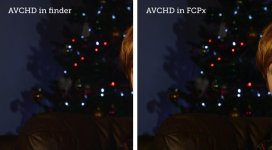
You have to view this on a higher res image on Flickr:
http://flickr.com/gp/64566893@N06/439KS2
I can't embed the flickr photo here. Maybe someone can tell me how?
You have to view this on a higher res image on Flickr:
http://flickr.com/gp/64566893@N06/439KS2
I can't embed the flickr photo here. Maybe someone can tell me how?
Last edited:
MattDavis
Well-known member
I can't embed the flickr photo here. Maybe someone can tell me how?
Excellent demo, dude - beat me to it. Chris aka DustyLense alerted me to this - it's pretty damning, and I've been gassing on about 5DtoRGB for far too long now. LOL
As far as Flickr is concerned, to get a proper resolution, you need to get the URL of the image by 'open image in new tab' (chrome, or the equivalent in your browser) so the URL ends in .jpg. The next trick is to embed it here so that the Forum software doesn't try to load it in and do its own thing with it - you want to link to the original file. That means clicking the 'Insert Image' button (pic with four dots in corners), select 'From URL' - paste your URL in there, and most importantly, UNCHECK that little checkbox underneath it (Retrieve Remote File and Process Locally - no! Not that! Reference remote file!).
Here's proof from Flickr:

I'll delete this if I can as soon as you're happy with the process. Not everyone likes chickens.

dustylense
Veteran
Here's a screenshot from a current project showing the problems FCPx is having with AVCHD. At 100% the red lights in the background clearly show interlacing in FCPx and exports this way, whether transcoded to ProRes or not within FCPx. Strangely outside in the OSx finder the interlacing is non existent in the AVCHD file!
View attachment 80282
You have to view this on a higher res image on Flickr:
http://flickr.com/gp/64566893@N06/439KS2
I can't embed the flickr photo here. Maybe someone can tell me how?
Yep. Even if FCPX takes a Clipwrap converted image and terms it progressive, if you zoom in on reds your will see that interlaced artifact. Now Clipwrap did have a recent update that says it addressed this for Canon PSF, but I have yet to test it.
If you're under the gun and you want PSF footage to be free of this, then the only way I found to do so is transcoding with 5D2RGB. Or record to a Ninja 2. I'll test the new Clipwrap update and report back.
Curnsie
Well-known member
Yep. Even if FCPX takes a Clipwrap converted image and terms it progressive, if you zoom in on reds your will see that interlaced artifact. Now Clipwrap did have a recent update that says it addressed this for Canon PSF, but I have yet to test it.
If you're under the gun and you want PSF footage to be free of this, then the only way I found to do so is transcoding with 5D2RGB. Or record to a Ninja 2. I'll test the new Clipwrap update and report back.
i tried transcoding to prores in the latest Clipwrap demo and the interlacing was still there in the prores file I imported in to fcpx. As this is a personal project I'm not too worried but I'd be a little annoyed if it was a paying client job. I masked out the background and added a slight Gaussian blur to get rid of the artifacts.