Is 64GB Extreme Pro SDXC Sandisk card not compatible with GH2???

Has anyone else been able to use the Extreme Pro 64GB Sandisk card with any GH2 hack???

I just upgraded to a Sandisk 64GB card today after long using the Sandisk 32GB 30MB/s.

But for some reason, the SDXC 64GB card doesn't allow me to copy or modify ANYTHING. I can't rename the disk from "Untitled" to anything. And I can't drag and drop any GH2 hack onto the SDXC card. The card behaves like it's locked even though the lock/unlock switch is in the unlock position.

Is the SDXC card not compatible with the GH2???
 
This doesn't help your exact problem but you can rule out it being the extreme pro series as the Extreme Pro 32gb works fine for me.

I think Eyepathproductions used or uses the 64gb for his super hack videos.
 
Thanks Gundar. Just spoke to B&H where I bought the card and they concluded it was defective. Quick question. When you first get the card, is correct procedure to format it in the GH2 first or on your mac first? Thanks!
 
I use the Extreme Pro 64GB Sandisk card in my GH2 all the time. Works perfectly, so I think yours may be defective. Hopefully B&H will swap it out for you.
 
Thanks Gundar. Just spoke to B&H where I bought the card and they concluded it was defective. Quick question. When you first get the card, is correct procedure to format it in the GH2 first or on your mac first? Thanks!

Glad that it's getting figured out. About the formatting, yes that is what is recommended by Panasonic and what I have always done.
 
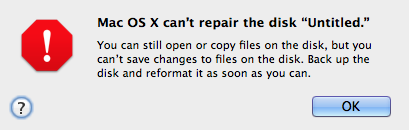
After returning my SDXC 64GB 95MB/s card to B&H. I just bought another one from Adorama this time and encountered the same problem. So now I'm really stumped. It can't be the card. The deal is this: the card won't let me copy any hack to it. If I try to drag and drop Driftwood's Quantum X hack, all I get is a do not enter symbol on the mac. If anyone has been able to copy any hack to an SDXC 64GB card, please tell me how you did it. It doesn't make sense that these cards come locked even though the switch is in the unlock position. I can format on the mac and but then the GH2 demands I reformat the card. And after reformatting on the GH2, I get this window on the mac and it doesn't let me copy any hack:

Screen Shot 2012-04-29 at 3.26.34 PM.png
 
Possible lightning has struck twice and you got two duds? I've got the same card and have had no problems getting hacked firmware onto it. When you do a File>Get Info on the card, do you have Read and Write permissions? I've never formatted the card under OSX(10.7.3), only in camera.
 
Thanks Gymnut. OK here's what I don't understand. For some reason I have read write permissions with this card on my Macbook Air laptop but the same card is read only on my mac pro desktop. Even though I'm the administrator on both.

So how can I make this card "read/write" on my desktop like it is on my laptop??? It just doesn't make sense that it can read write on a macbook air and not on a mac pro desktop.

Thanks very much in advance.
 
Last edited:
That is odd; I take it ptool is on your Mac Pro. When you do a Get Info on the card, is there a little padlock on the lower right/left hand corner of the Info pane? If so, click that and it'll prompt you to enter your administrator password to change permissions to allow read/write access.
 
Another thing to add, how are you connecting the SDXC card to your computer(s)? If you have the 13" MB Air, you probably have an SD card slot, but just curious as to what card reader you're using for the Mac Pro; Or maybe you're using the same card reader for both computers. Reason I ask:

https://discussions.apple.com/thread/2741689?start=0&tstart=0

It could be your card reader.

"well i went back to harvey normans where i bought my card and they tried everything.....well in the end it was mysteriously my card reader and now with a new one it works good....thanks for all the support!!"
 
Hi Gymnut808, you nailed it! It turns out it was my card reader or going via USB port. I had the same issue on an old Macbook pro latop. But on my macbook air (the only one I have that has an internal SD card slot) I do have read write permissions.

But here's the weird thing. I also happen to have a slower 32GB SDHC card, and I'm always able to read write with it when connecting it to the same USB reader. But for some reason the SDXC 64Gb 90MB/s card is read only when using that same USB reader.

Thanks everyone and thanks Gymnut for your continued help.
 
Last edited:
I'm running OSX Lion 10.7.3 and I have Ptools. But I don't have that little padlock in the card's info window. It justs says "read only". No option to unlock.
 
Well glad you got it sorted out; Can't explain it, but might be just a quirk with SDXC cards and certain card readers. I happen to use the SD card slot on the side of my Dell 2008wfp monitor and haven't had any problems.
 
Look Out Re non camera formatting????

Look Out Re non camera formatting????

Well, here I am, late in the game in responding to you,(!) BUT I believe I am correct in the following, and IF the following is correct, then IT IS VERY IMPORTANT - please check me out elsewhere

The only cards I use for my GH2 are SDXC 64GB 95MB/s cards - I believe that there is instruction someplace that the cards should be formatted ONLY in the GH2, and NEVER in a computer! If the card is EVER formatted in a computer, then its capacity or speed is destroyed, and cannot be restored by a later format in camera - I believe this statement was presented in the data accompanying the cards, but I have thrown all these out - even if this is only possibly true, then it is certainly worth checking out!

By the way, I had two different USB ended devices to connect the cards to my computers - now I have one - the other became defective (I assume re the "hidden" contacts within the device) and was thrown out.
 
Last edited:
will connecting the gh2 to the mac (10.7.2) be able to read the files OFF my gh2? I have always just connected the camera to the mac via usb cable and transferred like that
 
Back
Top