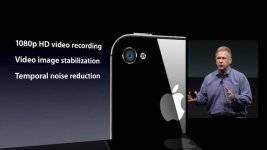
iPhone 4S camera

With the advent of people shooting short films and such on their mobile phones, I figured we could discuss the latest iPhone 4S camera which has some marked improvements.

Of note:
- 8MP sensor capable of up to 3264x2448 pixels
- 4.28mm focal length
- 35mm FoV equivalent
- F/2.4 aperture
- 5 lens elements
- Hybrid IR filter
- 1080p video with real-time Image Stabilization
- Temporal Noise Reduction for video

Combine the wonderfulness of all that with the automatic iCloud syncing\backup feature in iOS5 and you have a hell of a point & shoot, err smartphone camera.

Here is a great article for more info.
 
I'm really happy it's 1080p now. Won't replace a proper camera, but will do more than enough to replace a cheap point 'n' shoot.
 
Here is the actual 1080p mp4 file that's on the Apple site:

http://www.mediafire.com/?du9yb2cmz3r1i3m

http://www.multiupload.com/RN90QB0OZS


Apple web page: http://www.apple.com/iphone/built-in...recording.html


----------------------------------------------------------------------------------------------------------------------------------------

Built-in real-time noise reduction & stabilization

23739842.jpg


Attachments

  • 23739842.jpg
    23739842.jpg
    23.6 KB · Views: 0
I just got the phone and the tap to focus feature has gotten even better with this new camera. Plus photos and videos look great on it. It won't replace my HVX200 for work anytime soon, but if I was in a pinch and I needed to grab something really fast, I don't think shooting it with the iPhone 4s would be so bad.
 
This camera is sick. lol Make sure to grab the different video camera apps. The one where you can go between 16/8mm et al is awesome.
 
To make iphonevideography even more interesting are some great apps such as "almost dslr" and accessories such as the Owle Bubo and Encinemas 35mm Adapter. I have the Owle Bubo and the 35mm Adapter but I'm waiting on a Nikon to Canon EOS mount. If you haven't done so yet ... you might want to check out some great shorts that are being made on the iPhone such as "Framed" .
And then the cream of the crop is Red Giant's Looks in iPhone app form ... I love it!
I'm shooting more with my iPhone then I ever have with my DVX100b or Canon HV20
 
Hello all,

Long time lurker here. I've done several color grading and low light tests with the iPhone 4S camera over the past several weeks, and if you treat the footage well you can get some decent stuff out of it. In sunlight, I shoot using a custom Owle Bubo rig with a variable neutral density filter that I dial up to starve the sensor of light so that the shutter speed slows enough to create motion blur. Without doing this, the shutter can run up to 1/10,000th of a second and that creates a stroby, erratic look that I don't particularly like. This would be a great "overcranked" look for a zombie chase or fight, however.

I use Filmic Pro set to the maximum bitrate of 48mb/sec to record and After Effects for color grading. The main thing I've found with grading 4S footage is to work in a 32bit color space set to Rec. 709, as this is the space recorded natively by the iPhone's camera. Just by changing the working space color mode to 709, you gain a little bit of shadow information and color rendition. By stacking one or more Color Profile Converter effects onto a shot to serve as a base to color grading, you can push the original footage into a more appealing look and away from the slightly cheap feel of it as it comes right off the camera. The color profiles I'e found most useful are the Genesis Tungsten, Dalsa Tungsten, the D-20 Tungsten and Daylight, and sometimes the Viper Tungsten and Daylight presets. I'll start with these and then use Levels, Color Finesse, and Curves to push it farther. The CIneon profile converter can be useful to flatten out highlights to get away from the harsh video-feel of the iPhone footage as well, though this has a dramatic effect on the shot, so you have to plan it into your color correction workflow carefully.

You can check out some of my results on my Vimeo collection. I'd suggest downloading the original .MP4 files to see the maximum quality as Vimeo's compression is a bit harsh.

https://vimeo.com/user4026562/videos/sort:date/format:detail
 
Last edited:
Hello all,

Long time lurker here. I've done several color grading and low light tests with the iPhone 4S camera over the past several weeks, and if you treat the footage well you can get some decent stuff out of it. In sunlight, I shoot using a custom Owle Bubo rig with a variable neutral density filter that I dial up to starve the sensor of light so that the shutter speed slows enough to create motion blur. Without doing this, the shutter can run up to 1/10,000th of a second and that creates a stroby, erratic look that I don't particularly like. This would be a great "overcranked" look for a zombie chase or fight, however.

I use Filmic Pro set to the maximum bitrate of 48mb/sec to record and After Effects for color grading. The main thing I've found with grading 4S footage is to work in a 32bit color space set to Rec. 709, as this is the space recorded natively by the iPhone's camera. Just by changing the working space color mode to 709, you gain a little bit of shadow information and color rendition. By stacking one or more Color Profile Converter effects onto a shot to serve as a base to color grading, you can push the original footage into a more appealing look and away from the slightly cheap feel of it as it comes right off the camera. The color profiles I'e found most useful are the Genesis Tungsten, Dalsa Tungsten, the D-20 Tungsten and Daylight, and sometimes the Viper Tungsten and Daylight presets. I'll start with these and then use Levels, Color Finesse, and Curves to push it farther. The CIneon profile converter can be useful to flatten out highlights to get away from the harsh video-feel of the iPhone footage as well, though this has a dramatic effect on the shot, so you have to plan it into your color correction workflow carefully.

You can check out some of my results on my Vimeo collection. I'd suggest downloading the original .MP4 files to see the maximum quality as Vimeo's compression is a bit harsh.

https://vimeo.com/user4026562/videos/sort:date/format:detail
Thanks for posting and be welcome! :-)

I read this on here: http://vimeo.com/37111848

«Edit: I re-uploaded the video in 1080p to showcase the sharpness and detail possible with the iPhone 4S. If you treat the footage right, it can look pretty fantastic. Download the original file to check it out.»

But didn't find the 1080p file...
 
Thanks Emanuel! It would appear that the 1080P original isn't there since my Plus account expired. I'll get it going again soon so that the 1080 is available.
 
So, Marlenedrood shoots with "almost DLSR", and ScottW with FiLMCPro. I use FiLMCPro when I want to work with clean video, and 8mm for quick videos with some vintage effects. What video capture apps do other folks use????
 
Back
Top